Visit Captain Sim web site  
  Welcome, Guest. Please Login or Register


Page Index Toggle Pages: 1 Send TopicPrint
Radio knobs and autopilot Mode switch! (Read 7079 times)
stretch1365
Full Member
*
Offline


Posts: 56
Joined: Jun 27th, 2013
Radio knobs and autopilot Mode switch!
Jun 30th, 2013 at 5:36pm
Print Post  
Hi all,

I only bought the 707 the other day, what a great looking plane! but I have a couple of issues with it.

Firstly I can't seem to change the frequencies of the radios, either the Comm's ones or the Nav ones.  I have turned on the power, turning the top part of the knob to the right, and have ground power on, power selected to ground on the busses too. I can select comm's radio frequencies using the fsx atc window but not using the radio knobs in the VC.

Also I have noticed the autopilot mode selector doesn't seem to change  out of "Man" mode, it makes the clicking noises but the knob doesn't move. I only found this out after setting up the Ceva INS and then taking off and finding I couldn't select INS nav mode.

Also the autopilot switch on the same  panel doesn't seem to move either. I think it's the main master on/off switch, next to the elevator release switch.............I apologise as I'm typing this away from my sim.

I did look on  the forum here, before typing this and did find a similar problem where you suggested running the installer again, this I have done and nothing changed.

I have windows7 64bit and have the 707 running with administrator rights, as is all my flight sim programs,, I  also have trusted status in my Norton set so that it isn't scanned when running either.

I'm interested in any comments anyone has here, as I have a few nice flights planned for this wonderful bird once I can get it to start homing onto the VOR's!

Thanks for any advice.

David Phillips.
  

Happy Flying,&&&&David Phillips
Back to top
 
IP Logged
 
Markoz
CS Team
*
Offline


Posts: 12445
Location: Victoria, Australia
Joined: Apr 24th, 2009
Gender: Male
Re: Radio knobs and autopilot Mode switch!
Reply #1 - Jul 1st, 2013 at 11:01am
Print Post  
Quote:
Hi all,

I only bought the 707 the other day, what a great looking plane! but I have a couple of issues with it.

Firstly I can't seem to change the frequencies of the radios, either the Comm's ones or the Nav ones.  I have turned on the power, turning the top part of the knob to the right, and have ground power on, power selected to ground on the busses too. I can select comm's radio frequencies using the fsx atc window but not using the radio knobs in the VC.

Also I have noticed the autopilot mode selector doesn't seem to change  out of "Man" mode, it makes the clicking noises but the knob doesn't move. I only found this out after setting up the Ceva INS and then taking off and finding I couldn't select INS nav mode.

Also the autopilot switch on the same  panel doesn't seem to move either. I think it's the main master on/off switch, next to the elevator release switch.............I apologise as I'm typing this away from my sim.

I did look on  the forum here, before typing this and did find a similar problem where you suggested running the installer again, this I have done and nothing changed.

I have windows7 64bit and have the 707 running with administrator rights, as is all my flight sim programs,, I  also have trusted status in my Norton set so that it isn't scanned when running either.

I'm interested in any comments anyone has here, as I have a few nice flights planned for this wonderful bird once I can get it to start homing onto the VOR's!
It sounds like your Avionics are OFF!

One way of fixing this is to make sure that your default flight for FSX has the Avionics master (on/off) switched ON. My default FSX flight is the C172 in a cold and dark setting with the Avionics switched ON.

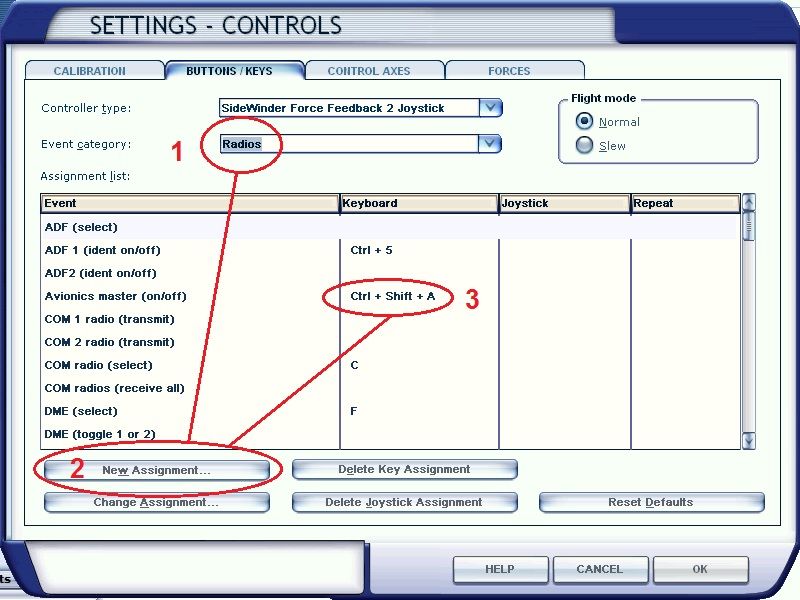
Another thing you could do would be to make a keyboard command for the Avionics master (on/off) by going to Settings > Controls > Buttons / Keys, change Event category to Radios, highlight Avionics master (on/off), click on New Assignment, then add you key-presses. As you can see in the image below, I'm using CTRL + SHIFT + A.


For any problems with the CIVA-INS, there is lots of help in this topic CIVA INS - THE ONLY THREAD PLEASE.

Hope this helps

  

Mark Fletcher


PC: i7 10700K @3.8/5.1GHz | 64GB DDR4 3200 | 12GB RTX 4070 Super | 32" LCD Monitor | 1TB SSD + 2TB SSD + 2TB HDD | Win 11 Pro
Back to top
 
IP Logged
 
stretch1365
Full Member
*
Offline


Posts: 56
Joined: Jun 27th, 2013
Re: Radio knobs and autopilot Mode switch!
Reply #2 - Jul 1st, 2013 at 8:46pm
Print Post  
Hi Mark,

Thanks for the quick reply,

I did a quick ten minute flight this morning, and the radio's weren't working on the ground but after taking off I was playing around with switches in the cockpit and got radio's and autopilot all working, but don't know exactly what I switched on to achieve this, typical!

I do start off with a cold dark cockpit as a default so might set up a hot key to switch avionics on, but is there not an avionics switch in the VC that would be more realistic?

Regards,
  

Happy Flying,&&&&David Phillips
Back to top
 
IP Logged
 
stretch1365
Full Member
*
Offline


Posts: 56
Joined: Jun 27th, 2013
Re: Radio knobs and autopilot Mode switch!
Reply #3 - Jul 2nd, 2013 at 7:52pm
Print Post  
Hi,

Just to report back on your advice above. set up a Avionics Switch through FSUIPC on my throttle quadrant and all now works fine.

Thank you so much, and the INS is working too so all problems sorted.

Looking forward to some great 707 flights now  Smiley
  

Happy Flying,&&&&David Phillips
Back to top
 
IP Logged
 
Markoz
CS Team
*
Offline


Posts: 12445
Location: Victoria, Australia
Joined: Apr 24th, 2009
Gender: Male
Re: Radio knobs and autopilot Mode switch!
Reply #4 - Jul 3rd, 2013 at 2:17am
Print Post  
Glad it's all working now. Have fun. Grin
  

Mark Fletcher


PC: i7 10700K @3.8/5.1GHz | 64GB DDR4 3200 | 12GB RTX 4070 Super | 32" LCD Monitor | 1TB SSD + 2TB SSD + 2TB HDD | Win 11 Pro
Back to top
 
IP Logged
 
sieggie
Full Member
*
Offline


Posts: 59
Location: Melbourne, FL
Joined: Sep 9th, 2010
Gender: Male
Re: Radio knobs and autopilot Mode switch!
Reply #5 - Jul 3rd, 2013 at 3:13pm
Print Post  
You can also use FSUIPC to create an autorun macro that sets the Avionics Switch on when the plane loads. That way you won't forget to hit the switch.

Dave
  

Back to top
 
IP Logged
 
Page Index Toggle Pages: 1
Send TopicPrint
 
  « Board Index ‹ Board  ^Top
