Visit Captain Sim web site  
  Welcome, Guest. Please Login or Register


Page Index Toggle Pages: 1 Send TopicPrint
 10 fuel dump (Read 9417 times)
mrhaloreach
Full Member
*
Offline


Seattle Washington

Posts: 107
Joined: Sep 19th, 2012
fuel dump
Oct 20th, 2013 at 10:09pm
Print Post  
how to dump fuel with pics please


HP Pavilion P7-1180i-Intel i7 2600k-windows 8 pro-11GB Ram-1Terabite hard DRive&&&&
Back to top
GTalk  
IP Logged
 
Markoz
CS Team
*
Online


Posts: 12445
Location: Victoria, Australia
Joined: Apr 24th, 2009
Gender: Male
Re: fuel dump
Reply #1 - Oct 21st, 2013 at 6:39am
Print Post  
I messed around with fuel dumping back in the v0.x days of the 777, I found it to be great. I will try to get it in here using pics on what I did, but it will take a while to get it done (as long as I don't forget to do it). Wink

* Markoz makes a mental note to NOT forget to do this!
  

Mark Fletcher


PC: i7 10700K @3.8/5.1GHz | 64GB DDR4 3200 | 12GB RTX 4070 Super | 32" LCD Monitor | 1TB SSD + 2TB SSD + 2TB HDD | Win 11 Pro
Back to top
 
IP Logged
 
mrhaloreach
Full Member
*
Offline


Seattle Washington

Posts: 107
Joined: Sep 19th, 2012
Re: fuel dump
Reply #2 - Oct 26th, 2013 at 12:32am
Print Post  
no effect and doesn't give remainder amount
  

HP Pavilion P7-1180i-Intel i7 2600k-windows 8 pro-11GB Ram-1Terabite hard DRive&&&&
Back to top
GTalk  
IP Logged
 
Markoz
CS Team
*
Online


Posts: 12445
Location: Victoria, Australia
Joined: Apr 24th, 2009
Gender: Male
Re: fuel dump
Reply #3 - Oct 26th, 2013 at 2:47am
Print Post  
When I messed with it before, I don't remember seeing fuel being dumped out of the plane, but looking at the fuel display, I could see that fuel was being dumped.

I think I set the fuel to what  wanted remaining, and let it dump until it got there, once there, the dumping was stopped automatically. I even wrote about it in the forum and how good it worked.
  

Mark Fletcher


PC: i7 10700K @3.8/5.1GHz | 64GB DDR4 3200 | 12GB RTX 4070 Super | 32" LCD Monitor | 1TB SSD + 2TB SSD + 2TB HDD | Win 11 Pro
Back to top
 
IP Logged
 
mrhaloreach
Full Member
*
Offline


Seattle Washington

Posts: 107
Joined: Sep 19th, 2012
Re: fuel dump
Reply #4 - Oct 27th, 2013 at 9:39pm
Print Post  
anyway to get the effect?
  

HP Pavilion P7-1180i-Intel i7 2600k-windows 8 pro-11GB Ram-1Terabite hard DRive&&&&
Back to top
GTalk  
IP Logged
 
Markoz
CS Team
*
Online


Posts: 12445
Location: Victoria, Australia
Joined: Apr 24th, 2009
Gender: Male
Re: fuel dump
Reply #5 - Oct 28th, 2013 at 2:09am
Print Post  
I was doing it at about FL260-FL300, so I have contrails and can't tell if there is an effect or not.
I'll try again at a lower altitude where there is no contrail.
  

Mark Fletcher


PC: i7 10700K @3.8/5.1GHz | 64GB DDR4 3200 | 12GB RTX 4070 Super | 32" LCD Monitor | 1TB SSD + 2TB SSD + 2TB HDD | Win 11 Pro
Back to top
 
IP Logged
 
mrhaloreach
Full Member
*
Offline


Seattle Washington

Posts: 107
Joined: Sep 19th, 2012
Re: fuel dump
Reply #6 - Nov 8th, 2013 at 12:50am
Print Post  
MARKOZ PLEASE TELL ME
  

HP Pavilion P7-1180i-Intel i7 2600k-windows 8 pro-11GB Ram-1Terabite hard DRive&&&&
Back to top
GTalk  
IP Logged
 
Markoz
CS Team
*
Online


Posts: 12445
Location: Victoria, Australia
Joined: Apr 24th, 2009
Gender: Male
Re: fuel dump
Reply #7 - Nov 8th, 2013 at 6:25am
Print Post  
Okay. Here is what you need to do.
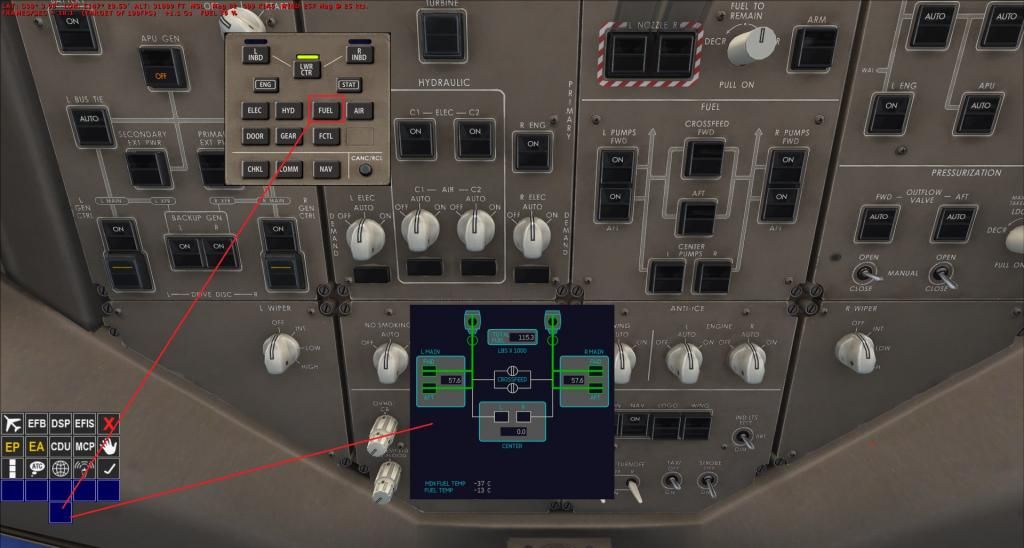

Pic #1
Open the DSP (Shift+4) and click on the FUEL button. This will display the fuel in the currently selected ND. In Pic #1 above, I have chosen the Lower Center Display.
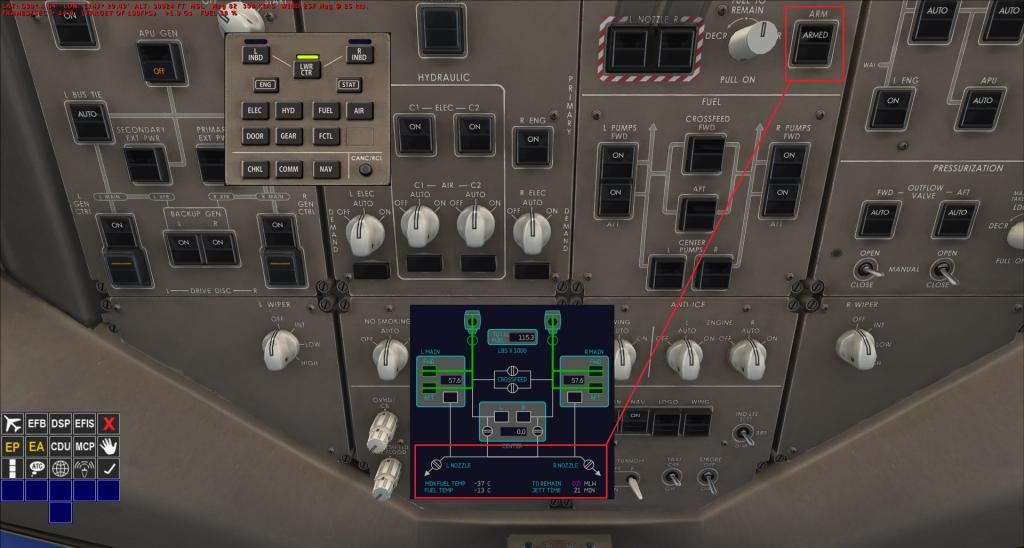

Pic #2
Click on the Fuel Jettison ARM Switch, so ARM appears on it. In Pic #2 above, you can see that the Fuel Jettison indicators are now showing in the FUEL Display.
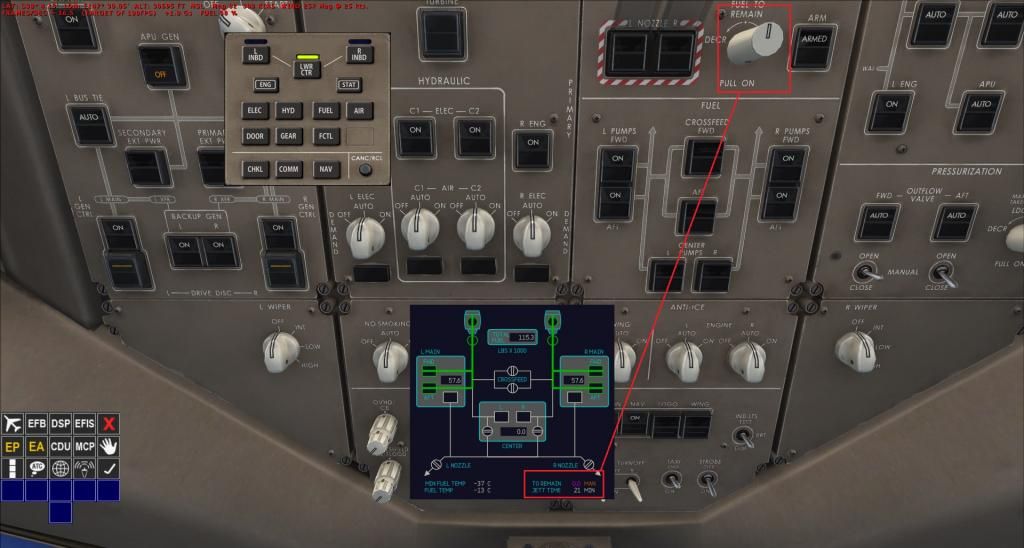

Pic #3
Now you have to MIDDLE Mouse Button click on the Fuel To Remain Selector (knob). The FUEL Display now shows the Fuel Jettison information.
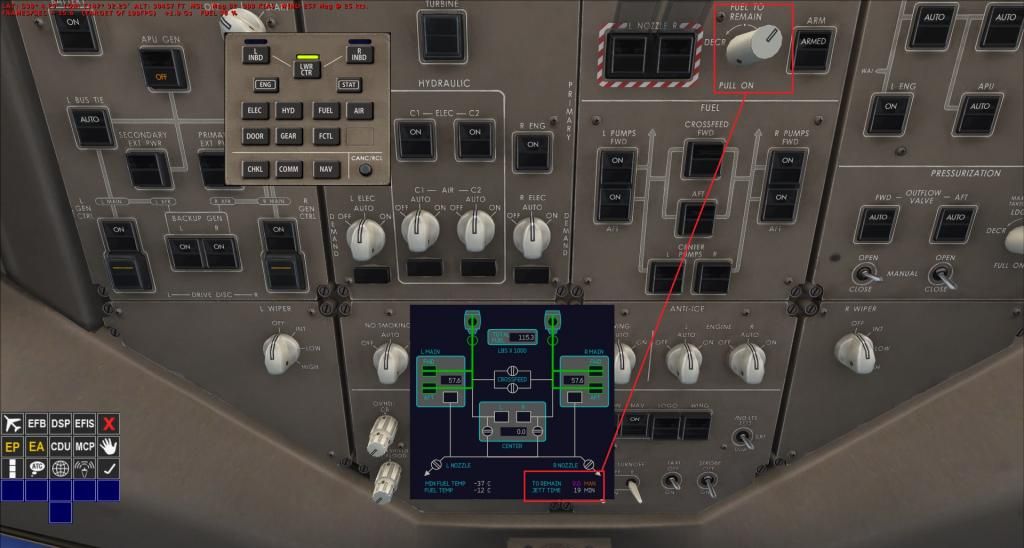

Pic #4
RIGHT Mouse Button click on the Fuel To Remain Selector to increase the amount of fuel to remain. It starts of at 0.0 to remain, and if you don't increase it, ALL your fuel will be jettisoned! In Pic #4 above, I have chosen 60.3 (60,300 pounds) to remain. I tried to stop it on 60.0, but it was too hard to achieve. Once you have set it to the amount of fuel you want to remain, LEFT Mouse Button click on the Fuel To Remain Selector until it is centered! Do not Middle Mouse Button click on the Fuel To Remain Selector because it WILL return it to 0.0! So leave it alone until the fuel jettison process is finished.
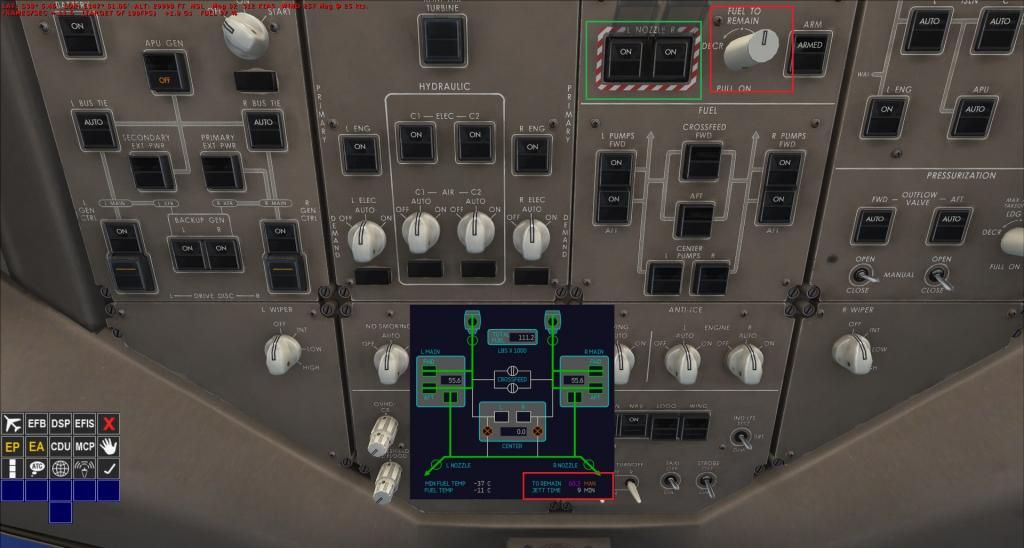

Now press the 2 Fuel Jettison Nozzle Switches ON. The Fuel jettison will start. It will automatically switch OFF once the amount of fuel that you have selected, in the previous step, which in my case was 60.3.

It really is quite simple to do.

Sorry about my previous post, where I said I had written about it before. I written about messing with it, but I had not explained how I had done it.

  

Mark Fletcher


PC: i7 10700K @3.8/5.1GHz | 64GB DDR4 3200 | 12GB RTX 4070 Super | 32" LCD Monitor | 1TB SSD + 2TB SSD + 2TB HDD | Win 11 Pro
Back to top
 
IP Logged
 
mrhaloreach
Full Member
*
Offline


Seattle Washington

Posts: 107
Joined: Sep 19th, 2012
Re: fuel dump
Reply #8 - Nov 10th, 2013 at 11:59pm
Print Post  
BUT NO EFFECT
  

HP Pavilion P7-1180i-Intel i7 2600k-windows 8 pro-11GB Ram-1Terabite hard DRive&&&&
Back to top
GTalk  
IP Logged
 
mrhaloreach
Full Member
*
Offline


Seattle Washington

Posts: 107
Joined: Sep 19th, 2012
Re: fuel dump
Reply #9 - Nov 11th, 2013 at 12:02am
Print Post  
WHEN TURN KNOB STAYS AT  0.0
USING -300ER MODEL
  

HP Pavilion P7-1180i-Intel i7 2600k-windows 8 pro-11GB Ram-1Terabite hard DRive&&&&
Back to top
GTalk  
IP Logged
 
Markoz
CS Team
*
Online


Posts: 12445
Location: Victoria, Australia
Joined: Apr 24th, 2009
Gender: Male
Re: fuel dump
Reply #10 - Nov 11th, 2013 at 2:02am
Print Post  
mrhaloreach wrote on Nov 10th, 2013 at 11:59pm:
BUT NO EFFECT

I'm not a hundred percent sure, but  think that the fuel dump effect has to be "attached" to the MDL (in 3DS Max), so it can only be done by Captain Sim. Sad

mrhaloreach wrote on Nov 11th, 2013 at 12:02am:
WHEN TURN KNOB STAYS AT  0.0
USING -300ER MODEL

I am currently testing the 777-300ER Cathay Pacific livery (not that the livery should make a difference) and it works fine for me!

If yours isn't working, are you sure you are following the instructions I gave above:

PULL the Fuel Jettison ARM Switch knob out with the MIDDLE Mouse Button, then use the RIGHT Mouse Button to increase the amount of fuel you want remaining. LEFT Mouse Button to decrease the fuel you want remaining. And DO NOT to push the Fuel Jettison ARM Switch knob back in until AFTER the fuel dumping is completed.
  

Mark Fletcher


PC: i7 10700K @3.8/5.1GHz | 64GB DDR4 3200 | 12GB RTX 4070 Super | 32" LCD Monitor | 1TB SSD + 2TB SSD + 2TB HDD | Win 11 Pro
Back to top
 
IP Logged
 
mrhaloreach
Full Member
*
Offline


Seattle Washington

Posts: 107
Joined: Sep 19th, 2012
Re: fuel dump
Reply #11 - Nov 13th, 2013 at 6:01pm
Print Post  
markoz is there a setting i can not dump fuel it stays at 0.0 and there is no effect
  

HP Pavilion P7-1180i-Intel i7 2600k-windows 8 pro-11GB Ram-1Terabite hard DRive&&&&
Back to top
GTalk  
IP Logged
 
Markoz
CS Team
*
Online


Posts: 12445
Location: Victoria, Australia
Joined: Apr 24th, 2009
Gender: Male
Re: fuel dump
Reply #12 - Nov 14th, 2013 at 1:24am
Print Post  
I have tried using the CS727 fuel dump FX file, but nothing shows Sad

I'll do a video on the fuel dumping process from beginning to end. Let's see if that can help you. Wink

I'll need time to do it because I am a bit busy at the moment, and if I don't get it done before the weekend, it might have to wait until after. Sorry.
  

Mark Fletcher


PC: i7 10700K @3.8/5.1GHz | 64GB DDR4 3200 | 12GB RTX 4070 Super | 32" LCD Monitor | 1TB SSD + 2TB SSD + 2TB HDD | Win 11 Pro
Back to top
 
IP Logged
 
Page Index Toggle Pages: 1
Send TopicPrint
 
  « Board Index ‹ Board  ^Top
