CAPTAIN SIM FORUM
727 Captain >> 727 Captain >> Support/Update...
https://www.captainsim.org/forum/csf.pl?num=1267076606

Message started by James F. Chams on Feb 25th, 2010 at 5:43am

Title: Support/Update...
Post by James F. Chams on Feb 25th, 2010 at 5:43am
CS Staff,

Thank you for the continued support and updates to this already awesome product.  Just downloaded the updates and am looking forward to using the Wx Radar built into the VC with this version 2.4 soon.

Thanks again!  8-)

Title: Re: Support/Update...
Post by Markoz on Feb 25th, 2010 at 6:56am
Hi James.

I was sure that I had not added anything to the panel.cfg in any of the CS 727's with regards to the CS Weather Radar. And that I had used it nearly every time I flew in one of them. So....I uninstalled the 727 v2.4 and removed everything with regards to the 727 v2.4. Like  the Captain_Sim\727 folder AND ALL of the SimObjects\Airplanes\CS_B727-XXX folders. I then installed the 727 Base Pack v2.3  and this is a screen shot of the WXR panel in it:
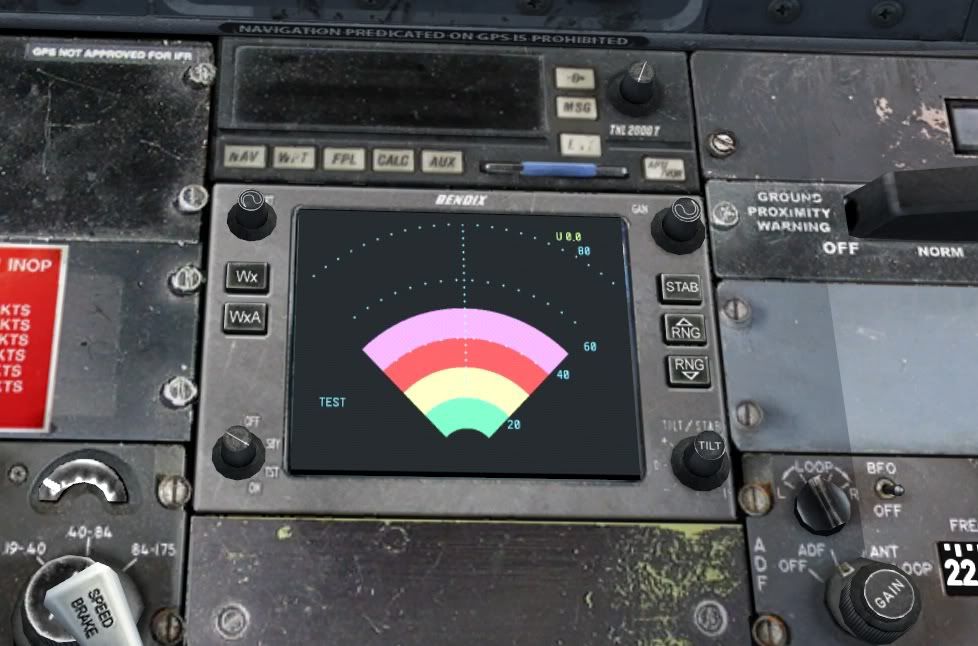
As you can see, the button is set to TST (TEST Mode) and the coloured bars show the test working. So this means it (to me) was included in the 727 Base Pack v2.3.

Mark

EDIT: Here is why I could see the weather radar in v2.3

Title: Re: Support/Update...
Post by Berlopez on Feb 25th, 2010 at 8:21am
:D As most of you have seen in my pots I'm still using my original v 2.2; I had to go back as 2.3 proved to difficult for my stupidity to install it and edit it everytime I wanted to use  727-100; Until my patients cut in...Then I decided I knew 2.2 better and could fly the plane better off from that install. I have used a few of the fixings of 2.3 like the Cessnas' NAV switch incorporated into the GPS panel to perform GPS track navigation; Still learning again ILS on the bird...But that's the fun of it  :D

Upon returning to 2.2 from 2.3 I use my original installer and my engine gauges dissapeared; See my posts. Eventhough I managed,eventually, to revive them,I now run 2.2; I'd like to ask what am I risking if I jump to 2.4 from 2.2 without having 2.3? What problems may I run into??? Like all the autopilot issues we encountered in 2.3...

Title: Re: Support/Update...
Post by Markoz on Feb 25th, 2010 at 8:51am
Yep. I read you posts and saw the problems you had.

The changes aren't very much. For the 727 SP2.4 Full List, click here.

Seeing as I had no issues with v2.3, going up to v2.4 is not a problem for me. V2.4 works as well for me as v2.3 did. I still find that the "trick" to catching the ILS and G/S are still there, but no other issues have shown up. So except for that, the 727 v2.4 works perfectly for me.

Unfortunately. I can't say the same for you. You could try v2.4, but if you get the same issues as before, you will have to go through all you went through before. Not a pretty picture. :(

Mark

Title: Re: Support/Update...
Post by Berlopez on Feb 25th, 2010 at 9:11am
'morning Mark: Thanks for replying so soon.

I'm asking because first my posts might seem of no interest,eventually,as I'm running an outdated version, secondly the version would eventually not be supported ?...Since I don't run 2.3 with all the editing that has been done to it...How would 2.4 work?

I'll leave it as is; It's good enough for my FS needs.

Thanks: Bernardo

Title: Re: Support/Update...
Post by Markoz on Feb 25th, 2010 at 10:09am
Hi Bernardo.

I have just done some more flights in the 727 SP2.4 and I have to take back this from my previous reply:

Quote:
I still find that the "trick" to catching the ILS and G/S are still there
I don't need to do it anymore. I realized I was "rushing" my flights and was trying to catch on to the ILS and G/S when "not the best of positions". It catches them quite easily and it DOES disengage HDG HOLD and ALT HOLD once has caught them.

I make one change in the panel.cfg by adding the NAV/GPS switch to the 2D Autopilot panel. And I make a few changes to the aircraft.cfg. I add the electric_always_available=1 and I add the following lines into the VC CameraDefinisions [CameraDefinition.001] to [CameraDefinition.008]. From this :

PitchPanRate=20
HeadingPanRate=60


To this :

PitchPanRate=30
HeadingPanRate=75


AND I add this line as well :

PanAcceleratorTime=0

The last change I make is this following one to the sound.ini file in FSX\Captain_Sim\727 folder:

SoundOffWhenSimIsSlew=0

They are the only changes I need to make and the 727 works perfectly for me.

Title: Re: Support/Update...
Post by Berlopez on Feb 25th, 2010 at 11:12am
Great Mark: Thaks for testing this...One of my questions regarding ILS capture is: excuse my ignorance: Must I catch it from above or below?

Another of my issues is getting rid of the "sink rate and pull-up" calls on the 727. I've opted by unticking detect crashes and damage on the settings.
And finally how exactly will this Headingpanrate and Panaccelerator affect me? i.e. Will my v/c pan rate be faster? As is now with my rig sometimes it locks for about 20-40 seconds; My rig isn't very big is a dual core 1.8~1.79 @4300 1.8 GB; I have a lot of addons installed mostly planes from different developers ( mostly freeware) and some scenery. I know I'm well below min.specs for running FSX,Though I manage a confortable 30FPS ( Locked at 40 in  FSX.cfg) My last question when and if I jump into all this? Do I need to have 2.3 installed in order to install 2.4? Or can I go straight ahead?

Sorry to be so undecisive.

Thanks:

Bernardo

Title: Re: Support/Update...
Post by Markoz on Feb 25th, 2010 at 1:23pm
Hi Bernardo.

Catching the G/S is fairly easy. It is better to catch it from below, but you can do it from above. I have caught it from both above and below and it always works better from below.

Sink rate is still a case of trial and error for me. I tend to just ignore it. Once the Autopilot has got a good hold on the G/S it doesn't happen very much, if at all.

With the Pitch/Heading Pan Rates, the higher the number the faster it moves. Pitch = UP/DOWN and Heading = LEFT/RIGHT. PanAcceleratorTime=n is how long before the Pitch and Heading pan rates reach the speed entered. Zero (0) means it is instant. These all have an enormous effect on the POV Hat switch on most joysticks/yokes but also work with the view movement keys NP4, NP6, NP8, NP2 etc. They have nothing to do with the frame rates you get in FSX. That, I believe, is CPU driven.

Your computer seems to give you a pretty good run, but I'd bet the sliders a low.

I always uninstall the previous version before installing the latest version. That way nothing gets messed up.

I hope this helps.

Mark

CAPTAIN SIM FORUM » Powered by YaBB 2.6.0!
YaBB Forum Software © 2000-2025. All Rights Reserved.