Visit Captain Sim web site  
  Welcome, Guest. Please Login or Register


Page Index Toggle Pages: 1 [2]  Send TopicPrint
 10 707Captain Tutorial (Read 29932 times)
Markoz
CS Team
*
Offline


Posts: 12445
Location: Victoria, Australia
Joined: Apr 24th, 2009
Gender: Male
Re: 707Captain Tutorial
Reply #15 - Jun 27th, 2011 at 4:27am
Print Post  
What happens when you change the flight plan and reload it, is that the autopilot starts the plan from the beginning (from origin to waypoint 1).
The only way that I know of to change which waypoint you want to head to (that I know of), is using the default GPS.

How to add the default GPS:

Open the panel.cfg with Windows notepad.

In [Window Titles] add the following line (bold text):

[Window Titles]
Window00=Simicons
Window01=Animations Control
Window02=CS Weather Radar
Window03=Map
Window04=Autopilot
Window05=Crew Messenger

Window06=GPS

Then add the bold text part below [Window05] and before [VCockpit01], like this:

[Window05]
size_mm=349,218
window_size=0.25
window_pos= 0.030, 0.690
background_color=0,0,0
visible=0
ident=11005
render_3d_window=0
gauge00=Captain_Sim.x707.P15!P15_voice, 0,0, 349,218


[Window06]
background_color=0,0,0
size_mm=303,283
position=2
visible=0
ident=GPS
gauge00=fs9gps!gps_500, 0,0,303,283


[VCockpit01]
size_mm=1024,1024
pixel_size=1024,1024
texture=$FPSP
background_color=0,0,0
gauge00=Captain_Sim.x707.R01!R01_001_light, 625, 824, 56,55
gauge01=Captain_Sim.x707.R02!R02_clock, 50, 300, 155,151
gauge02=Captain_Sim.x707.R03!R03_aplight, 625, 750, 55,55
gauge03=Captain_Sim.x707.R05!R05_rmi, 275, 775, 200,200


*This is not the panel.cfg with the CIVA INS panel


Now you have added the GPS, we will assume that you are in mid flight and have added the STAR/TRANS to the revised flight plan. DO NOT LOAD IT YET!
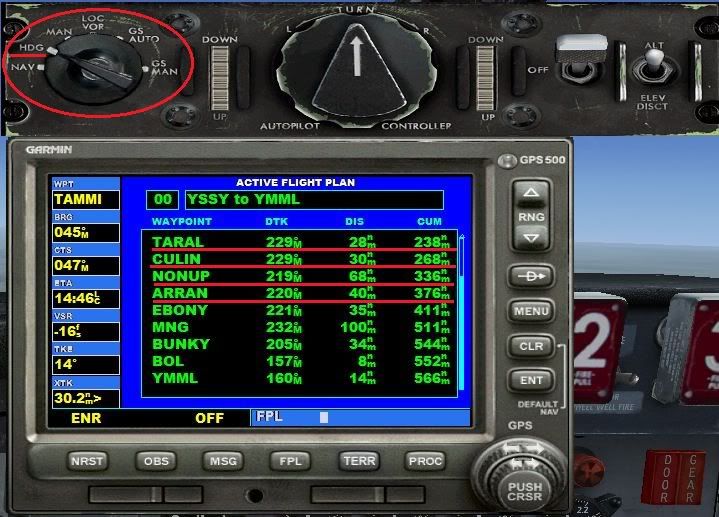
Now place the HDG Bug at the top center of the HSI and turn the Autopilot MODE SELECTOR SWITCH to HDG so that the 707 continues towards its current waypoint.

Here I have switched the Autopilot Mode Selector Switch to HDG

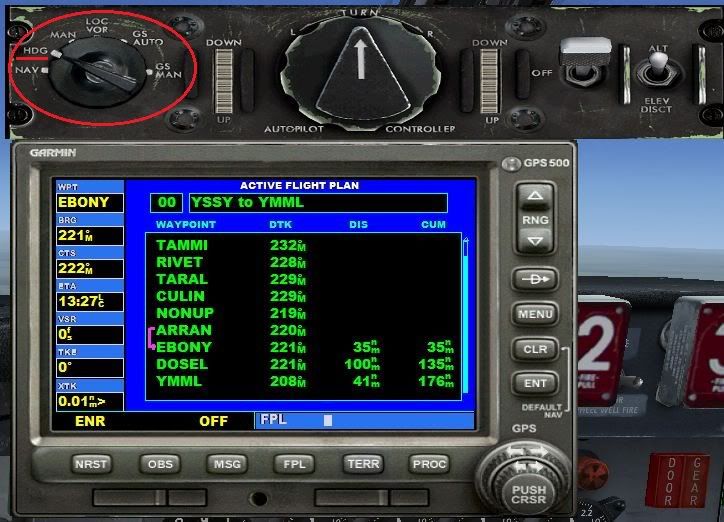
Now load the revised flight plan.


New plan loaded, but all the early waypoints are not finished. The Autopilot in NAV mode would head for waypoint 1 (notice I am still in HDG mode!

Open the default FS GPS (if you followed my instructions use SHIFT+7). Press the FPL button to call up the Flight Plan.
Press the PUSH CRSR button on the GPS and scroll down to the current waypoint (the one you were heading towards in the first plan).


Notice that I have highlighted the waypoint I was originally headed towards before the revised plan was loaded

Press the MENU button, and it display a box that says (what I see using my demo flight plan):

FLY LEG
TARAL  -->  CULIN
ACTIVATE? <- this is highlighted and flashing
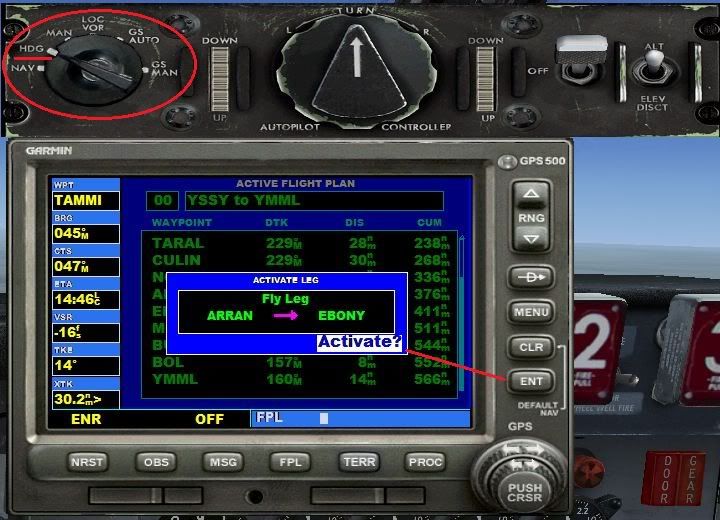


Press the ENT button and that leg of your flight plan is now active.
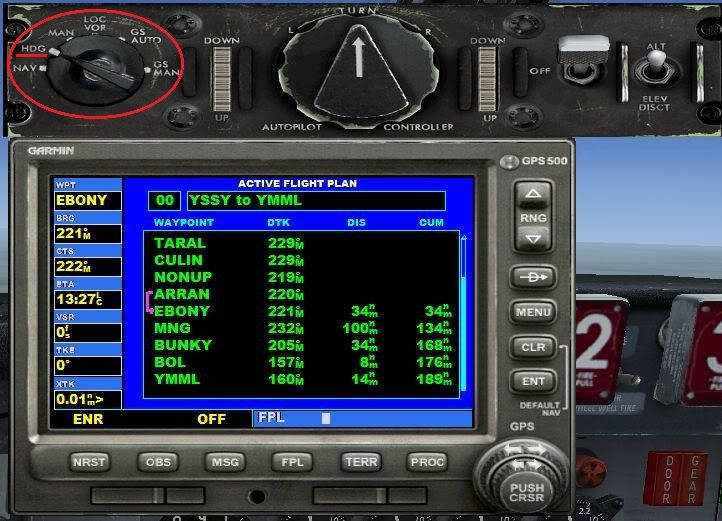

The flight plan leg to my current waypoint is now activated (see that the previous waypoints are clear) but I'm still in HDG Mode

Now turn the Autopilot MODE SELECTOR SWITCH to NAV and the 707 will continue as if nothing happened.
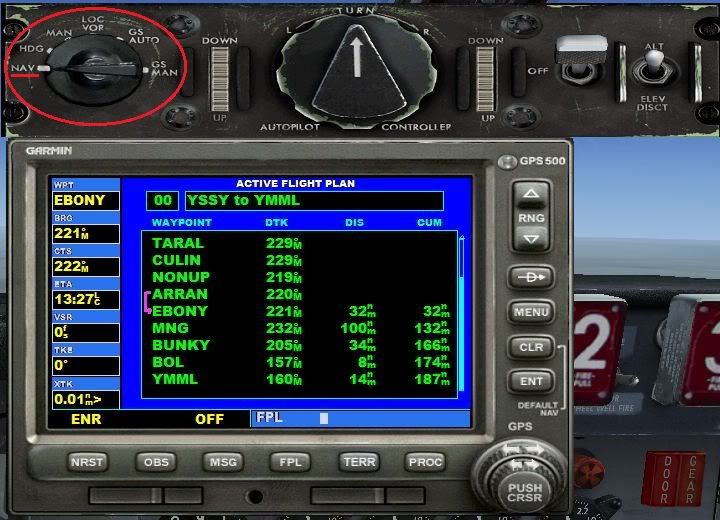

All back to normal and my 707 has not skipped a beat. She has continued on as if nothing has happend

I hope this helps you with your flights, especially after you have revised them to include STAR and TRANS.
And to those who shudder at the thought of putting the default GPS in an aircraft, think again. This is a most helpful tool to have in the CS707 because of the fact that it can follow an FS flight Plan. Wink

Mark

Note: You can learn about the FS GPS in the Help > Learning Center > GPS > using

  

Mark Fletcher


PC: i7 10700K @3.8/5.1GHz | 64GB DDR4 3200 | 12GB RTX 4070 Super | 32" LCD Monitor | 1TB SSD + 2TB SSD + 2TB HDD | Win 11 Pro
Back to top
 
IP Logged
 
Colvale
Senior Member
*
Offline


Posts: 253
Joined: Jun 23rd, 2011
Gender: Male
Re: 707Captain Tutorial
Reply #16 - Jun 27th, 2011 at 12:10pm
Print Post  
Hi Mark.

Once again,I'm indebted to you. You have now clarified to me why my 707 was heading back to where it came from.And the tutorial on how to add the default GPS is a great boon.

As I stated, I use a commercial Flight Planner that gives me the arrival airport's ATIS,which is where I get my arrival Rwy,and then accordingly input the STARs.

Now,thanks to you,I will be able to use a revised Flight Plan.
  
Back to top
 
IP Logged
 
Colvale
Senior Member
*
Offline


Posts: 253
Joined: Jun 23rd, 2011
Gender: Male
Re: 707Captain Tutorial
Reply #17 - Jun 27th, 2011 at 8:51pm
Print Post  
Markoz wrote on Jun 25th, 2011 at 2:11am:
Try following this guide: http://www.captainsim.org/yabb2/YaBB.pl?num=1286115031/1#1 on Engine Start.
I did this back when the 707 Captain was first released and we all had trouble starting it.

Hi Mark.Tried this engine start flowsheet.Managed to get engines to fire,etc,etc,but cannot get the rudder to deflect to give me turn after push-back,and despite advancing throttles, no power seems to be going through.Start/idle levers at top setting,all fuel pumps on,bleeds on.

Co-pilot's hydraulic lamps stay lit despite selecting on.Rudder lamps off.

What am I doing wrong?
  
Back to top
 
IP Logged
 
Markoz
CS Team
*
Offline


Posts: 12445
Location: Victoria, Australia
Joined: Apr 24th, 2009
Gender: Male
Re: 707Captain Tutorial
Reply #18 - Jun 28th, 2011 at 1:52am
Print Post  
Managed to get engines to fire,etc,etc,but cannot get the rudder to deflect to give me turn after push-back,and despite advancing throttles, no power seems to be going through.
From the manual:
‘707 Captain’ FLIGHT MANUAL Part II – Aircraft and Systems (cs707_manual2.pdf) pages 37-38
R17. HYDRAULIC SYSTEM PANEL

9,10. AC Auxiliary Pump Switches
When positioned to
ON: Activates pump motor.
OFF: Shuts off pump motor.
Switch No.1 is powered from an AUX PUMP CONT No. 1 CB on P5, TR bus No. 4, the No.2 switch from an
AUX HYD PUMP CONT-2 CB on P5, TR bus No.3.


Make sure that switches 5, 7, 9 and 10 are ON (they are OFF when you load the 707-300 Cold-n-Dark (KSEA).FLT!
When switches 9 and 10 are OFF, the rudder wont move.


In this image, the AC Auxiliary Pump Switches (9 & 10) are OFF and so my rudder doesn't move.

Hope this helps

Mark
  

Mark Fletcher


PC: i7 10700K @3.8/5.1GHz | 64GB DDR4 3200 | 12GB RTX 4070 Super | 32" LCD Monitor | 1TB SSD + 2TB SSD + 2TB HDD | Win 11 Pro
Back to top
 
IP Logged
 
Colvale
Senior Member
*
Offline


Posts: 253
Joined: Jun 23rd, 2011
Gender: Male
Re: 707Captain Tutorial
Reply #19 - Jun 28th, 2011 at 10:49am
Print Post  
Hi Mark.

Thank you for that. The two switches that you have circled were exactly the lamps that stayed on.

I will read up on that relevant section as I was sure that I had turned on all the relevant switches but still could not get those 2 switches to extinguish. But I'll give it another go. At least I got to the point of doing a 'Cold 'n Dark' engine start, which was the first objective.
  
Back to top
 
IP Logged
 
Markoz
CS Team
*
Offline


Posts: 12445
Location: Victoria, Australia
Joined: Apr 24th, 2009
Gender: Male
Re: 707Captain Tutorial
Reply #20 - Jun 28th, 2011 at 1:35pm
Print Post  
If there are ever any lights glowing in the 707, I quickly to look them up in the ‘707 Captain’ FLIGHT MANUAL Part II – Aircraft and Systems (cs707_manual2.pdf), to find out why they are ON, how to get them OFF and what will happen if I don't get them to go out.
This is a good way to learn about an aircraft (not just the 707). The same applies to all the manuals dealing with it. If I'm trying to do something I can't figure out, out come the manuals an I start looking for help with what I need to know.
I read up on how to start the aircraft and then I go for a flight. I look into the manuals after I have flown around for a while in the aircraft. This is the case for all my third party aircraft, except one.

With the 707 engine start, I kept at it until I came up with a way to get them started every time I tried. Once I could get them started every time, it was time to learn the rest of the procedures and about the instruments.

Mark
  

Mark Fletcher


PC: i7 10700K @3.8/5.1GHz | 64GB DDR4 3200 | 12GB RTX 4070 Super | 32" LCD Monitor | 1TB SSD + 2TB SSD + 2TB HDD | Win 11 Pro
Back to top
 
IP Logged
 
Colvale
Senior Member
*
Offline


Posts: 253
Joined: Jun 23rd, 2011
Gender: Male
Re: 707Captain Tutorial
Reply #21 - Jun 28th, 2011 at 8:44pm
Print Post  
Hi Mark

Glad to report  Smileythat this time around, I followed your Start-up flowsheet to the tee ,but also remembered after reading your advice above to switch the DC Voltage switches and the AC Paralleling switches to GEN3/GEN4 and TR3/TR4 respectively in turn as these power the AC Aux Pump switches,and indeed watched as those neons went out and thus I was able to gain Rudder control.

Everything to T/O went smoothly.Thanks.I have also integrated your GPS window fix but not yet used it as I now create a FP with both SIDs and STARs integrated,so she can track without any interference from me. Smiley
  
Back to top
 
IP Logged
 
Page Index Toggle Pages: 1 [2] 
Send TopicPrint
 
  « Board Index ‹ Board  ^Top