CAPTAIN SIM FORUM
767 Captain II (P3D4) >> 767 Captain II - General  >> No warning or shaker during stall
https://www.captainsim.org/forum/csf.pl?num=1666843426

Message started by KD756 on Oct 27th, 2022 at 4:03am

Title: No warning or shaker during stall
Post by KD756 on Oct 27th, 2022 at 4:03am
Hello everyone, I did a search for this already and found nothing in the forum.
There is no warnings or shaker sound when I stall the plane.
has anyone figured out how to fix this?

Title: Re: No warning or shaker during stall
Post by KD756 on Oct 27th, 2022 at 5:55am
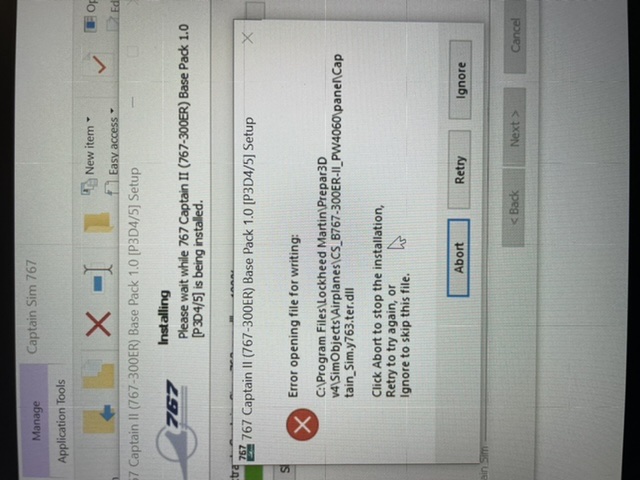
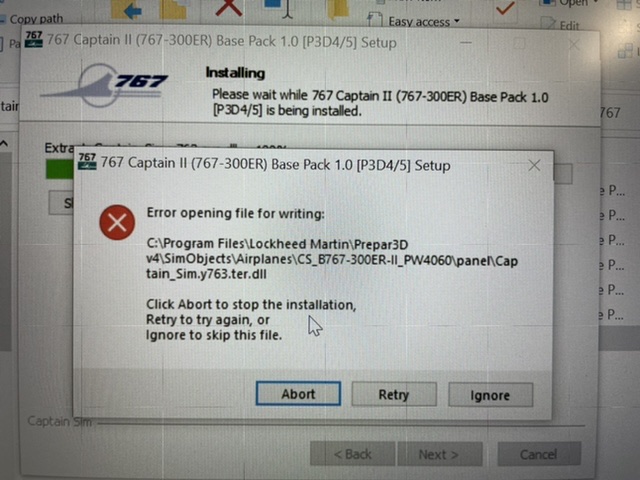
I uninstall the program and disabled Windows defender, re-downloaded again from CS and tried reinstalling only to get this message…
Any ideas?
4C2F2004-4A42-48F8-BA92-49B4059D2416.jpeg ( 92 KB | 169 Downloads )
Title: Re: No warning or shaker during stall
Post by KD756 on Oct 27th, 2022 at 5:58am
Sorry everyone m, I don’t know why it rotated my original photo…
A70E61F7-FAC0-413A-BD9C-6384406E35CD.jpeg ( 98 KB | 174 Downloads )

Title: Re: No warning or shaker during stall
Post by Markoz on Oct 27th, 2022 at 11:19pm
Was your Anti-Virus software off/disabled when you were installing it?
The problem could be the AV preventing the file from being installed believing it to be infected (a false positive).

Title: Re: No warning or shaker during stall
Post by KD756 on Oct 28th, 2022 at 8:44am
Hi Mark, thanks for the response.
When I first downloaded and installed the 767, my AV was not disabled.
But after I read the instructions on the CS site, I disabled Windows defender and uninstalled the 767, and re-downloaded it from the CS website. When I tried to install it again I got the warning you see above.

I then stopped everything with the 767.

I went back to the CS website and purchased the 757. I downloaded and installed that (with Windows defender still disabled) and had zero issues.

Is there something else that needs to be done besides disabling windows defender?

Title: Re: No warning or shaker during stall
Post by Markoz on Oct 29th, 2022 at 12:41am
Just so you know, I don't use Windows Defender as my AV, I use Avast One (the registered version, not the free version), so I'm not exactly sure if it has an exclusions list (but I assume that like most AV programs that it does). So... The only other thing that I can think of that might help, is to add the installer(s) to Windows Defender's exclusion list before installing. Hopefully doing that will prevent you from getting the message you see when installing it.

Note. I have also added the location of my Captain Sim product installers, AND the folders that my flight sims (FSX, FSX-SE, P3Dv3, P3Dv4, and P3Dv5) are installed, to the Exclusions list, and I have never seen any messages about them failing to be installed, nor have I had any issues where my AV has found any of Captain Sim's files as a threat (false positive), and so they work fine. I haven't had any problems with viruses in many years since I first started using Avast Free, followed by Avast One Free, and then the registered version of Avast One.

CAPTAIN SIM FORUM » Powered by YaBB 2.6.0!
YaBB Forum Software © 2000-2026. All Rights Reserved.