| CAPTAIN SIM FORUM | |
|
727 Captain >> 727 Captain >> Struggling With AP 2D Panel At Night
https://www.captainsim.org/forum/csf.pl?num=1437923176 Message started by Pinatubo on Jul 26th, 2015 at 3:06pm |
|
|
Title: Struggling With AP 2D Panel At Night Post by Pinatubo on Jul 26th, 2015 at 3:06pm
I'm glad to see all enhancements made on B727 after version 2.6 release, in which a lot of bugs were fixed. But, in my opinion, up to now, despite every CS team effort, a single detail was missed (maybe there are others). It is about the 2D Auto Pilot panel lighting. It's very, very hard, almost impossible, to find the AP switches and knobs when flying at night, mainly after IFR take-off / approach procedure, even with all cockpit flood and panels lights on.
Curiously, there is a bright control knob on AISLE STAND, tagged as "RADIO PANELS & AUTOPILOT", but it doesn't work at all (just an eye candy), so, while the 2D radio stack is well-lit, 2D AP panel remains in total darkness. Am I forgetting to do something or is there a fix? If not, I ask CS team to fix it, please. Night shift pilots will be thankful. |
|
Title: Re: Struggling With AP 2D Panel At Night Post by Don Nelson on Jul 27th, 2015 at 4:27pm
My 2D autopilot window is illuminated. The 3D on the pedestal is not.
I moved the 2D to the top right corner, eye level for me: [Window03] background_color=0,0,0 size_mm=267,88 position=2 visible=0 type=special ident=10005 gauge00=Captain_Sim.p721.P12!P12_001_ap, 0,0,267,88 |
|
Title: Re: Struggling With AP 2D Panel At Night Post by Pinatubo on Jul 28th, 2015 at 2:11am
Not sure if it will work, but I'll give it a try. Thanks.
|
|
Title: Re: Struggling With AP 2D Panel At Night Post by Pinatubo on Jul 30th, 2015 at 12:14am
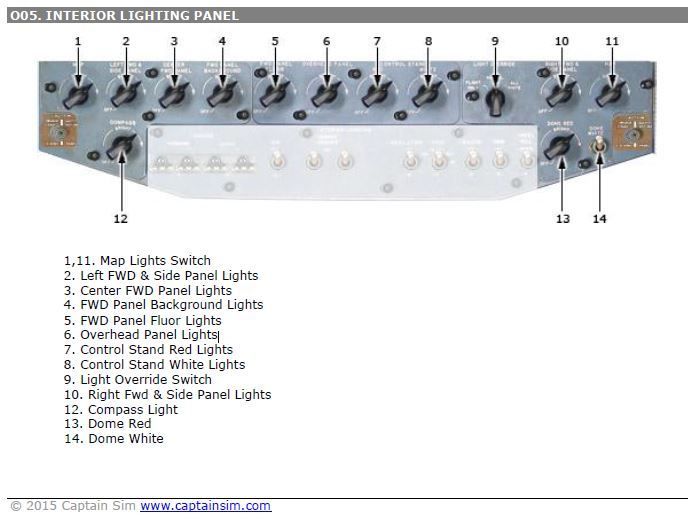
Switching off the knob labeled as "5. FWD Panel Fluor Lights" on the overhead panel, increases 2D AP panel visibility, but on the other hand sensibly decreases "Heading Selector" and "Course Selector" visibility on HSI, as well as turns off overhead panel
|
|
Title: Re: Struggling With AP 2D Panel At Night Post by Jim Kaye on Jul 31st, 2015 at 2:27am
I have had this problem with the 727 AP 2D panel. If I am going to fly at night, I first load the default Cessna 172 at my starting airport, then press Shift-1 and turn on the Panel Light. This should light up the panel. Then I switch to the CS 727, such as United Airlines -100. When pressing Shift 4 to bring up the AP panel, it will be bright enough to be viewable.
Jim Kaye |
|
Title: Re: Struggling With AP 2D Panel At Night Post by Don Nelson on Jul 31st, 2015 at 6:02am
Have you tried setting up the 727 for flight with everything on as you would like it and then save it as the default flight? I switch back and forth between the 707 and 727 and never had a 2d problem.
|
|
CAPTAIN SIM FORUM » Powered by YaBB 2.6.0! YaBB Forum Software © 2000-2025. All Rights Reserved. |