Post by Nick Cooper on Jan 19th, 2014 at 6:54am
Hello Tim,
While I am pleased that you seem to have found a fix, your original problem was simple.
Your effects were being displayed without textures which the Gauge Recovery utility has replaced.
The 707 uses these effects, all custom and apparently not addressed
by the fix you used.
cs707_smoke
cs707_smoke1
cs707_vaportrail
cs707_smoke_dark
However, all of them use the default effects\texture files fx_1.bmp and fx_smoke.bmp
As to why, I expect that tucked away somewhere on your computer, probably inside another folder in FSX,hopefully where there was not previously a textue folder, there will be a folder named texture that used to be at FSX\effects\texture. Easily done. :)
Should you wish to test this explanation, go to effects\texture and temporarily rename the folder to textureOFF.
Restart FSX and you will once again see what appears in your screen shot.
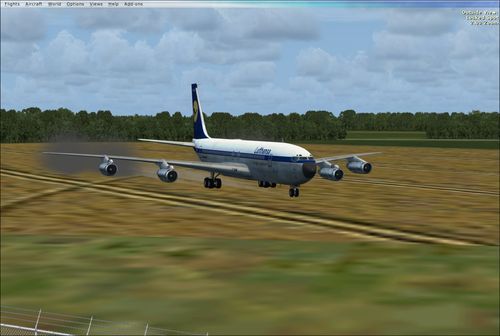
With textures
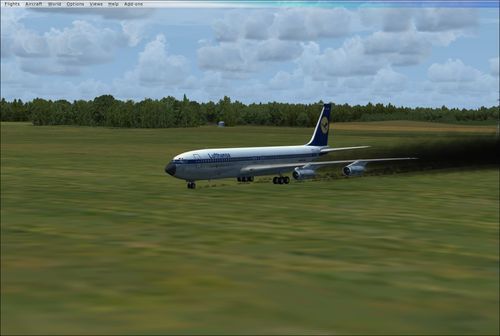
Without textures
Regards,
Nick.
While I am pleased that you seem to have found a fix, your original problem was simple.
Your effects were being displayed without textures which the Gauge Recovery utility has replaced.
The 707 uses these effects, all custom and apparently not addressed
by the fix you used.
cs707_smoke
cs707_smoke1
cs707_vaportrail
cs707_smoke_dark
However, all of them use the default effects\texture files fx_1.bmp and fx_smoke.bmp
As to why, I expect that tucked away somewhere on your computer, probably inside another folder in FSX,hopefully where there was not previously a textue folder, there will be a folder named texture that used to be at FSX\effects\texture. Easily done. :)
Should you wish to test this explanation, go to effects\texture and temporarily rename the folder to textureOFF.
Restart FSX and you will once again see what appears in your screen shot.
With textures
Without textures
Regards,
Nick.