Post by Tim Capps on Jan 17th, 2014 at 9:48am
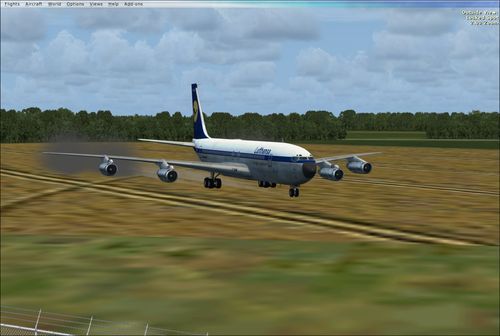
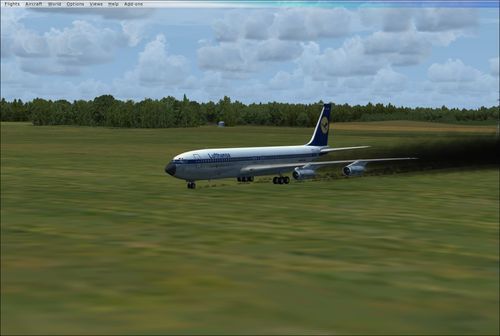
Well, this is worse than I thought. It seems to be a global FSX problem, and not just smoke, as I originally supposed, but contrails and wing vortices. If you look from the side, they are translucent squares that add up to a dense black artifact behind the airplane. It is not "smokey," in the proper sense, i.e. this is not just a case of the contrail being the wrong color. Impressive, no?
Now I'm really clueless as to what is going on. This affects all of my airplanes. I removed my custom Nvidia settings and reduced all graphics options to nil, but that had no effect. The only weird thing I've done lately is dropping the 707 sound gauge renamed to the 727 sound gauge into the gauges folder, replacing the original. Don't see how that could cause this, though. Something has happened to the way FSX is making smoke and wing vortices, and contrails, too. I am seriously not in the mood to reinstall FSX. I have only just now got everything put back after a hard drive crash.
After that last few weeks, I'm beginning to wonder if this hobby is worth the constant "issues." You fix one and two more crop up. :(
UPDATE: Stand by... think I'm on to something.
PROBLEM SOLVED. Sometimes when you uninstall something, FSX files get sucked into the void, too. This is often the cause for BLACK GAUGES or, in my case, BLACK CONTRAILS. In the A++++ library, search for "gauge recovery." Run the simple program that installs all your original GAUGES and EFFECTS that might have gone missing. It doesn't mess with anything else; just restores your FSX to what it should be. It fixed my problem in less than ten seconds.

Now I'm really clueless as to what is going on. This affects all of my airplanes. I removed my custom Nvidia settings and reduced all graphics options to nil, but that had no effect. The only weird thing I've done lately is dropping the 707 sound gauge renamed to the 727 sound gauge into the gauges folder, replacing the original. Don't see how that could cause this, though. Something has happened to the way FSX is making smoke and wing vortices, and contrails, too. I am seriously not in the mood to reinstall FSX. I have only just now got everything put back after a hard drive crash.
After that last few weeks, I'm beginning to wonder if this hobby is worth the constant "issues." You fix one and two more crop up. :(
UPDATE: Stand by... think I'm on to something.
PROBLEM SOLVED. Sometimes when you uninstall something, FSX files get sucked into the void, too. This is often the cause for BLACK GAUGES or, in my case, BLACK CONTRAILS. In the A++++ library, search for "gauge recovery." Run the simple program that installs all your original GAUGES and EFFECTS that might have gone missing. It doesn't mess with anything else; just restores your FSX to what it should be. It fixed my problem in less than ten seconds.