| CAPTAIN SIM FORUM | |
|
727 Captain >> 727 Captain >> 727F Winglets
https://www.captainsim.org/forum/csf.pl?num=1347130714 Message started by Caribflyer on Sep 8th, 2012 at 6:58pm |
|
|
Title: 727F Winglets Post by Caribflyer on Sep 8th, 2012 at 6:58pm
So I purchased and installed the 727 F expansion and I don't see the Winglet models at all. I checked the folder and all it has was the F and F RE models but no winglets. How can i get this fixed?
|
|
Title: Re: 727F Winglets Post by Markoz on Sep 9th, 2012 at 2:21am
I remember correctly having a siscution on this not that long after the 727 v2.4 was released and we couldn't add the winglets to the 727 (not sure if it was all of them or just the Freighters).
I think we determined that it is a bug in v2.4. Check and see if the model you added the winglets to, has the line: ui_wglts=1 added (in the aircraft.cfg) and if you can't see them on the model itself, it doesn't work. :( |
|
Title: Re: 727F Winglets Post by Caribflyer on Sep 9th, 2012 at 11:37am
still doesn't work. I don't see a model folder for the winglets model so I guess that wasn't installed....tried to do a repair installation and that didn't work either..
|
|
Title: Re: 727F Winglets Post by Markoz on Sep 10th, 2012 at 4:18am Caribflyer wrote on Sep 9th, 2012 at 11:37am:
Which one do you want to put the Winglets on? I added them to the 727-100F DHL: Without winglets [fltsim.0] title=CS 727-100F Captain Paint0 sim=cs727100 model=f panel= sound= texture=dhl kb_checklists= kb_reference= atc_id=OO-DHM atc_airline=DHL atc_flight_number=0001 ui_manufacturer=Boeing ui_type=727-100 Freighter ui_variation=DHL ui_typerole=Commercial Airliner ui_createdby=Captain Sim visual_damage=1 ui_wglts=0 description="727 Captain (727-100 Freighter Expansion Model) v2.3\n(c) 2009 Captain Sim www.captainsim.com" With winglets [fltsim.0] title=CS 727-100F Captain Paint0 sim=cs727100 model=f panel= sound= texture=dhl kb_checklists= kb_reference= atc_id=OO-DHM atc_airline=DHL atc_flight_number=0001 ui_manufacturer=Boeing ui_type=727-100 another company Freighter ui_variation=DHL ui_typerole=Commercial Airliner ui_createdby=Captain Sim visual_damage=1 ui_wglts=1 description="727 Captain (727-100 Freighter Expansion Model) v2.3\n(c) 2009 Captain Sim www.captainsim.com" The differences in the aircraft.cfg are in bold text. So it is working for me. If you check the aircraft.cfg, you might need to add wiglts=0 (to those that don't have winglets) so that the ACE can add them to it. ACE seemed not to want to make the changes at first, but it is working fine for me now (as the images show). |
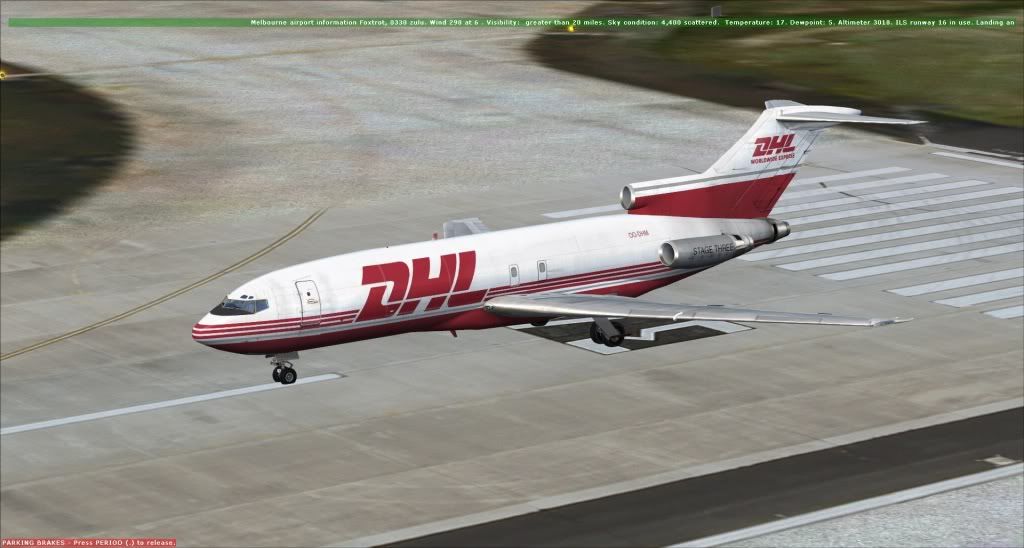
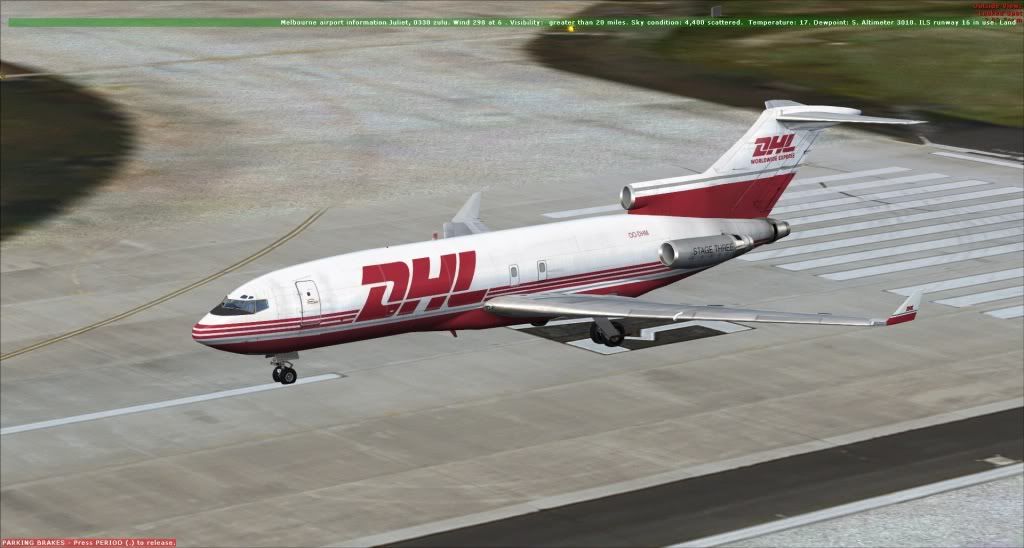
|
Title: Re: 727F Winglets Post by Caribflyer on Sep 10th, 2012 at 11:27am
I was tryin to add the winglets to the 727-200F. Is there suppose to be a model.another company folder in the CS 727-200F folder? I am only seeing model.f and model.f_re
|
|
Title: Re: 727F Winglets Post by Markoz on Sep 11th, 2012 at 5:13am Caribflyer wrote on Sep 10th, 2012 at 11:27am:
Okay. The fault is with the 727-200F. Here is the file structure of the 727-100F: CS_B727-100F model.f model.f_re panel sound texture texture.dhl texture.kfc aircraft.cfg cs727100.air Here is the file structure od the CS_B727-200F: CS_B727-200F model.f model.f_re panel sound texture texture.cougar texture.fedex aircraft.cfg cs727200.air There is no another company folder in either aircraft, and yet the 727-100F winglets work, but not the 727-200F winglets. :( |
|
Title: Re: 727F Winglets Post by Caribflyer on Jan 9th, 2013 at 3:08pm
Markoz, does your 727F winglets show up?
|
|
Title: Re: 727F Winglets Post by Markoz on Jan 10th, 2013 at 11:14am
Nothing I do on the -200F Freighter gets the winglets.
On the -200, I have to manually edit the aircraft.cfg file. Here is the 727-200 Air Canada variant without the changes: [fltsim.0] title=CS 727-200 Captain Paint0 sim=cs727200 model= panel= sound= texture=aircanada kb_checklists= kb_reference= atc_id=C-GYNM atc_airline=Air Canada atc_flight_number=722 ui_manufacturer=Boeing ui_type=727-200 ui_variation=Air Canada ui_typerole=Commercial Airliner ui_createdby=Captain Sim description=727 Captain (727-200 Expansion Model) v2.4\n(c) 2010 Captain Sim www.captainsim.com visual_damage=1 and with the changes: [fltsim.0] title=CS 727-200 Captain Paint0 sim=cs727200 model=another company panel= sound= texture=aircanada kb_checklists= kb_reference= atc_id=C-GYNM atc_airline=Air Canada atc_flight_number=722 ui_manufacturer=Boeing ui_type=727-200 ui_variation=Air Canada ui_typerole=Commercial Airliner ui_createdby=Captain Sim description=727 Captain (727-200 Expansion Model) v2.4\n(c) 2010 Captain Sim www.captainsim.com visual_damage=1 Hope this helps. |
|
Title: Re: 727F Winglets Post by Caribflyer on Jan 10th, 2013 at 12:42pm
Thanks, I guess I will have to wait for Captainsim to hopefully fix some of these issues after the B777. Right now the 727 is a bit of a "soar" spot among all of their products.
|
|
Title: Re: 727F Winglets Post by Markoz on Jan 11th, 2013 at 3:36am
"Soar" point, sore point! Nicely done!!!! ;D
Yes. The 727 is due for a service (upgrade). We'll just have to continue to hope it isn't too far off. ;) |
|
CAPTAIN SIM FORUM » Powered by YaBB 2.6.0! YaBB Forum Software © 2000-2025. All Rights Reserved. |