Post by Markoz on Jul 26th, 2012 at 3:51am
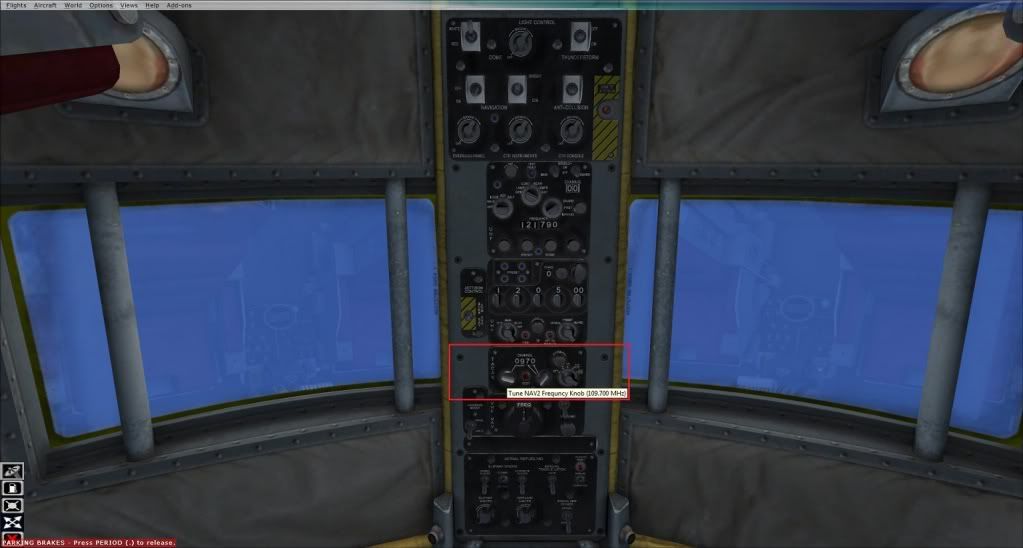
The NAV2 is on the overhead (named TACAN). It does not display the first digit of the nav frequency. In the attached image, you can see that the frequency is set to 109.70 (in Cockpit ToolTip), yet the gauge shows 09.70.
If you want to add a 2D Radio Panel, it is quite easy.
[Window Titles]
Window00=Main
Window01=Simicons
Window02=Radio Stack
Then put the following at the bottom of the panel.cfg
[Window02]
BACKGROUND_COLOR=2,2,2
size_mm=156,227
position=8
visible=0
ident=RADIO_STACK_PANEL
zorder=3
gauge00=Bendix_King_Radio!Bendix-King Radio Audio, 0, 0,156,31
gauge01=Bendix_King_Radio!Bendix-King Radio Nav-Comm 1, 0, 30,156,59
gauge02=Bendix_King_Radio!Bendix-King Radio Nav-Comm 2, 0, 88,156,59
gauge03=Bendix_King_Radio!Bendix-King Radio ADF, 0,146,156,41
gauge04=Bendix_King_Radio!Bendix-King Radio DME, 0,186,156,41
It will look like this:
The location of the Radio Stack on the screen is controlled by the position=8 entry.
0 = top left
1 = top center
2 = top right
3 = center left
4 = center
5 = center right
6 = bottom left
7 = bottom center
8 = bottom right
So you can use that as a guide for changing the location of Radio Stack on the area of screen you prefer.
NOTE. I only included the radios I think that you wanted. If you want all of them, just say so. ;)
If you want to add a 2D Radio Panel, it is quite easy.
[Window Titles]
Window00=Main
Window01=Simicons
Window02=Radio Stack
Then put the following at the bottom of the panel.cfg
[Window02]
BACKGROUND_COLOR=2,2,2
size_mm=156,227
position=8
visible=0
ident=RADIO_STACK_PANEL
zorder=3
gauge00=Bendix_King_Radio!Bendix-King Radio Audio, 0, 0,156,31
gauge01=Bendix_King_Radio!Bendix-King Radio Nav-Comm 1, 0, 30,156,59
gauge02=Bendix_King_Radio!Bendix-King Radio Nav-Comm 2, 0, 88,156,59
gauge03=Bendix_King_Radio!Bendix-King Radio ADF, 0,146,156,41
gauge04=Bendix_King_Radio!Bendix-King Radio DME, 0,186,156,41
It will look like this:
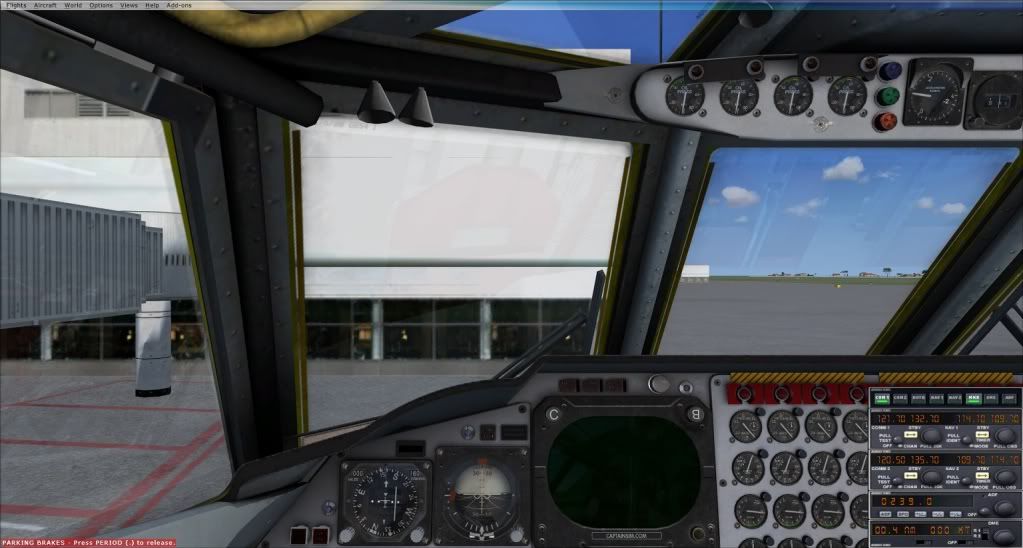
The location of the Radio Stack on the screen is controlled by the position=8 entry.
0 = top left
1 = top center
2 = top right
3 = center left
4 = center
5 = center right
6 = bottom left
7 = bottom center
8 = bottom right
So you can use that as a guide for changing the location of Radio Stack on the area of screen you prefer.
NOTE. I only included the radios I think that you wanted. If you want all of them, just say so. ;)