CAPTAIN SIM FORUM
727 Captain >> 727 Captain >> Buttons move too fast.
https://www.captainsim.org/forum/csf.pl?num=1339966304

Message started by Manok on Jun 17th, 2012 at 8:51pm

Title: Buttons move too fast.
Post by Manok on Jun 17th, 2012 at 8:51pm
My new PC handles like a dream, in fact, it handles a bit too fast with CS aircraft, is there a way to slow down how fast the knobs turn?

Title: Re: Buttons move too fast.
Post by fsxpaul on Jun 17th, 2012 at 9:34pm

Manok wrote on Jun 17th, 2012 at 8:51pm:
My new PC handles like a dream, in fact, it handles a bit too fast with CS aircraft, is there a way to slow down how fast the knobs turn?

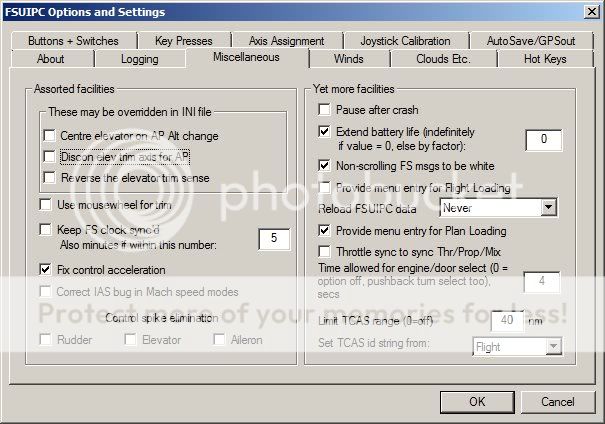
If you have a registered version of FSUIPC, try this...


wrote on Mar 27th, 2012 at 2:56am:
We'll I've finally come across the solution for the sensitive pitch! You must have a registered version of FSUIPC. Check 'Fix control acceleration' and all will be good.  Now I have to re-learn my hand flying!


Title: Re: Buttons move too fast.
Post by Manok on Jun 18th, 2012 at 2:42am
Sorry if I wasn't too clear, it is a bad habit, but I am talking about things like the baro knob, and the communication knobs etc, does that make it clearer?

Title: Re: Buttons move too fast.
Post by LOU on Jun 18th, 2012 at 6:30pm
Use short clicks.

If you hold the mouse button on a knob for anything longer than a second or so,
it will begin to move faster so you can make a larger changes.

If you wish to make small changes just use quick taps on the mouse button.

This goes for trim, autopilot pitch, frequency changes etc.

Lou

Title: Re: Buttons move too fast.
Post by Markoz on Jun 19th, 2012 at 2:50am

LOU wrote on Jun 18th, 2012 at 6:30pm:
Use short clicks.

If you hold the mouse button on a knob for anything longer than a second or so,
it will begin to move faster so you can make a larger changes.

If you wish to make small changes just use quick taps on the mouse button.

This goes for trim, autopilot pitch, frequency changes etc.

Lou

That's exactly how I do it. It works perfectly fine for me too. ;)

Title: Re: Buttons move too fast.
Post by AirCanadaGuy on Jun 19th, 2012 at 1:33pm
Same in most of the CS planes, I mean it's handy for a heading change from 330 to 190... for example...

CAPTAIN SIM FORUM » Powered by YaBB 2.6.0!
YaBB Forum Software © 2000-2025. All Rights Reserved.