| CAPTAIN SIM FORUM | |
|
767 Captain (FSX) >> 767 Captain (FSX) >> 767 issues!
https://www.captainsim.org/forum/csf.pl?num=1337364510 Message started by GregM on May 18th, 2012 at 6:08pm |
|
|
Title: 767 issues! Post by GregM on May 18th, 2012 at 6:08pm
I am new to CS products. I bought the CS 767-300 base pack but am having some issues that I just don't seem to be able to solve. I installed the aircraft in FSX.
When I load the 767 all the panels are blank (Black) and the windows are open. I have tried closing the windows but all I hear is the window sliding shut but it remains open. I was able to start the aircraft but the panels are stick dark. I Aligned the IRS but the panel and window issues still remain - Could I have any help please. Any help would be appreciated! Thanks in advance! Greg |
|
Title: Re: 767 issues! Post by AirCanadaGuy on May 18th, 2012 at 10:17pm
Usually loading a default aircraft like the C 172 before will allow the CS products to start up properly. Try doing that then loading the 767.
Reinstall the CS 767 if that doesn't work. ;) |
|
Title: Re: 767 issues! Post by GregM on May 19th, 2012 at 6:10pm
I normally load the UltaTrike first always and then connect to VATSIM and then I choose my aircraft of choice and it still loads up with windows open and panel black!
I am busy with a long haul at the moment but will try and uninstall and re-insatll it later and report back! Thanks for the reply! Greg |
|
Title: Re: 767 issues! Post by GregM on May 21st, 2012 at 4:33am
I have just uninstalled this AC and reinstalled it and I am still having the same issue!
There has to be a simple solution to this. It is a direct installation from CS site! Greg |
|
Title: Re: 767 issues! Post by Markoz on May 21st, 2012 at 7:07am
To get it installed and working, try the following:
1) Install it using the Right Mouse Click > Select "Run as administrator" (Vista/Win7 users), select Repair from the options (Repair or Remove are the options). 2) Turn of your Anti Virus software (especially if you are using the latest version of Avast free, it will not allow the file to install/uninstall correctly) it might be preventing you from installing it correctly. If doing the above doesn't work and you are still having problems, try the following 1) Do an OFFLINE activation (the installer guides you through it, so it's easy to do) 2) Do the FULL uninstall as described the KB #685 (this is the last ditch effort to get it installed correctly and requires removing the CS767 entry in the Windows Registry) Mark |
|
Title: Re: 767 issues! Post by GregM on May 22nd, 2012 at 3:16pm
Wow Mark - That was a mouthful for a "Not so savvy" PC operator!!
I will try your suggestions - Hope I get it right! :) Thanks! I will try it later today and report back! Greg |
|
Title: Re: 767 issues! Post by Markoz on May 22nd, 2012 at 5:08pm
Sorry Greg. I did not know you were a "not so savvy" PC operator. :(
Just let me know if you need a more detailed set of instructions. ;) |
|
Title: Re: 767 issues! Post by GregM on May 22nd, 2012 at 5:27pm
Mark, a layman's instructions would be nice - Thanks for your time!
Greg |
|
Title: Re: 767 issues! Post by GregM on May 22nd, 2012 at 10:00pm
I have done (with help from some PC savvy guys) as you suggested and I get the same problem with black panels and open windows.
I just spoke to someone on my VA I belong to about this issue and he helped me. But I am still getting the same results! The person I spoke to has just purchased the CS767 that I am having problems with and his is working fine! So I am out of ideas!! -- CS767 does not like my computer :'( Greg GregM wrote on May 22nd, 2012 at 3:16pm:
|
|
Title: Re: 767 issues! Post by Markoz on May 23rd, 2012 at 3:31am GregM wrote on May 22nd, 2012 at 10:00pm:
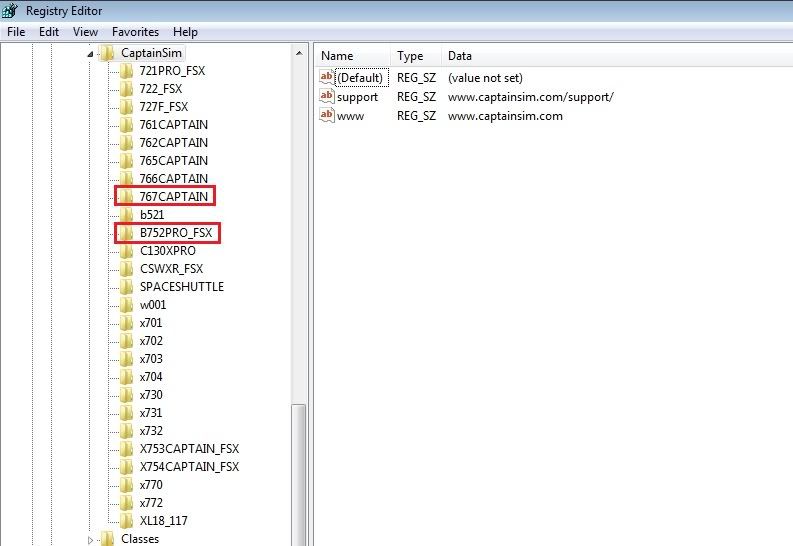
1) Uninstall the Captain Sim 767 (Start > Control Panel > Programs and Features (Add/Remove Programs for WinXP) > click on 767 Captain (767-300 Base Pack) to uninstall. 2) Go to [FSX]\Captain_Sim and make sure that the 767 folder is not there (delete it if it is). 3) Go to [FSX]\SimObjects\Airplanes and make sure that the CS_B767-300 folder is not there (it will still be there if you added any Variants), I recommend that you delete the CS_B767-300 folder if it is there. 4a) Vista/Win7 - Start > type regedit in the search field > Right click on regedit and select "run as administrator" 4b) WinXP Open the run command (*Windows Key+R) > type regedit and then click OK 5) Once Windows registry is running, in the left pane, select HKey Local Machine > Software > Wow6432Node (for 64bit OS otherwise skip this one) > Captain Sim find the 767Captain (folder) entry (see image below), select it then delete it (click on yes when asked if you are sure you want to delete it). You have completed the full uninstall of the 767-300 Base Pack. If using Vista/Win7, right click on the installer csx767_1500.exe and select "run as administrator" (for WinXP just double click on the installer). You will need to activate the 767 Captain again because you deleted the registry entry, so do that. Once the installation is completed, start FSX and see if the 767 is working correctly. *Windows Key. This is the key between the ALT and CTRL keys (bottom left side of the keyboard) with the Flying Windows logo on it. Here is an image of what you will see in the Windows registry: This image shows the Captain Sim entries in Windows Registry - notice that the 767 Captain (and 757 Captain) is highlighted. Hope this gets you through the complete uninstall process so that the 767 will (hopefully) work correctly after reinstalling and reactivating it. Mark |
|
Title: Re: 767 issues! Post by GregM on May 23rd, 2012 at 4:13am
I have just completed exactly "Step by Step" all that you wrote. Uninstalling the aircraft completely and going into the registry and deleting folders and files you mentioned.
I then re-installed the 767-300 as you suggested with right clicking and running the "Run as administrator" for Win7 -- I activated the 767 again and -------------------- Same problem! Have the same black panel and windows open! So, that didn't solve the problem. I even got another exe file from the friend that has the AC and used that but got the same problem. His works, mine does not! This is really getting frustrating - Not sure what to do!! Greg |
|
Title: Re: 767 issues! Post by Markoz on May 23rd, 2012 at 5:04am
Start > Enter %APPDATA%\Microsoft\FSX\DLL.XML in the search field > click on the resulting file to open it.
See if the following entries are in there: <Launch.Addon> <Name>Captain Sim 767 Menu</Name> <Disabled>False</Disabled> <Path>Captain_Sim\Captain_Sim.b767.menu.dll</Path> </Launch.Addon> <Launch.Addon> <Name>Captain Sim 767 Sound</Name> <Disabled>False</Disabled> <Path>Captain_Sim\767\cs.sound.dll</Path> </Launch.Addon> If they are not listed, add them manually. Copy the lines above. Scroll to the bottom of the DLL.xml file. Paste them directly above the line reads: </SimBase.Document>. The bottom of the DLL.xml file should then look like this: <Launch.Addon> <Name>Captain Sim 767 Menu</Name> <Disabled>False</Disabled> <Path>Captain_Sim\Captain_Sim.b767.menu.dll</Path> </Launch.Addon> <Launch.Addon> <Name>Captain Sim 767 Sound</Name> <Disabled>False</Disabled> <Path>Captain_Sim\767\cs.sound.dll</Path> </Launch.Addon> </SimBase.Document> save it. Mark |
|
Title: Re: 767 issues! Post by GregM on May 23rd, 2012 at 1:51pm
When I type that it the search box and try and open the file(s) it opens in Internet Explorer --- Which isn't even my default browser. Why would it open up in a browser?
Not sure what I should do there! Greg |
|
Title: Re: 767 issues! Post by GregM on May 24th, 2012 at 12:54am
This is what comes up in Internet Explorer, but I am not able to modify anything! ---- But from what I can see at the bottom, the info you wanted me to see if it was there, is there!
Greg <?xml version="1.0" encoding="Windows-1252" ?> - <SimBase.Document Type="Launch" version="1,0"> <Descr>Launch</Descr> <Filename>dll.xml</Filename> <Disabled>False</Disabled> <Launch.ManualLoad>False</Launch.ManualLoad> - <Launch.Addon> <Name>Addon Manager</Name> <Disabled>False</Disabled> <ManualLoad>False</ManualLoad> <Path>bglmanx.dll</Path> </Launch.Addon> - <Launch.Addon> <Name>FsPassengersX</Name> <Disabled>False</Disabled> <Path>FsPassengers\bin\fspassengersx.dll</Path> </Launch.Addon> - <Launch.Addon> <Name>Object Placement Tool</Name> <Disabled>True</Disabled> <ManualLoad>False</ManualLoad> <Path>..\Microsoft Flight Simulator X SDK\SDK\Mission Creation Kit\object_placement.dll</Path> </Launch.Addon> - <Launch.Addon> <Name>Traffic Toolbox</Name> <Disabled>True</Disabled> <ManualLoad>False</ManualLoad> <Path>..\Microsoft Flight Simulator X SDK\SDK\Environment Kit\Traffic Toolbox SDK\traffictoolbox.dll</Path> </Launch.Addon> - <Launch.Addon> <Name>Visual Effects Tool</Name> <Disabled>True</Disabled> <ManualLoad>False</ManualLoad> <Path>..\Microsoft Flight Simulator X SDK\SDK\Environment Kit\Special Effects SDK\visualfxtool.dll</Path> </Launch.Addon> - <Launch.Addon> <Name>another company HUD interface</Name> <Disabled>False</Disabled> <Path>another company\DLLs\another company_HUD_interface.dll</Path> <DllStartName>module_init</DllStartName> <DllStopName>module_deinit</DllStopName> </Launch.Addon> - <Launch.Addon> <Name>FSUIPC 4</Name> <Disabled>False</Disabled> <Path>Modules\FSUIPC4.dll</Path> </Launch.Addon> - <Launch.Addon> <Name>FSCopilot</Name> <Disabled>False</Disabled> <Path>Modules\FSCopilot.dll</Path> </Launch.Addon> - <Launch.Addon> <Name>another company Options</Name> <Disabled>False</Disabled> <Path>another company\DLLs\PMDGOptions.dll</Path> </Launch.Addon> - <Launch.Addon> <Name>another company Events</Name> <Disabled>False</Disabled> <Path>another company\DLLs\PMDGEvents.dll</Path> </Launch.Addon> - <Launch.Addon> <Name>another company Sounds</Name> <Disabled>False</Disabled> <Path>another company\DLLs\PMDGSounds.dll</Path> </Launch.Addon> - <Launch.Addon> <Name>GPS Module</Name> <Disabled>False</Disabled> <ManualLoad>False</ManualLoad> <Path>Modules\GPSModule.dll</Path> <DllStartName>module_init</DllStartName> <DllStopName>module_deinit</DllStopName> </Launch.Addon> + <Launch.Addon> <Name>Captain Sim 767 Menu</Name> <Disabled>False</Disabled> <Path>Captain_Sim\Captain_Sim.b767.menu.dll</Path> </Launch.Addon> - <Launch.Addon> <Name>Captain Sim 767 Sound</Name> <Disabled>False</Disabled> <Path>Captain_Sim\767\cs.sound.dll</Path> </Launch.Addon> </SimBase.Document> |
|
Title: Re: 767 issues! Post by Markoz on May 24th, 2012 at 4:50am
Hi Greg.
The info is there, so you don't need to change anything. I have got .CFG file extensions to open with Notepad. I forgot about that. :( If you enter this: %APPDATA%\Microsoft\FSX in the Search Bar, instead, it will show the C:\Users\<USERNAME>\AppData\Roaming\FSX folder, just click on it to open it and all the files are there for you to access. I wonder if FsPassengersX is causing a problem? I doubt that the PxDG items are because I have them too (although my entries are below the CaptainSim entries). I don't have FsPassengersX. Mark |
|
Title: Re: 767 issues! Post by GregM on May 27th, 2012 at 1:11am
So basically it is down to a guessing game? :-/
Why do CS make products that become so difficult to use! Surely a CS product has been tested before released! Can't understand it. I guess I am screwed with CS767 and just put it down as a lost cause and a waste of money! Thanks for your attempted help! -- Much appreciated! Greg |
|
Title: Re: 767 issues! Post by Markoz on May 27th, 2012 at 3:40am
Hi Greg.
I don't know what to say. I have never had this problem with the 767, or any other Captain Sim product for that matter, at all. I just install them and they work like they should. :-/ Is FSX installed in the default location [i](C:\Program Files\Microsoft Games\Microsoft Flight simulator X or C:\Program Files (x86)\Microsoft Games\Microsoft Flight simulator X)? It could be possible that the problem is because of that. But that doesn't ,mean it is. I have never had FSX installed in the default location, not even when my OS was WinXP. FSX is installed on a separate HDD, well away from the default location. Mark |
|
Title: Re: 767 issues! Post by GregM on May 27th, 2012 at 4:18am
Mine is just installed in C:\FSX
Greg |
|
Title: Re: 767 issues! Post by Markoz on May 27th, 2012 at 7:18am
So it should be okay there.
The only thing that may or may not help, is to move those two 767 entries in the DLL.xml file further up the list. Like this: <?xml version="1.0" encoding="Windows-1252" ?> <SimBase.Document Type="Launch" version="1,0"> <Descr>Launch</Descr> <Filename>dll.xml</Filename> <Disabled>False</Disabled> <Launch.ManualLoad>False</Launch.ManualLoad> <Launch.Addon> <Name>Addon Manager</Name> <Disabled>False</Disabled> <ManualLoad>False</ManualLoad> <Path>bglmanx.dll</Path> </Launch.Addon> <Launch.Addon> <Name>FsPassengersX</Name> <Disabled>False</Disabled> <Path>FsPassengers\bin\fspassengersx.dll</Path> </Launch.Addon> <Launch.Addon> <Name>Object Placement Tool</Name> <Disabled>True</Disabled> <ManualLoad>False</ManualLoad> <Path>..\Microsoft Flight Simulator X SDK\SDK\Mission Creation Kit\object_placement.dll</Path> </Launch.Addon> <Launch.Addon> <Name>Traffic Toolbox</Name> <Disabled>True</Disabled> <ManualLoad>False</ManualLoad> <Path>..\Microsoft Flight Simulator X SDK\SDK\Environment Kit\Traffic Toolbox SDK\traffictoolbox.dll</Path> </Launch.Addon> <Launch.Addon> <Name>Visual Effects Tool</Name> <Disabled>True</Disabled> <ManualLoad>False</ManualLoad> <Path>..\Microsoft Flight Simulator X SDK\SDK\Environment Kit\Special Effects SDK\visualfxtool.dll</Path> </Launch.Addon> <Launch.Addon> <Name>Captain Sim 767 Menu</Name> <Disabled>False</Disabled> <Path>Captain_Sim\Captain_Sim.b767.menu.dll</Path> </Launch.Addon> <Launch.Addon> <Name>Captain Sim 767 Sound</Name> <Disabled>False</Disabled> <Path>Captain_Sim\767\cs.sound.dll</Path> </Launch.Addon> <Launch.Addon> <Name>other HUD interface</Name> <Disabled>False</Disabled> <Path>other\DLLs\other_HUD_interface.dll</Path> <DllStartName>module_init</DllStartName> <DllStopName>module_deinit</DllStopName> </Launch.Addon> <Launch.Addon> <Name>FSUIPC 4</Name> <Disabled>False</Disabled> <Path>Modules\FSUIPC4.dll</Path> </Launch.Addon> <Launch.Addon> <Name>FSCopilot</Name> <Disabled>False</Disabled> <Path>Modules\FSCopilot.dll</Path> </Launch.Addon> <Launch.Addon> <Name>other Options</Name> <Disabled>False</Disabled> <Path>other\DLLs\PMDGOptions.dll</Path> </Launch.Addon> <Launch.Addon> <Name>other Events</Name> <Disabled>False</Disabled> <Path>other\DLLs\PMDGEvents.dll</Path> </Launch.Addon> <Launch.Addon> <Name>other Sounds</Name> <Disabled>False</Disabled> <Path>other\DLLs\PMDGSounds.dll</Path> </Launch.Addon> <Launch.Addon> <Name>GPS Module</Name> <Disabled>False</Disabled> <ManualLoad>False</ManualLoad> <Path>Modules\GPSModule.dll</Path> <DllStartName>module_init</DllStartName> <DllStopName>module_deinit</DllStopName> </Launch.Addon> </SimBase.Document> Start > Search Bar > %APPDATA%\Microsoft\FSX - Open the DLL.xml file with Notepad, highlight the Captain Sim 767 entries, <Launch.Addon> <Name>Captain Sim 767 Menu</Name> <Disabled>False</Disabled> <Path>Captain_Sim\Captain_Sim.b767.menu.dll</Path> </Launch.Addon> <Launch.Addon> <Name>Captain Sim 767 Sound</Name> <Disabled>False</Disabled> <Path>Captain_Sim\767\cs.sound.dll</Path> </Launch.Addon> and move them up above <Launch.Addon> <Name>other HUD interface</Name> <Disabled>False</Disabled> <Path>other\DLLs\other_HUD_interface.dll</Path> <DllStartName>module_init</DllStartName> <DllStopName>module_deinit</DllStopName> </Launch.Addon> I now what the "other" is, it is just the forum protection renaming it as other. ;) It might just be that something higher up the list prevents the 767 entries from working correctly. By putting the 767 entries ahead of the, it might stop them from causing any problems. I'm running out of options that can help. So I feel like I am grasping at straw here, but I have to try. :( Mark |
|
Title: Re: 767 issues! Post by GregM on May 30th, 2012 at 6:14pm
Now I am speaking about not much I know here ::)
But sometimes in the past when I used to install a "freeware" aircraft I was told to sometimes move "panel" and "effect" or was it "texture" files from one location to another and then I would see them. Could this not be the case here? That the "Panel" and other folders are not where they are meant to be? Greg |
|
Title: Re: 767 issues! Post by Markoz on May 31st, 2012 at 2:57am
Hi Greg.
It's always a possibility that it did not install correctly and so the location of the files is wrong. :-/ Download this tool from Flight1 - FSX/FS9 Registry Repair Tool - and run it. After you have done that, reinstall the 767-300 (using "Run as administrator"). Another thing. Are you running FSX "as an administrator"? It's worth a try. Right click on the FSX shortcut and select "Run as administrator". Mark |
|
Title: Re: 767 issues! Post by reza on May 31st, 2012 at 11:23pm
hi,
I also had the same problem, but I got it solved. do but step by step. this way solves your problem. 1. go to your cpmputer and uninstall the complete game in your computer. 2. go to websit of capitansim and login. 3. go to your profile and to the products that you purchased. 4. klick on 767 Captain (767-300 Base Pack). 5. in the down left klick on the Extended Download Service. 6.Click this button if you wish to receive new download links: Extended Download Service (EDS) and press get new links. download it and install the game again. this way definitely fix your problem. to let us know if you succeeded. thank you Reza |
|
Title: Re: 767 issues! Post by GregM on Jun 2nd, 2012 at 3:42pm
Sorry for no replies. I haven't tried both your (Mark and Reza's) ideas yet. Will get around to it later today and report back!
Thanks for the help guys! Much appreciated And Mark, yes I have tried "Run as administrator" but still no luck there! Greg |
|
Title: Re: 767 issues! Post by Markoz on Jun 2nd, 2012 at 5:15pm
I think that reza is right in saying you should download the 767 installer again. I thought I had already suggested it, but I obviously haven't. My bad. :(
So if that works, reza gets the pat on the back! ;) Mark |
|
Title: Re: 767 issues! Post by reza on Jun 2nd, 2012 at 11:37pm
this work 100%. only you must do steb by step , wat i sayed.
|
|
Title: Re: 767 issues! Post by reza on Jun 2nd, 2012 at 11:43pm
you must go to the Extended Download Service.
this is different than normal link. !!!!!!!!!!!!!!!!!!!!!!!! important !!!!!!!!!!!!!!!!!!!!!!!!!! !!!!!!!!!!!! Extended Download Service.!!!!!!!!!!! and klick on ((((( get new links)))))) and install de game let us know plz |
|
Title: Re: 767 issues! Post by GregM on Jun 3rd, 2012 at 2:09am
The file that I downloaded from the Extended Download Service, is the same name and same file size as I what I originally got!
Greg |
|
Title: Re: 767 issues! Post by GregM on Jun 3rd, 2012 at 2:43am
I did everything you suggested step by step ------ BUT... still have the same problems as before.. :-/
So I am really stumped! Greg reza wrote on May 31st, 2012 at 11:23pm:
|
|
Title: Re: 767 issues! Post by Markoz on Jun 3rd, 2012 at 3:22am
Something must be interfering with the install. I just don't know what is though. :(
|
|
Title: Re: 767 issues! Post by GregM on Jun 3rd, 2012 at 4:24am
Ok... I was chatting with one of the guys on the VA I belong to (United) and he basically went through all that you said when uninstalling the CS767 and then reinstalling! We deleted all files belonging to CS767 (as it is the only CS product I own).
Anyway, I was then looking at the program ACE which has tabs on the top Fleet - Preflight and Tools. I then noticed to the left it says in red "DEMO MODE" Activate Product. So, after speaking to one of the pilots that does own this aircraft, he said that when he tried the aircraft before buying it (demo) it also had a blank panel and open windows. So just logic tells me I am installing a DEMO version of the aircraft. My question is firstly WHY do I have a DEMO version when I bought the aircraft? Thanks in advance and hopefully this sheds some light on the problem! Greg |
|
Title: Re: 767 issues! Post by reza on Jun 3rd, 2012 at 11:30am
ok. Dont unistall de game. just install it again on step 5. I had a same problem
|
|
Title: Re: 767 issues! Post by GregM on Jun 3rd, 2012 at 4:39pm
I have downloaded the aircraft as in "Step 5" three times now ::)
|
|
Title: Re: 767 issues! Post by GregM on Jun 4th, 2012 at 12:09am
Ok, I have just done what you suggested and I still have the same old problem. Blank panels and opened windows -- And in ACE program I still have DEMO!!!
What is making me mad is that I purchased this AC and I only have this forum to speak about it. It seems as if I have a DEMO version only as others who have used the DEMO before flying had the same issues in the DEMO!!! --- So, if I purchased it and have a DEMO version, who do I contact to get the real AC that I purchased! I mean, I have the activation password and everything. All the files I have downloaded from my profile are the same as the one I was sent via e-mail originally. Same file and same size! csx767_1500 and the file size is 71MB in size once downloaded! Greg reza wrote on Jun 3rd, 2012 at 11:30am:
|
|
Title: Re: 767 issues! Post by Markoz on Jun 4th, 2012 at 2:35am
The demo mode in ACE can be fixed by downloading a new ACE_767.exe. To get it, check-in to Your Profile > Product > Customer Support > Search KB or Submit New Ticket and search for KB #4662. There is a link to the updated ACE_767.exe.
|
|
Title: Re: 767 issues! Post by GregM on Jun 4th, 2012 at 5:07pm
Now is the ACE_767.exe the file that will install the CS767 on FSX and fix my blank panel and open window issue?
Greg |
|
Title: Re: 767 issues! Post by Markoz on Jun 4th, 2012 at 6:31pm GregM wrote on Jun 4th, 2012 at 5:07pm:
I doubt it. They are probably too different issues. What version are you using? As far as I can remember, the ACE displaying that people were in "DEMO mode", was a problem with v1.4 and not with version 1.5. Did you ever try the 767 demo? |
|
Title: Re: 767 issues! Post by GregM on Jun 4th, 2012 at 8:27pm Markoz wrote on Jun 4th, 2012 at 6:31pm:
Nope, never had the 767 demo - Once I bought the CS767, I was emailed a link where I could download the CS767 exe file which I did and have had problems ever since :-[ So what am I to do with that ACE_767.exe file? Greg |
|
Title: Re: 767 issues! Post by GregM on Jun 4th, 2012 at 8:34pm
After installing the ACE_767 file it still shows up as DEMO! :-/
I am really getting totally confused and may I add a tad frustrated. Not with you Mark as you have really tried your best to help! -- It just annoys me that a simple aircraft BOUGHT should cause all these problems. If this continues to happen I will never touch a CS product again and still with my trusty P*M*D*G* products as they NEVER give me problems. simply download, install and fly! This really is getting out of hand! Sorry if I sound mad, I am but just more frustrated!!! Greg |
|
Title: Re: 767 issues! Post by Eric.M on Jun 4th, 2012 at 8:44pm
hey Mark, just making an observation here but shouldn't the file name start with csp76x_15xx? Greg which product did you purchase?
|
|
Title: Re: 767 issues! Post by Captain Sim 2 on Jun 4th, 2012 at 9:50pm GregM wrote on Jun 4th, 2012 at 12:09am:
Please check-in to Your Profile and use Customer Support > giving all details of the problem |
|
Title: Re: 767 issues! Post by GregM on Jun 5th, 2012 at 4:02am Eric.M wrote on Jun 4th, 2012 at 8:44pm:
Not sure what you mean by which product did I buy!! This is the CSX767 section. I bought the 767 Captain (767-300 Base Pack) 8-) Greg |
|
Title: Re: 767 issues! Post by GregM on Jun 5th, 2012 at 4:03am Captain Sim 2 wrote on Jun 4th, 2012 at 9:50pm:
I have tried that but don't get any satisfactory results for the problems I am having! |
|
Title: Re: 767 issues! Post by Eric.M on Jun 5th, 2012 at 6:20am GregM wrote on Jun 5th, 2012 at 4:02am:
Ok just wanted to be sure thats the one you purchased, it may be different for some but i thought the base packs started with the csp761_1500.exe or something to that nature. |
|
Title: Re: 767 issues! Post by Markoz on Jun 5th, 2012 at 6:31am
The file you need to be using to install the 767-300 Base Pack is named csx767_1500.exe!
If you bought the Boxed version from Aeosoft, or a download version from one of the other online stores, you are able to check in to your profile an download the latest version. I would have thought that they all would already be up to date, except for AS and their boxed product (old stock). So please make sure that is the one you are tying to install version 1.5 (csx767_1500.exe). I haven't heard of anyone having the demo mode problem with the 767-300 Base Pack v1.5. Mark |
|
Title: Re: 767 issues! Post by GregM on Jun 5th, 2012 at 7:05pm Markoz wrote on Jun 5th, 2012 at 6:31am:
Yes, I have the exe file called csx767_1500.exe -- Other than the email I received with a link to download this aircraft file, I have also downloaded it a few times now as suggested. It is definitely the same exe program but for some reason it seems like I am getting a DEMO version and not the FULL version that I should have! -- As said, others that have downloaded the DEMO version had the same issues of blank panel and windows open. Mine is suppose to be the FULL edition so it should work as a FULL version and NOT as a DEMO version!!!! As I have said before in other posts, I even got the exe file from someone else who had bought this product (and he isn't having issues) and tried his file with the same results! This has nothing to do with my computer or anything like that - I have had many tell me this (who are computer Flight Sim Geeks) so what is wrong with this product that I have a DEMO version or that is what it seems????? Greg |
|
Title: Re: 767 issues! Post by Markoz on Jun 5th, 2012 at 7:40pm Quote:
A simple question. Have you installed SP2 for FSX, or Acceleration (with SP2)? If not, install whichever one of those you have. Two things that are worth trying: 1) Reinstall SP1 and SP2 (or Acceleration) for FSX. See if the 767 is working after you have done that. If it isn't... 2) Repair FSX by putting the DVD in the drive and let it continue as if you were going to install FSX. When given the option to Repair or Remove FSX, select Repair. After you have done repaired FSX, reinstall SP1 and SP2 (or Acceleration). Again, see if the 767 is working after you have done that. Mark |
|
Title: Re: 767 issues! Post by Markoz on Jun 6th, 2012 at 2:58am
Hi Greg.
A final attempt if you are willing to try it (though I understand if you don't). Open the DLL.xml file and delete the 767 entries. These ones: <Launch.Addon> <Name>Captain Sim 767 Menu</Name> <Disabled>False</Disabled> <Path>Captain_Sim\Captain_Sim.b767.menu.dll</Path> </Launch.Addon> <Launch.Addon> <Name>Captain Sim 767 Sound</Name> <Disabled>False</Disabled> <Path>Captain_Sim\767\cs.sound.dll</Path> </Launch.Addon> Start FSX, say yes to trust them. Try the 767 and if it is working or not. If not, then I guess it is just not going to work on you system, no matter what we try to do. :( At least you can say you tried very hard to get it working. So after all that we have tried, I understand how you feel. I am at a loss as to why it refuses to work for you. I have seen these kinds of issues in all the other 3rd party addon forums that I am a member of, yours just happens to be with the Captain Sim 767. I'm sure it's a conflict between the CS767 and some other addon, but we can't seem pin it down to which one. My advice is to follow the last part of KB #685 and request a refund. I'm sure you will get one seeing as the 767 has never worked for you. Quote:
Sorry that it turned out this way for you. Mark |
|
Title: Re: 767 issues! Post by Willz on Jul 13th, 2012 at 7:24am
Hi I am new to CS products and bought both the 777 (V0.5) and the 767 (this cost me about $100) and both of these products dont work I have the same problem with blank panels and open windows, also the ASE comes up with Demo mode please activate. With the 777 there is no landing gear and the controls are locked which I understand to be a measure to prevent illegal download. I am really pretty angry because these AC are no use to me and cannot get a refund because I activated them. Can anyone help??
Will |
|
Title: Re: 767 issues! Post by Markoz on Jul 14th, 2012 at 3:44am Willz wrote on Jul 13th, 2012 at 7:24am:
Sounds like the activation failed. Do as instructed in KB #685 should fix these. Along with following KB #685, I recommend you re-download both installers (in case they are corrupt) and possibly do an Offline Activation (just follow the instruction when selecting it). That should get them working. My ASE was never affected by the CS767. I am now using AS2012 (which I got before the release of the CS777-200 v0.2) so I can't say if the 777 has an effect on ASE. |
|
Title: Re: 767 issues! Post by Eric.M on Jul 14th, 2012 at 9:56am Quote:
i think he means ACE not ASE ;) 8-) |
|
Title: Re: 767 issues! Post by Markoz on Jul 14th, 2012 at 4:57pm Eric.M wrote on Jul 14th, 2012 at 9:56am:
God call Eric!! After re-reading his post I'm sure you are right. :-[ Quote:
Check-in to Your Profile > Product > Customer Support > Search KB or Submit New Ticket. Search for KB #4662 (without the #) and get a new ACE_767.exe from the link in the KB. ;) |
|
Title: Re: 767 issues! Post by Cappy on Jul 21st, 2012 at 7:04am
It's the Demo ACE that causes this problem.
I've had it several times after re-installations. It always manifests itself this way, sometimes only certain gauges are blacked out. The way to fix it is completely uninstall the 767 and ACE including cleaning the registry (manually) then installing the new 767 and ACE as admin It is very frustrating when it happens. CS need to wipe that faulty ACE from their servers, it still gets downloaded from time to time for some reason. Otherwise it's pirates trying to get a freebie. I would also suggest the latest video drivers when graphics problems appear. |
|
Title: Re: 767 issues! Post by CoolP on Jul 21st, 2012 at 8:04pm
I think that ACE bug with the persistent demo mode was fixed as the 767 1.5 came out. Not? I only saw it once with 1.4.
|
|
Title: Re: 767 issues! Post by GregM on Mar 12th, 2013 at 11:52pm
It's me again ;D
I wanted to try and reinstall the CS767 -- Firstly I forgot my "Order Number" and since I purchased this product I have changed email servers and so my email address has changed. How do I go about changing my email so I can have my Order Number changed? Thanks in advance, GregM |
|
Title: Re: 767 issues! Post by GregM on Mar 13th, 2013 at 7:09pm
I am extremely happy to announce that I have eventually got the CS767 to install correctly on my system. ;D
Don't ask me how as I installed it exactly the same as I tried on previous attempts. The Panel is now alive and the windows open and close perfectly! Thanks all for patience, GregM |
|
Title: Re: 767 issues! Post by Cappy on Mar 27th, 2013 at 6:29am
Good news Greg !
After all you've been through... Have fun with it. PS. The first thing I did after I installed the 767 was to get the TSS 767 (GE) soundset. It changes the bird dramatically and all for the better. ;) |
|
CAPTAIN SIM FORUM » Powered by YaBB 2.6.0! YaBB Forum Software © 2000-2026. All Rights Reserved. |