CAPTAIN SIM FORUM
727 Captain >> 727 Captain >> V-One Takeoff and Landing Gauge w/Sounds (Updated)
https://www.captainsim.org/forum/csf.pl?num=1335753141

Message started by fsxpaul on Apr 30th, 2012 at 2:32am

Title: V-One Takeoff and Landing Gauge w/Sounds (Updated)
Post by fsxpaul on Apr 30th, 2012 at 2:32am
I've updated this XML gauge for the CS 727-100/F and -200/F. Now includes LB / KG and °C / °F display.

Now in the Avsim library, search for:
V-One Gauge for B727-100/F 727-200/F with Call-Outs

The sounds:
  • 80 knots
  • V1
  • VR
  • V2
  • Gear Up
  • Flaps Up
  • Slats Retract
  • Trim Wheel Sound

The gauge will calculate the correct v-speeds for gross weight using flaps 5, 15 & 25 including the required trim units.
The v-speeds are also adjusted for altitude and temperature.
Optimum FL and EPR are displayed based on current gross weight and are continually updated.
Clean speed (no flaps) is calculated as is Vref30 and Vref40.
Fuel, Gross Weight, OAT (°C or °F) and CG are displayed.
If the current gross weight has exceeded the max gross weight a 'red' warning of overloading is displayed.
Elapsed flight time and fuel used can be reset at anytime by clicking on their displays.

The main gauge is a text display of:
  • Vertical Speed
  • Pitch
  • EPR
  • N1%
  • Fuel Flow
  • TAS
  • TAT
  • MCT (Maximum Continuous Thrust)

    After flap selection, the following will display:
  • Flaps selected
  • Required Trim/Current Trim
  • Vr & V2

Note: EPR, N1% and FF are for Engine 2 only.

Both the main gauge and datacard can be toggled off and on via an icon.


Title: Re: V-One Takeoff and Landing Gauge with Sounds
Post by Rosario Manzo on Apr 30th, 2012 at 7:22am
Wow, that's a very nice addition. I will try it asap.

Title: Re: V-One Takeoff and Landing Gauge with Sounds
Post by Mric29 on Apr 30th, 2012 at 8:02am
:D Very, very good job Fsxpaul !

It works perfectly, congratulations... Thank you.

Do you prepare the same gauge for boeing 707?  ::)

Title: Re: V-One Takeoff and Landing Gauge with Sounds
Post by fsxpaul on May 2nd, 2012 at 1:25am

Mric29 wrote on Apr 30th, 2012 at 8:02am:
:D Very, very good job Fsxpaul !

It works perfectly, congratulations... Thank you.

Do you prepare the same gauge for boeing 707?  ::)


Thanks!

I have started on the 707 but haven't finished quite yet. I'm currently working on the 737 (which I'm just about finished with)  ;)

Title: Re: V-One Takeoff and Landing Gauge with Sounds
Post by Mric29 on May 2nd, 2012 at 9:25am
Does your V-One gauge work for CS727-200?

Title: Re: V-One Takeoff and Landing Gauge with Sounds
Post by fsxpaul on May 2nd, 2012 at 5:19pm

Mric29 wrote on May 2nd, 2012 at 9:25am:
Does your V-One gauge work for CS727-200?


No it currently does not. The gauge could be altered easy enough though.

I may create a gauge in the future (no guaranties).

Title: Re: V-One Takeoff and Landing Gauge with Sounds
Post by Lee Park on May 23rd, 2012 at 6:12am
Got it, will look forward to the 707 one. I'm currently on a 707 binge so it will be really useful.

Title: Re: V-One Takeoff and Landing Gauge with Sounds
Post by Edwin on May 27th, 2012 at 7:28am
tried it out and really gives an extra dimension to flying!! thank you for this wonderful tool!! :D:D :D

Title: Re: V-One Takeoff and Landing Gauge with Sounds
Post by Lee Park on May 27th, 2012 at 10:07am
Yes a really useful tool and learning aid. It would be great to have one for the 200 as well. Great job.

Title: Re: V-One Takeoff and Landing Gauge with Sounds
Post by CoolP on May 29th, 2012 at 8:48am
Hey, Paul, I've added your great work to the small tweak and mods list we've assembled. Hope you are ok with that.  :) http://www.captainsim.org/yabb2/YaBB.pl?num=1319547655/4#4

Title: Re: V-One Takeoff and Landing Gauge with Sounds
Post by fsxpaul on May 29th, 2012 at 12:55pm

CoolP wrote on May 29th, 2012 at 8:48am:
Hey, Paul, I've added your great work to the small tweak and mods list we've assembled. Hope you are ok with that.  :) http://www.captainsim.org/yabb2/YaBB.pl?num=1319547655/4#4


That sounds great! I'm glad I could contribute to the simming community! Thanks  :)

Title: Re: V-One Takeoff and Landing Gauge with Sounds
Post by Edwin on May 30th, 2012 at 8:01am
Monday i did a small real flight (first attempt was just to see how it works so i started on the runway) and after taxiing from the gate to the runway and taking off the v1 etc stayed on 0.

Did i do anything wrong? When i start my FSX and start on the runway, it works fine.

Title: Re: V-One Takeoff and Landing Gauge with Sounds
Post by fsxpaul on May 30th, 2012 at 12:40pm

Edwin wrote on May 30th, 2012 at 8:01am:
Monday i did a small real flight (first attempt was just to see how it works so i started on the runway) and after taxiing from the gate to the runway and taking off the v1 etc stayed on 0.

Did i do anything wrong? When i start my FSX and start on the runway, it works fine.


Make certain to change your cockpit view to the 2D view once to properly initialize the gauge.
If you’ve added the gauge icons to the 'Simicons' (Shift+1), you can click on ‘v1’ to initialize as well.

Also, the v-speeds will not show any value until you select flaps, 5, 15 or 25. All other flap setting (0, 2, 30 and 40) will display '0'.

Title: Re: V-One Takeoff and Landing Gauge with Sounds
Post by Edwin on May 31st, 2012 at 7:36am
I recall i kept my flaps on 2, so that would have been the case. I will keep an eye on it, thanks :)

Title: Re: V-One Takeoff and Landing Gauge with Sounds
Post by Berlopez on May 31st, 2012 at 8:49am
Paul: In your intruction you indicate that adding the gauge by drag and drop would work just as well; What about the .cfg changes I suppose these would have to be done anyway ?
I just have difficulty keeping up with so many folders open at the same time.

Berlopez

Title: Re: V-One Takeoff and Landing Gauge with Sounds
Post by fsxpaul on May 31st, 2012 at 2:42pm

Berlopez wrote on May 31st, 2012 at 8:49am:
Paul: In your intruction you indicate that adding the gauge by drag and drop would work just as well; What about the .cfg changes I suppose these would have to be done anyway ?
I just have difficulty keeping up with so many folders open at the same time.

Berlopez


There are a four folders to deal with but that's not uncommon for a gauge like this. This manual install method is very typical. Just take your time  ;)

Yes you will still need to modify your aircraft.cfg and panel.cfg files. I strongly recommend you back these up first (always a good rule of thumb)!

Title: Re: V-One Takeoff and Landing Gauge with Sounds
Post by Berlopez on Jun 1st, 2012 at 6:10am
Thanks for your Reply Paul. I managed to install the gauge it showed, the colored numbers and the card and the icon, Unfortunately I seem to have ommitted a change when adding it to one of the panel .cfg files/Or forgot to number something...So I didn't get the sound,as described....Like 80 knts,V1,gearup etc...
I realized this when i began to delete my edits and put the plane back to it's original stage. :-[
I believe my mistake was under the vc cockpit edits?  :D

Title: Re: V-One Takeoff and Landing Gauge with Sounds
Post by fsxpaul on Jun 1st, 2012 at 11:49am

Berlopez wrote on Jun 1st, 2012 at 6:10am:
Thanks for your Reply Paul. I managed to install the gauge it showed, the colored numbers and the card and the icon, Unfortunately I seem to have ommitted a change when adding it to one of the panel .cfg files/Or forgot to number something...So I didn't get the sound,as described....Like 80 knts,V1,gearup etc...
I realized this when i began to delete my edits and put the plane back to it's original stage. :-[
I believe my mistake was under the vc cockpit edits?  :D


Is everthing working but the sounds?
If so, then check your panel.cfg [VCockpit01] section; it should look like below:


[VCockpit01]
other lines here...
gauge35=Captain_Sim.p727.sound!main, 0,0, 10,10, Captain_Sim\727\sound.ini
gauge36=dsd_fsx_xml_sound!Sound,2,2,2,2,\panel\v-one\v-one_Sound.ini
gauge37=dsd_fsx_xml_sound!Debugger, 420,550,600,80

Hope you can get it sorted out soon!  :)

Title: Re: V-One Takeoff and Landing Gauge with Sounds
Post by Berlopez on Jun 1st, 2012 at 3:41pm
Thanks for your reply Paul; I just attempted to reinstall and got the same results...realized I had made a editting mistake and the icon wasn't showing; I fixed that easy enough...Then I tried a flight to test the sounds...
As soon as I the needle hits 80KTS my sim freezes,as I wait a little while to see if it goes to the next step I hear a bell Bung,Bing,Like the error windows makes when something is wrong?
I wil attemp at a later time to c/p the lines you have included in yoour post above to the [VCockpit01] And see if that helps. BTW I have also Mattews alt. call outs which sound on descending...But that shouldn't have anything to do with this?

BTW: How does your machine behave with FSX?; Personally I'm below specs.with a Intel Core 2 Cpu 1.8-1.79 @ 4300 1022 Mb.RAM Nvidia GeForce 7500 LE; Tuned with AlacrityPC I can get FSX to give some descent performance, 18.9 FPS Locked at 20 FPS. via FSX.cfg file.
My [Vcockpit01] Section looks like this Right now after uninstalling everything again:

[VCockpit01]
size_mm=1024,1024
pixel_size=1024,1024
texture=$FPSP
background_color=0,0,0

gauge00=Captain_Sim.p721.general!L_backlight, 25, 230, 200, 20
gauge01=Captain_Sim.p721.L01!L01_machmeter, 24,26, 200,200
gauge02=Captain_Sim.p721.L02!L02_clock, 50, 300, 155, 151
gauge03=Captain_Sim.p721.L03!L03_aplight, 625,749, 55,55
gauge04=Captain_Sim.p721.L04!L04_airspeed, 275, 30, 177, 169
gauge05=Captain_Sim.p721.L05!L05_rmi, 275, 775, 200,200
gauge06=Captain_Sim.p721.L10!L10_altimeter, 275,270, 210,240
gauge07=Captain_Sim.p721.L11!L11_vsi, 20,524, 217,220
gauge08=Captain_Sim.p721.L13!L13_ra, 260,505, 240,240
gauge09=Captain_Sim.p721.L14!L14_ealtimeter, 25, 779, 200, 220
gauge10=Captain_Sim.p721.general!R_backlight, 25, 749, 200, 20
gauge11=Captain_Sim.p721.general!C_backlight, 25, 500, 200, 20
gauge12=Captain_Sim.p721.L07!L07_adi, 505, 29 , 168, 150
gauge13=Captain_Sim.p721.L07!L07_010_slip, 275,225, 200, 47
gauge14=Captain_Sim.p721.L08!L08_hsi, 599, 399, 199, 239
gauge15=Captain_Sim.p721.L09!L09_002_light, 725,649, 133,64
gauge16=Captain_Sim.p721.L09!L09_003_light, 725,724, 133,64
gauge17=Captain_Sim.p721.L09!L09_004_light, 725,799, 133,64
gauge18=Captain_Sim.p721.L09!L09_005_light, 725,874, 133,64
gauge19=Captain_Sim.p721.L09!L09_006_light, 725,949, 80,64
gauge20=Captain_Sim.p721.L09!L09_007_light, 799,949, 80,64
gauge21=Captain_Sim.p721.L09!L09_008_light, 871,649, 136,64
gauge22=Captain_Sim.p721.L09!L09_009_light, 871,724, 136,64
gauge23=Captain_Sim.p721.L09!L09_010_light, 871,799, 136,64
gauge24=Captain_Sim.p721.L09!L09_011_light, 871,874, 136,64
gauge25=Captain_Sim.p721.L09!L09_012_light, 871,949, 136,64
gauge26=Captain_Sim.p721.L09!L09_001_light, 623,924, 92,90
gauge27=Captain_Sim.p721.L15!L15_001_dme,      499,799, 90,30
gauge28=Captain_Sim.p721.L15!L15_002_light, 625,824, 100,45
gauge29=Captain_Sim.p721.L15!L15_003_light, 625,873, 100,45
gauge30=Captain_Sim.p721.L06!L06_001_light, 624,698, 101,46
gauge31=Captain_Sim.p721.L06!L06_002_light, 498,923, 115,81
gauge32=Captain_Sim.p721.L06!L06_003_light, 499,849, 87,57
gauge33=Captain_Sim.p721.L09!L09_013_light, 626,649, 100,45
gauge34=Captain_Sim.p721.L13!L13_001_light, 500,675, 50,50
gauge35=Captain_Sim.p727.sound!main, 0,0, 10,10, Captain_Sim\727\sound.ini
gauge36=CALLOUT_SOUND!dsd_xml_sound3, 0,0,0,0, Sound\CALLOUT\Sound.ini
gauge37=CALLOUT_SmallJets!CALLOUT2500,      0,0,0,0
gauge38=CALLOUT_SmallJets!CALLOUT1000,      0,0,0,0
gauge39=CALLOUT_SmallJets!CALLOUT500,      0,0,0,0
gauge40=CALLOUT_SmallJets!CALLOUT100,      0,0,0,0
gauge41=CALLOUT_SmallJets!CALLOUT50,      0,0,0,0
gauge42=CALLOUT_SmallJets!CALLOUT40,      0,0,0,0
gauge43=CALLOUT_SmallJets!CALLOUT30,      0,0,0,0
gauge44=CALLOUT_SmallJets!CALLOUT20,      0,0,0,0
gauge45=CALLOUT_SmallJets!CALLOUT10,      0,0,0,0
gauge46=CALLOUT_SmallJets!CALLOUTMIN,     0,0,0,0
gauge47=CALLOUT_SmallJets!CALLOUTAPPMIN,  0,0,0,0

I have added the gauges with the next number in sequence...48...49...Yet I get the ding-dong!? And the freeze?


Berlopez

Title: Re: V-One Takeoff and Landing Gauge with Sounds
Post by Berlopez on Jun 1st, 2012 at 6:43pm
just attempted again adding 48,49,50...Still ding-Dong; and the lenght of one of the gauges exceeds the line and makes a new line; If this has anything to do with it. At the spot of when the gauges are supposed to sound, V1, Gear-up,Flaps in, Slat in.All I hear is the ding dong. :-/

Paul I'm sure is me or my system that is causing all this trouble. I don't want you to think I'm grateful for your improvement on the 727,or others.

Berlopez

Title: Re: V-One Takeoff and Landing Gauge with Sounds
Post by fsxpaul on Jun 1st, 2012 at 11:18pm

Berlopez wrote on Jun 1st, 2012 at 6:43pm:
just attempted again adding 48,49,50...Still ding-Dong; and the lenght of one of the gauges exceeds the line and makes a new line; If this has anything to do with it. At the spot of when the gauges are supposed to sound, V1, Gear-up,Flaps in, Slat in.All I hear is the ding dong. :-/

Paul I'm sure is me or my system that is causing all this trouble. I don't want you to think I'm ungrateful for your improvement on the 727,or others.

Berlopez


I suspect your problem is your other sound gauge conflicting with the V-One gauge:

gauge36=CALLOUT_SOUND!dsd_xml_sound3, 0,0,0,0, Sound\CALLOUT\Sound.ini

does not work with

gaugexx=dsd_fsx_xml_sound!Sound,2,2,2,2,\panel\v-one\v-one_Sound.ini

Matthew's sound gauge is using an older version written by Doug Dawson.

I believe I still may have a copy of my first sound.ini file which references dsd_xml_sound3.gau that you're already using. I will look for it.

If you want to fly for now without the V-One sounds, comment out or remove:
gaugexx=dsd_fsx_xml_sound!Sound,2,2,2,2,\panel\v-one\v-one_Sound.ini
gaugexx=dsd_fsx_xml_sound!Debugger, 420,550,600,80

Title: Re: V-One Takeoff and Landing Gauge with Sounds
Post by fsxpaul on Jun 2nd, 2012 at 12:05am

Berlopez wrote on Jun 1st, 2012 at 3:41pm:

I have added the gauges with the next number in sequence...48...49...Yet I get the ding-dong!? And the freeze?
Berlopez


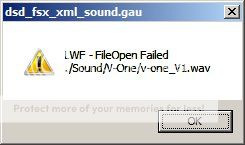
When the freeze happens, is there a small message box that comes up like the one below?
This error will sound the 'ding-dong' you've described for every sound it can't find (.wav)


Title: Re: V-One Takeoff and Landing Gauge with Sounds
Post by Berlopez on Jun 2nd, 2012 at 10:37am
No, When the freeze happens I don't get any message just the freeze...The sound keeps going,as if the sim doesn't notice the freeze ( Strage)? Then when the needle hits 80 KTS the ding comes...Waiting a little longer another one comes,like if correspponding to the gear-up sound?...Then I close it via CRTL+Alt+Del then I notice that down on the task bar there a window dsd_fsx_xml_sound.gau. when I unstall the gauge,ie delete it from everywhere,put in my unedited .cfgs Try to fly I don't freeze...
I added your lines to the [VCockpit01] At the bottom,renumbered them to my next number in sequence...Didn't help?

ie:
...gauge46=CALLOUT_SmallJets!CALLOUTMIN,     0,0,0,0
gauge47=CALLOUT_SmallJets!CALLOUTAPPMIN,  0,0,0,0
gauge48=Captain_Sim.p727.sound!main, 0,0, 10,10, Captain_Sim\727\sound.ini
gauge49=dsd_fsx_xml_sound!Sound,2,2,2,2,\panel\v-one\v-one_Sound.ini
gauge50=dsd_fsx_xml_sound!Debugger, 420,550,600,80

Title: Re: V-One Takeoff and Landing Gauge with Sounds
Post by fsxpaul on Jun 2nd, 2012 at 3:39pm

Berlopez wrote on Jun 2nd, 2012 at 10:37am:
No, When the freeze happens I don't get any message just the freeze...The sound keeps going,as if the sim doesn't notice the freeze ( Strage)? Then when the needle hits 80 KTS the ding comes...Waiting a little longer another one comes,like if correspponding to the gear-up sound?...Then I close it via CRTL+Alt+Del then I notice that down on the task bar there a window dsd_fsx_xml_sound.gau. when I unstall the gauge,ie delete it from everywhere,put in my unedited .cfgs Try to fly I don't freeze...
I added your lines to the [VCockpit01] At the bottom,renumbered them to my next number in sequence...Didn't help?

ie:
...gauge46=CALLOUT_SmallJets!CALLOUTMIN,     0,0,0,0
gauge47=CALLOUT_SmallJets!CALLOUTAPPMIN,  0,0,0,0
gauge48=Captain_Sim.p727.sound!main, 0,0, 10,10, Captain_Sim\727\sound.ini
gauge49=dsd_fsx_xml_sound!Sound,2,2,2,2,\panel\v-one\v-one_Sound.ini
gauge50=dsd_fsx_xml_sound!Debugger, 420,550,600,80


First problem I see there are duplicate lines entered in your panel.cfg in the [VCockpit01] section:

gauge35=Captain_Sim.p727.sound!main, 0,0, 10,10, Captain_Sim\727\sound.ini

AND

gauge48=Captain_Sim.p727.sound!main, 0,0, 10,10, Captain_Sim\727\sound.ini


Remove gauge48=Captain_Sim.p727.sound!main, 0,0, 10,10, Captain_Sim\727\sound.ini

and re-number the V-One gauge lines:
gauge48=dsd_fsx_xml_sound!Sound,2,2,2,2,\panel\v-one\v-one_Sound.ini
gauge49=dsd_fsx_xml_sound!Debugger, 420,550,600,80


Next, I believe you had everything correctly installed except the sound files.

The task bar item 'dsd_fsx_xml_sound.gau' is the error generated when it can't find the sound files and makes the 'ding-dong' sounds you hear. It makes a sound for each file it can not find.
Make certain you have the V-One gauge sound files in one of the following directories:

For Window 7 (64 bit):
C:\Program Files (x86)\Microsoft Games\Microsoft Flight Simulator X\Sound\V-One

For Window 7 (32 bit) and Windows XP:
C:\Program Files\Microsoft Games\Microsoft Flight Simulator X\Sound\V-One

Example of Windows 7 (64 bit):


Title: Re: V-One Takeoff and Landing Gauge with Sounds
Post by Berlopez on Jun 2nd, 2012 at 8:20pm
;D Got them!...After reading your very explicit post,thank you very much Paul  :) :) And comparring what I had done..I realized I was missing a folder and of course the renumeration of the gauges; As you state. Now they work and in combination with Mathews alt_calls The 727 is a pleasure to fly  :)

Title: Re: V-One Takeoff and Landing Gauge with Sounds
Post by fsxpaul on Jun 2nd, 2012 at 10:40pm

Berlopez wrote on Jun 2nd, 2012 at 8:20pm:
;D Got them!...After reading your very explicit post,thank you very much Paul  :) :) And comparring what I had done..I realized I was missing a folder and of course the renumeration of the gauges; As you state. Now they work and in combination with Mathews alt_calls The 727 is a pleasure to fly  :)


I'm very happy you finally have it all sorted out. Maybe the problem you were having, and now that it's fixed, can help others that may be having the same issues.  :)

Title: Re: V-One Takeoff and Landing Gauge with Sounds
Post by r626 on Jun 6th, 2012 at 12:35am
Hi! I've installed the v-0ne gauge for my cs 727-100 and I can't get it to work at all. I edited both cfg files like it said to do and I check and rechecked to make sure that I didn't make a misstake in the editing of the files. I can't seem to find the the icon file where would it be? Is there another program that has to be loaded for it to work. I using Windows 7 64 bit.

Thanks, Bob out!

Title: Re: V-One Takeoff and Landing Gauge with Sounds
Post by fsxpaul on Jun 7th, 2012 at 2:18am

r626 wrote on Jun 6th, 2012 at 12:35am:
Hi! I've installed the v-0ne gauge for my cs 727-100 and I can't get it to work at all. I edited both cfg files like it said to do and I check and rechecked to make sure that I didn't make a misstake in the editing of the files. I can't seem to find the the icon file where would it be? Is there another program that has to be loaded for it to work. I using Windows 7 64 bit.

Thanks, Bob out!


First, check if you can open the gauge as shown below.
If you can't, you must double check your installation again.


Title: Re: V-One Takeoff and Landing Gauge with Sounds
Post by Lee Park on Jun 11th, 2012 at 4:34pm
another silly question, will this work on the 100 freighter? (F)

Title: Re: V-One Takeoff and Landing Gauge with Sounds
Post by fsxpaul on Jun 11th, 2012 at 8:14pm

Lee Park wrote on Jun 11th, 2012 at 4:34pm:
another silly question, will this work on the 100 freighter? (F)


I believe it will work just fine. The only issue may be the CG / trim. Can always adjust if need be.

Give it a try and let us know how it works out ;)

Title: Re: V-One Takeoff and Landing Gauge with Sounds
Post by Lee Park on Jun 23rd, 2012 at 8:47am
Paul, I had a few cracks but was missing icons or in one instance could not install to get actual card to come up. Eventually removed it from the 100F. I don't know enough about the innards of these things. Hopefully one day you may consider expanding to the 100 F and 200 and 200F. I find this incredibly useful.

Just out of curiosity, how are you coming along with the one for the 707?

Title: Re: V-One Takeoff and Landing Gauge with Sounds
Post by asanal on Jun 24th, 2012 at 5:13am
Paul,
Thanks,  :)
I installed and solved the no sound problem. All  OK now.
I have one questions:

1-How did you managed 727 Load stations amount?
Sanal

Title: Re: V-One Takeoff and Landing Gauge with Sounds
Post by fsxpaul on Jun 24th, 2012 at 8:41am

Lee Park wrote on Jun 23rd, 2012 at 8:47am:
Paul, I had a few cracks but was missing icons or in one instance could not install to get actual card to come up. Eventually removed it from the 100F. I don't know enough about the innards of these things. Hopefully one day you may consider expanding to the 100 F and 200 and 200F. I find this incredibly useful.

Just out of curiosity, how are you coming along with the one for the 707?


The 707 gauge is on hold right now as I'm currently working on another project. I'll be a few weeks out for sure.

Title: Re: V-One Takeoff and Landing Gauge with Sounds
Post by fsxpaul on Jun 24th, 2012 at 9:03am

asanal wrote on Jun 24th, 2012 at 5:13am:


1-How did you managed 727 Load stations amount?

Glad your sound problems are sorted out  :)

If you're referring to the CG% value on the gauge, I added an offset value to what FSX reports as the current CG% value.

Determining what the offset value should be required a lot of searching on the internet. I eventually found the information I needed from an 727-100 accident report.

Title: Re: V-One Takeoff and Landing Gauge with Sounds
Post by asanal on Jun 24th, 2012 at 4:20pm
I think I didn't make my question clear.
MY questions was, when I load "Payload" there are only three "Load Stations" available in FS Fuel/Payload page. Those three load stations are for Captain, FO and FE. No passenger load stations. If I divide total load 15,000 Lbs, I have to put each load 5,000Lbs. This will keep CG all the way nose of the plane.
In  Aircraft cfg Weight/Balance section you can see available Load Stations are 50, but CS did not open those 50 Stations.(May be CS did it and I missed it)
Now, I am testing 727-200  stations, I took all stations and reduced to 87 passenger stations and saved  to Aircraft Cfg, file ( I didn't make any changes for Containers load stations, YET). That is how I am making my TEST flights with out any problem, but I am sure this is  not the correct way to adjust Weight and Balance"stations for 727-100
I was wondering how did you over come proper payload loading?


[WEIGHT_AND_BALANCE]
max_gross_weight=161000
empty_weight=87600
max_zf_weight=118000

reference_datum_position     =  0, 0, 0        
empty_weight_CG_position     = 0, 0, 0        

max_number_of_stations =50

station_load.0 =170, 49, -2, 0, Captain
station_load.1 =170, 49, 2, 0, First Officer
station_load.2 =170, 46, 0, 0, Flight Engineer

station_name.0 = "Captain"
station_name.1 = "First Officer"
station_name.2 = "Flight Engineer"
station_load.0 =170, 49, -2, 0, Captain        
station_load.1 =170, 49, 2, 0, First Officer
station_load.2 =170, 46, 0, 0, Flight Engineer

station_name.0 = "Pilot"            
station_name.1 = "Co-Pilot"        
station_name.2 = "Crew"            
station_name.3 = "First Class"      
station_name.4 = "Coach 3-10"      
station_name.5 = "Coach 11-18"      
station_name.6 = "Coach 19-25"      
station_name.7 = "Forward Baggage"  
station_name.8 = "Aft Baggage"            
empty_weight_roll_MOI=620000.000000
empty_weight_pitch_MOI=2500000.000000
empty_weight_yaw_MOI=2700000.000000
empty_weight_coupled_MOI=0.000000
unit_weight.1=180
unit_weight.2=1200
station_load.3=200, 38, 5, 0, Passenger
station_load.4=200, 38, 3, 0, Passenger
station_load.5=200, 38, 2, 0, Passenger
station_load.6=200, 35, 2, 0, Passenger
station_load.7=200, 35, 3, 0, Passenger
station_load.8=200, 35, 5, 0, Passenger
station_load.9=200, 31, 2, 0, Passenger
station_load.10=200, 31, 3, 0, Passenger
station_load.11=200, 31, 5, 0, Passenger
station_load.12=200, 28, 2, 0, Passenger
station_load.13=200, 28, 3, 0, Passenger
station_load.14=200, 25, 2, 0, Passenger
station_load.15=200, 25, 3, 0, Passenger
station_load.16=200, 25, 5, 0, Passenger
station_load.17=200, 22, 2, 0, Passenger
station_load.18=200, 22, 3, 0, Passenger
station_load.19=200, 22, 5, 0, Passenger
station_load.20=200, 19, 2, 0, Passenger
station_load.21=200, 19, 3, 0, Passenger
station_load.22=200, 19, 5, 0, Passenger
station_load.23=200, 15, 2, 0, Passenger
station_load.24=200, 15, 5, 0, Passenger
station_load.25=200, 8, 2, 0, Passenger
station_load.26=200, 8, 3, 0, Passenger
station_load.27=200, 8, 5, 0, Passenger
station_load.28=200, 5, 2, 0, Passenger
station_load.29=200, 5, 3, 0, Passenger
station_load.30=200, 5, 5, 0, Passenger
station_load.31=200, 2, 2, 0, Passenger
station_load.32=200, 0, 2, 0, Passenger
station_load.33=200, -3, 2, 0, Passenger
station_load.34=200, -3, 3, 0, Passenger
station_load.35=200, -3, 5, 0, Passenger
station_load.36=200, 0, 5, 0, Passenger
station_load.37=200, 2, 3, 0, Passenger
station_load.38=200, 2, 5, 0, Passenger
station_load.39=200, -7, 2, 0, Passenger
station_load.40=200, -7, 3, 0, Passenger
station_load.41=200, -7, 5, 0, Passenger
station_load.42=200, -10, 2, 0, Passenger
station_load.43=200, -10, 3, 0, Passenger
station_load.44=200, -10, 5, 0, Passenger
station_load.45=200, -13, 3, 0, Passenger
station_load.46=200, -13, 5, 0, Passenger
station_load.47=200, -17, 2, 0, Passenger
station_load.48=200, -20, 2, 0, Passenger
station_load.49=200, -23, 2, 0, Passenger
station_load.50=200, -23, 3, 0, Passenger
station_load.51=200, -23, 5, 0, Passenger
station_load.52=200, -20, 5, 0, Passenger
station_load.53=200, -20, 3, 0, Passenger
station_load.54=200, -17, 3, 0, Passenger
station_load.55=200, -17, 5, 0, Passenger
station_load.56=200, -27, 2, 0, Passenger
station_load.57=200, -27, 3, 0, Passenger
station_load.58=200, -27, 5, 0, Passenger
station_load.59=200, -30, 2, 0, Passenger
station_load.60=200, -30, 3, 0, Passenger
station_load.61=200, -30, 5, 0, Passenger
station_load.62=200, 38, -2, 0, Passenger
station_load.63=200, 38, -3, 0, Passenger
station_load.64=200, 38, -5, 0, Passenger
station_load.65=200, 35, -5, 0, Passenger
station_load.66=200, 35, -2, 0, Passenger
station_load.67=200, 31, -5, 0, Passenger
station_load.68=200, 31, -2, 0, Passenger
station_load.69=200, 28, -5, 0, Passenger
station_load.70=200, 28, -3, 0, Passenger
station_load.71=200, 28, -2, 0, Passenger
station_load.72=200, 25, -5, 0, Passenger
station_load.73=200, 25, -3, 0, Passenger
station_load.74=200, 25, -2, 0, Passenger
station_load.75=200, 22, -5, 0, Passenger
station_load.76=200, 22, -3, 0, Passenger
station_load.77=200, 19, -5, 0, Passenger
station_load.78=200, 19, -3, 0, Passenger
station_load.79=200, 19, -2, 0, Passenger
station_load.80=200, 15, -5, 0, Passenger
station_load.81=200, 15, -3, 0, Passenger
station_load.82=200, 15, -2, 0, Passenger
station_load.83=200, 8, -5, 0, Passenger
station_load.84=200, 8, -3, 0, Passenger
station_load.85=200, 8, -2, 0, Passenger
station_load.86=200, 5, -5, 0, Passenger
station_load.87=200, 5, -3, 0, Passenger
station_load.118=1200, 29, 0, -2, Container
station_load.119=1200, 23, 0, -2, Container
station_load.120=1200, 35, 0, -2, Container
station_load.121=1200, -37, 0, -2, Container
station_load.122=1200, -29, 0, -2, Container
station_load.123=1200, -45, 0, -2, Container

Title: Re: V-One Takeoff and Landing Gauge with Sounds
Post by fsxpaul on Jun 25th, 2012 at 12:00am

asanal wrote on Jun 24th, 2012 at 4:20pm:
I think I didn't make my question clear.
MY questions was, when I load "Payload" there are only three "Load Stations" available in FS Fuel/Payload page. Those three load stations are for Captain, FO and FE. No passenger load stations. If I divide total load 15,000 Lbs, I have to put each load 5,000Lbs. This will keep CG all the way nose of the plane.
In  Aircraft cfg Weight/Balance section you can see available Load Stations are 50, but CS did not open those 50 Stations.(May be CS did it and I missed it)
Now, I am testing 727-200  stations, I took all stations and reduced to 87 passenger stations and saved  to Aircraft Cfg, file ( I didn't make any changes for Containers load stations, YET). That is how I am making my TEST flights with out any problem, but I am sure this is  not the correct way to adjust Weight and Balance"stations for 727-100
I was wondering how did you over come proper payload loading?


I believe your main issue is that you must run the ACE Tool as 'Administrator'. This is essential with Vista or Windows 7.

Also the following section does nothing and should be removed:
station_name.0 = "Pilot"            
station_name.1 = "Co-Pilot"        
station_name.2 = "Crew"            
station_name.3 = "First Class"      
station_name.4 = "Coach 3-10"      
station_name.5 = "Coach 11-18"      
station_name.6 = "Coach 19-25"      
station_name.7 = "Forward Baggage"  
station_name.8 = "Aft Baggage"  

Please note that your station loads are not sequentially numbered which is an indicator of ACE not saving your changes properly (i.e. not running as Administrator):
station_load.87=200, 5, -3, 0, Passenger
station_load.118=1200, 29, 0, -2, Container

Your 'max_number_of_stations' should be '94' not '50'.

Hope this helps you with your load problems.

Paul

Title: Re: V-One Takeoff and Landing Gauge with Sounds
Post by asanal on Jun 25th, 2012 at 6:00am
Paul,
Thanks, all fixed
Sanal

Title: Re: V-One Takeoff and Landing Gauge with Sounds
Post by Fatback on Jul 8th, 2012 at 7:44pm
Nice job!! Took me a while to get it going (use error lol) but it sure adds another dimension. Thanks!


Title: Re: V-One Takeoff and Landing Gauge w/Sounds (Updated)
Post by fsxpaul on Jul 22nd, 2012 at 11:28am
I've updated the V-One gauge to now include the -200...freighters as well!
Also, Pounds (LB), Kilograms (KG), Celsius (C) and Fahrenheit (F) are supported!

Please see first post (original post) for details!

Title: Re: V-One Takeoff and Landing Gauge w/Sounds (Updated)
Post by CoolP on Jul 23rd, 2012 at 1:52am
Thanks for your efforts again, Paul.  :)

Title: Re: V-One Takeoff and Landing Gauge w/Sounds (Updated)
Post by DanW on Jul 27th, 2012 at 3:49am
Hi Guys,

This should work ok with Michael's flight model mod?

Hmm I saw in the readme file "IMPORTANT: Do not use any modified .air file! Use only the cs727100.air and cs727200.air original files!"

This means a hard decision.. revert from Michael's mod to use this, or go without V-One mod..  :(

Has anybody done any full test flights with both together?

thanks

Title: Re: V-One Takeoff and Landing Gauge w/Sounds (Updated)
Post by fsxpaul on Jul 27th, 2012 at 9:22am

DanW wrote on Jul 27th, 2012 at 3:49am:
Hi Guys,

This should work ok with Michael's flight model mod?

Hmm I saw in the readme file "IMPORTANT: Do not use any modified .air file! Use only the cs727100.air and cs727200.air original files!"

This means a hard decision.. revert from Michael's mod to use this, or go without V-One mod..  :(

Has anybody done any full test flights with both together?

thanks


I wrote this gauge with the intent to support the majority of users, most of which are not using significant modifications.

Starting with a 'stock' set-up made the most sense.

I did try Michael's mods when they first came out and did not keep them so no testing with the V-One gauge was done by me.

The V-One gauge items affected by the mods will be: V-speeds, trim units, Opt Alt and Opt EPR.

My suggestion is to try the V-One gauge with what you have. Do not use the recommended thrust value change (16080) and use what you are currently using.

Try out the gauge and let us know if it works okay or not at all.

Title: Re: V-One Takeoff and Landing Gauge w/Sounds (Updated)
Post by DanW on Jul 31st, 2012 at 6:41am
Thanks Paul

I might give it a try.

Just curious how come you didn't keep Michael's mods? Is it the issue Tanya highlighted in her screenshot?

Or issue with the pitch?

I'm not real familiar with the real 727, so just trying to get the best result possible with what CS have given us, modded or not.

Title: Re: V-One Takeoff and Landing Gauge w/Sounds (Updated)
Post by fsxpaul on Jul 31st, 2012 at 2:49pm

DanW wrote on Jul 31st, 2012 at 6:41am:
Thanks Paul

I might give it a try.

Just curious how come you didn't keep Michael's mods? Is it the issue Tanya highlighted in her screenshot?

Or issue with the pitch?

I'm not real familiar with the real 727, so just trying to get the best result possible with what CS have given us, modded or not.


My thoughts were the 727 set-up was good right 'out-of-the-box'.
After installing the mods I experienced really bad rotation tendencies and engine over-revving.

To me, the 'improved' flight dynamics and 'on-the-mark' numbers just weren't important enough to keep. This is just my opinion and I'm sure others would say the mods are a great improvement to an already great aircraft.

Anyway, the V-One gauge can be installed for the audible call-outs only. You would still initialize the gauge as described in the readme file and then just toggle off the V-One and Data Card and ignore for the rest of your flight.

Title: Re: V-One Takeoff and Landing Gauge w/Sounds (Updated)
Post by DanW on Aug 3rd, 2012 at 3:18pm
Thanks Paul

Also do you think you'll be doing the 707 Gauge soon :)

I really like the 707 more than the 727 and would love to use the V-One gauge

Title: Re: V-One Takeoff and Landing Gauge w/Sounds (Updated)
Post by fsxpaul on Aug 3rd, 2012 at 3:50pm

DanW wrote on Aug 3rd, 2012 at 3:18pm:
Thanks Paul

Also do you think you'll be doing the 707 Gauge soon :)

I really like the 707 more than the 727 and would love to use the V-One gauge


I'll be uploading to the Avsim library today  :)

Title: Re: V-One Takeoff and Landing Gauge w/Sounds (Updated)
Post by DanW on Aug 3rd, 2012 at 5:08pm
Thanks!

Title: Re: V-One Takeoff and Landing Gauge w/Sounds (Updated)
Post by Berlopez on Aug 5th, 2012 at 11:39am
You won't believ it! My computer crashed and burnt, litterary,all of a sudden while closing a Skype call everything went haywire...he ventilator had been going on for sometime, and Bang! The computer froze and began to reboot, but it only got to the windows logo and then I kept getting a Balck screen, and nothing else happened ? After various attempts to restart it and get to windows. I got a message of hardware error? I took it to ashop to have it fixed or at least looked at, nd the technician found theGC had had it. Dust everywhere, I must admit I never opeend that computer and gave it a thourough clean with air. :-/

The guy also said other parts were burnt and the prospect didn't look cheap. So he offered me another computer,used,of course.And I purchased it.It is not the latest in fashion terms but a bit bigger than my old one:

Dell vostro
pendium R Dual Core CPU E6300 @ 2.8 Ghz 2-79
3.00Gb; Nvidia GeForce 7600GS
High resolution Audio
Windows 7 Professional 32
And I'm poor for the rest of the month :-?

I'm installinig all my programs including FSX, there are some fixes I have no idea how to proceed, like the V-1 gauge,Alacrity...That's why I post here. 8-)

Title: Re: V-One Takeoff and Landing Gauge w/Sounds (Updated)
Post by Lee Park on Aug 14th, 2012 at 9:58am
Great update. Have all your work for the 737 and 707 as well. Nice to see it included for the freighter and 200 versions.  ;D

Just out of curiosity, did you do anything for the 757 and 767 at all? I have them, as getting my head around that FMC was a little too much at the time.

Title: Re: V-One Takeoff and Landing Gauge w/Sounds (Updated)
Post by Berlopez on Aug 23rd, 2012 at 7:39am
Got it working now with all sounds  ;D

Title: Re: V-One Takeoff and Landing Gauge w/Sounds (Updated)
Post by Jeff Favignano on Sep 8th, 2012 at 2:21am
This is exactly what I needed, thanks!

Title: Re: V-One Takeoff and Landing Gauge w/Sounds (Updated)
Post by Berlopez on Oct 17th, 2012 at 6:50pm
Yes Paul that's right, I scanned here for answers earlier but didn't make sense to me this time.
Next I found out I was missing the dsd_xml sound3.dll from my gauges folder. Another simmer I just met sent it to me and I plaved it in the FSX\auges folder. it didn't overwrite meaning it wasn't there at all.Then I did the .cfg changes ; Again, to a new 727,tested it and it works fine. One question though I also had Matts' altitude calls installed, they also call for the gauge will they work? Or mess things up again? I just attepted to nstall the call_outs and got the ding-dong error sound,again and freeze. I added it like this:

[VCockpit01]
size_mm=1024,1024
pixel_size=1024,1024
texture=$FPSP
background_color=0,0,0

gauge00=Captain_Sim.p721.general!L_backlight, 25, 230, 200, 20
gauge01=Captain_Sim.p721.L01!L01_machmeter, 24,26, 200,200
gauge02=Captain_Sim.p721.L02!L02_clock, 50, 300, 155, 151
gauge03=Captain_Sim.p721.L03!L03_aplight, 625,749, 55,55
gauge04=Captain_Sim.p721.L04!L04_airspeed, 275, 30, 177, 169
gauge05=Captain_Sim.p721.L05!L05_rmi, 275, 775, 200,200
gauge06=Captain_Sim.p721.L10!L10_altimeter, 275,270, 210,240
gauge07=Captain_Sim.p721.L11!L11_vsi, 20,524, 217,220
gauge08=Captain_Sim.p721.L13!L13_ra, 260,505, 240,240
gauge09=Captain_Sim.p721.L14!L14_ealtimeter, 25, 779, 200, 220
gauge10=Captain_Sim.p721.general!R_backlight, 25, 749, 200, 20
gauge11=Captain_Sim.p721.general!C_backlight, 25, 500, 200, 20
gauge12=Captain_Sim.p721.L07!L07_adi, 505, 29 , 168, 150
gauge13=Captain_Sim.p721.L07!L07_010_slip, 275,225, 200, 47
gauge14=Captain_Sim.p721.L08!L08_hsi, 599, 399, 199, 239
gauge15=Captain_Sim.p721.L09!L09_002_light, 725,649, 133,64
gauge16=Captain_Sim.p721.L09!L09_003_light, 725,724, 133,64
gauge17=Captain_Sim.p721.L09!L09_004_light, 725,799, 133,64
gauge18=Captain_Sim.p721.L09!L09_005_light, 725,874, 133,64
gauge19=Captain_Sim.p721.L09!L09_006_light, 725,949, 80,64
gauge20=Captain_Sim.p721.L09!L09_007_light, 799,949, 80,64
gauge21=Captain_Sim.p721.L09!L09_008_light, 871,649, 136,64
gauge22=Captain_Sim.p721.L09!L09_009_light, 871,724, 136,64
gauge23=Captain_Sim.p721.L09!L09_010_light, 871,799, 136,64
gauge24=Captain_Sim.p721.L09!L09_011_light, 871,874, 136,64
gauge25=Captain_Sim.p721.L09!L09_012_light, 871,949, 136,64
gauge26=Captain_Sim.p721.L09!L09_001_light, 623,924, 92,90
gauge27=Captain_Sim.p721.L15!L15_001_dme,      499,799, 90,30
gauge28=Captain_Sim.p721.L15!L15_002_light, 625,824, 100,45
gauge29=Captain_Sim.p721.L15!L15_003_light, 625,873, 100,45
gauge30=Captain_Sim.p721.L06!L06_001_light, 624,698, 101,46
gauge31=Captain_Sim.p721.L06!L06_002_light, 498,923, 115,81
gauge32=Captain_Sim.p721.L06!L06_003_light, 499,849, 87,57
gauge33=Captain_Sim.p721.L09!L09_013_light, 626,649, 100,45
gauge34=Captain_Sim.p721.L13!L13_001_light, 500,675, 50,50
gauge35=Captain_Sim.p727.sound!main, 0,0, 10,10, Captain_Sim\727\sound.ini
gauge36=dsd_fsx_xml_sound!Sound,2,2,2,2,\panel\v-one\v-one_Sound.ini
gauge37=dsd_fsx_xml_sound!Debugger, 420,550,600,80
gauge38=CALLOUT_SOUND!dsd_xml_sound3, 0,0,0,0, Sound\CALLOUT\Sound.ini
gauge39=CALLOUT_SmallJets!CALLOUT2500,      0,0,0,0
gauge40=CALLOUT_SmallJets!CALLOUT1000,      0,0,0,0
gauge41=CALLOUT_SmallJets!CALLOUT500,      0,0,0,0
gauge42=CALLOUT_SmallJets!CALLOUT100,      0,0,0,0
gauge43=CALLOUT_SmallJets!CALLOUT50,      0,0,0,0
gauge44=CALLOUT_SmallJets!CALLOUT40,      0,0,0,0
gauge45=CALLOUT_SmallJets!CALLOUT30,      0,0,0,0
gauge46=CALLOUT_SmallJets!CALLOUT20,      0,0,0,0
gauge47=CALLOUT_SmallJets!CALLOUT10,      0,0,0,0
gauge48=CALLOUT_SmallJets!CALLOUTMIN,     0,0,0,0
gauge49=CALLOUT_SmallJets!CALLOUTAPPMIN,  0,0,0,0

I wonder where the conflict is, Not sure? What line to delete??? Of the XML lines???
Thanks,

Bernardo

Title: Re: V-One Takeoff and Landing Gauge w/Sounds (Updated)
Post by fsxpaul on Oct 17th, 2012 at 7:46pm
Okay, this is a good starting point. Please check the following:

You have confirmed that dsd_fsx_xml_sound.gau is now in the \FSX\Gauges folder. Does the V-one gauge work?

What about dsd_xml_sound3.gau? Is it in the \FSX\Gauges folder?

Also, you had success before (02-Jun-2012), try installing Matts callout gauge without the V-one gauge.

Please let me know.

Title: Re: V-One Takeoff and Landing Gauge w/Sounds (Updated)
Post by fsxpaul on Oct 17th, 2012 at 8:09pm
Once you have confirmed that you have the dsd_xml_sound3.gau file in the \FSX\Gauges folder, you can try replacing the following section in RED in your panel.cfg:

gauge35=Captain_Sim.p727.sound!main, 0,0, 10,10, Captain_Sim\727\sound.ini
gauge36=CALLOUT_SOUND!dsd_xml_sound3, 0,0,0,0, Sound\CALLOUT\Sound.ini
gauge37=CALLOUT_SmallJets!CALLOUT2500,      0,0,0,0
gauge38=CALLOUT_SmallJets!CALLOUT1000,      0,0,0,0
gauge39=CALLOUT_SmallJets!CALLOUT500,      0,0,0,0
gauge40=CALLOUT_SmallJets!CALLOUT100,      0,0,0,0
gauge41=CALLOUT_SmallJets!CALLOUT50,      0,0,0,0
gauge42=CALLOUT_SmallJets!CALLOUT40,      0,0,0,0
gauge43=CALLOUT_SmallJets!CALLOUT30,      0,0,0,0
gauge44=CALLOUT_SmallJets!CALLOUT20,      0,0,0,0
gauge45=CALLOUT_SmallJets!CALLOUT10,      0,0,0,0
gauge46=CALLOUT_SmallJets!CALLOUTMIN,     0,0,0,0
gauge47=CALLOUT_SmallJets!CALLOUTAPPMIN,  0,0,0,0
gauge48=dsd_fsx_xml_sound!Sound,2,2,2,2,\panel\v-one\v-one_Sound.ini
gauge49=dsd_fsx_xml_sound!Debugger, 420,550,600,80


Title: Re: V-One Takeoff and Landing Gauge w/Sounds (Updated)
Post by Berlopez on Oct 17th, 2012 at 8:33pm
Hello Paul, Thanks for your reply, NO Go! for me. I also have installed the v-one gauge which worked perfectly until I installed the alt_calls and made the edits...Then It make a ding-dong and freeze; ONly way to exit it Crtl+Alt+DEl. And beggin to try again. I had it working one evening flew it an dit was a pleasure, thne the next morning the Gremlins got into my computer and messed thing up??? It didn't work???I've reinstalled new 727's from new download links to have fresh files,edited them accordingly. Just before I has the V-One gauge working...Then I added the alt cals and it got messed up.Now I have to start anew...Again... ::) I wonder if gauges 36 and 38 are conflicting.I tried deleting one of them from the panle entries of the panel section I posted and all these sounds went away...
I'll continue giving this a try tomorrow I've been at it now for more than 48 hours.Is it possible to have them both? Or do the XML'S conflict??The plane load fine with the gauge in yellow showing at the top and when I call the card that shows as well...But! When I Crtl+Alt+"r" to load the cockpit sounds it freezes and I get the ding-dong.(Sorry to repeat)

Title: Re: V-One Takeoff and Landing Gauge w/Sounds (Updated)
Post by fsxpaul on Oct 17th, 2012 at 10:41pm

Berlopez wrote on Oct 17th, 2012 at 8:33pm:
Hello Paul, Thanks for your reply, NO Go! for me. I also have installed the v-one gauge which worked perfectly until I installed the alt_calls and made the edits...Then It make a ding-dong and freeze; ONly way to exit it Crtl+Alt+DEl. And beggin to try again. I had it working one evening flew it an dit was a pleasure, thne the next morning the Gremlins got into my computer and messed thing up??? It didn't work???I've reinstalled new 727's from new download links to have fresh files,edited them accordingly. Just before I has the V-One gauge working...Then I added the alt cals and it got messed up.Now I have to start anew...Again... ::) I wonder if gauges 36 and 38 are conflicting.I tried deleting one of them from the panle entries of the panel section I posted and all these sounds went away...
I'll continue giving this a try tomorrow I've been at it now for more than 48 hours.Is it possible to have them both? Or do the XML'S conflict??The plane load fine with the gauge in yellow showing at the top and when I call the card that shows as well...But! When I Crtl+Alt+"r" to load the cockpit sounds it freezes and I get the ding-dong.(Sorry to repeat)


What about dsd_xml_sound3.gau? Is it in the \FSX\Gauges folder?

Please let me know.

Title: Re: V-One Takeoff and Landing Gauge w/Sounds (Updated)
Post by Berlopez on Oct 18th, 2012 at 7:30am
Yes I do have have dsd_xml_sound3.gau in gauges folder; I was missing the .dll. A simmer I jsut met sent it to me and then i installed and the v-one worked. BUt when I added Matts' alt -calls it all went haywire and Ibegan to get the ding-dong and the freze again.
berlopez

http://i270.photobucket.com/albums/jj107/berlopez/th_panelcfg727andreadme.jpg

Here is an image of both the 727 panel.cfg ection and the intructions as I added the entries, I still get the sound and freeze, like is not calling the right XML sound gauge?...And or .dll????? they are both present in my gauges folder

Title: Re: V-One Takeoff and Landing Gauge w/Sounds (Updated)
Post by fsxpaul on Oct 18th, 2012 at 2:45pm
Bernardo,

Let's take this one step at a time...

Please answer the following:

1. Does 'Ctrl'+'Shift'+'R' work with the V-One gauge?
2. Do all the sounds work on the V-One gauge?
3. Where is the 'CALLOUT_SmallJets.cab' file located?
4. Where are the sound files for the altitude call-out gauge?

Let's try Google translator just for fun  :)
Bernardo,

Lad os tage et skridt ad gangen ...

Besvar venligst følgende:

1. Betyder 'Ctrl' + 'Shift' + 'R' arbejde med V-One gauge?
2. Må alle lydene arbejde på V-One gauge?
3. Hvor er 'CALLOUT_SmallJets.cab' fil placeret?
4. Hvor er de lydfiler til højden call-out gauge?

Title: Re: V-One Takeoff and Landing Gauge w/Sounds (Updated)
Post by Berlopez on Oct 18th, 2012 at 5:35pm
1. When the plane loads the first time the v-one gauge shows and can be called via the icons. When I press Crtl+Shift+R to reload it to get cockpit sounds safeties,altimeter, lights' clicks etc.. it seems to crash and freeze everytime I touch a key I get the ding.dong and the only way to exit the sim is via Task manager,that I know of?
2. Can't say because it doesn't load that far... So the sounds can be heard?
3.In FSX/Gauges Folder
4. Under FSX\Sound folder in a folder "Callouts" ( I added the callout from your post # 53 They work, but I don't know,am sure? Exactly how to add the v-one? Since the way I have added it via intruction, gives me the issue...Ding-Dong and freeze  :-[ NOw I messed it up. Trying to install the v-one gauge again, by adding the XML lines at the bottom below the alt_calls and renumbering the gauges all has gone quite, even after Ctrl+Shift+R Stragely it loads Without the ding-dong or Freeze...But without cockpit sounds Here is my section of the VC01 section...I removed the entries to the V-one and only kept those for altcalls and the sound still don sound  :'(

gauge00=Captain_Sim.p721.general!L_backlight, 25, 230, 200, 20
gauge01=Captain_Sim.p721.L01!L01_machmeter, 24,26, 200,200
gauge02=Captain_Sim.p721.L02!L02_clock, 50, 300, 155, 151
gauge03=Captain_Sim.p721.L03!L03_aplight, 625,749, 55,55
gauge04=Captain_Sim.p721.L04!L04_airspeed, 275, 30, 177, 169
gauge05=Captain_Sim.p721.L05!L05_rmi, 275, 775, 200,200
gauge06=Captain_Sim.p721.L10!L10_altimeter, 275,270, 210,240
gauge07=Captain_Sim.p721.L11!L11_vsi, 20,524, 217,220
gauge08=Captain_Sim.p721.L13!L13_ra, 260,505, 240,240
gauge09=Captain_Sim.p721.L14!L14_ealtimeter, 25, 779, 200, 220
gauge10=Captain_Sim.p721.general!R_backlight, 25, 749, 200, 20
gauge11=Captain_Sim.p721.general!C_backlight, 25, 500, 200, 20
gauge12=Captain_Sim.p721.L07!L07_adi, 505, 29 , 168, 150
gauge13=Captain_Sim.p721.L07!L07_010_slip, 275,225, 200, 47
gauge14=Captain_Sim.p721.L08!L08_hsi, 599, 399, 199, 239
gauge15=Captain_Sim.p721.L09!L09_002_light, 725,649, 133,64
gauge16=Captain_Sim.p721.L09!L09_003_light, 725,724, 133,64
gauge17=Captain_Sim.p721.L09!L09_004_light, 725,799, 133,64
gauge18=Captain_Sim.p721.L09!L09_005_light, 725,874, 133,64
gauge19=Captain_Sim.p721.L09!L09_006_light, 725,949, 80,64
gauge20=Captain_Sim.p721.L09!L09_007_light, 799,949, 80,64
gauge21=Captain_Sim.p721.L09!L09_008_light, 871,649, 136,64
gauge22=Captain_Sim.p721.L09!L09_009_light, 871,724, 136,64
gauge23=Captain_Sim.p721.L09!L09_010_light, 871,799, 136,64
gauge24=Captain_Sim.p721.L09!L09_011_light, 871,874, 136,64
gauge25=Captain_Sim.p721.L09!L09_012_light, 871,949, 136,64
gauge26=Captain_Sim.p721.L09!L09_001_light, 623,924, 92,90
gauge27=Captain_Sim.p721.L15!L15_001_dme,      499,799, 90,30
gauge28=Captain_Sim.p721.L15!L15_002_light, 625,824, 100,45
gauge29=Captain_Sim.p721.L15!L15_003_light, 625,873, 100,45
gauge30=Captain_Sim.p721.L06!L06_001_light, 624,698, 101,46
gauge31=Captain_Sim.p721.L06!L06_002_light, 498,923, 115,81
gauge32=Captain_Sim.p721.L06!L06_003_light, 499,849, 87,57
gauge33=Captain_Sim.p721.L09!L09_013_light, 626,649, 100,45
gauge34=Captain_Sim.p721.L13!L13_001_light, 500,675, 50,50
gauge35=Captain_Sim.p727.sound!main, 0,0, 10,10, Captain_Sim\727\sound.ini
gauge36=CALLOUT_SOUND!dsd_xml_sound3, 0,0,0,0, Sound\CALLOUT\Sound.ini
gauge37=CALLOUT_SmallJets!CALLOUT2500,      0,0,0,0
gauge38=CALLOUT_SmallJets!CALLOUT1000,      0,0,0,0
gauge39=CALLOUT_SmallJets!CALLOUT500,      0,0,0,0
gauge40=CALLOUT_SmallJets!CALLOUT100,      0,0,0,0
gauge41=CALLOUT_SmallJets!CALLOUT50,      0,0,0,0
gauge42=CALLOUT_SmallJets!CALLOUT40,      0,0,0,0
gauge43=CALLOUT_SmallJets!CALLOUT30,      0,0,0,0
gauge44=CALLOUT_SmallJets!CALLOUT20,      0,0,0,0
gauge45=CALLOUT_SmallJets!CALLOUT10,      0,0,0,0
gauge46=CALLOUT_SmallJets!CALLOUTMIN,     0,0,0,0
gauge47=CALLOUT_SmallJets!CALLOUTAPPMIN,  0,0,0,0

Title: Re: V-One Takeoff and Landing Gauge w/Sounds (Updated)
Post by fsxpaul on Oct 18th, 2012 at 6:30pm

Berlopez wrote on Oct 18th, 2012 at 5:35pm:
1. When the plane loads the first time the v-one gauge shows and can be called via the icons. When I press Crtl+Shift+R to reload it to get cockpit sounds safeties,altimeter, lights' clicks etc.. it seems to crash and freeze everytime I touch a key I get the ding.dong and the only way to exit the sim is via Task manager,that I know of?
2. Can't say because it doesn't load that far... So the sounds can be heard?
3.In FSX/Gauges Folder
4. Under FSX\Sound folder in a folder "Callouts" ( I added the callout from your post # 53 They work, but I don't know,am sure? Exactly how to add the v-one? Since the way I have added it via intruction, gives me the issue...Ding-Dong and freeze


It would appear that the V-One gauge sounds are not being found.

Please confirm / verify that they are in the folder indicated below:

[/

Title: Re: V-One Takeoff and Landing Gauge w/Sounds (Updated)
Post by Berlopez on Oct 18th, 2012 at 6:45pm
affirmative Paul the sound are in exactly that location in my sim, the only differece is I have VLC to play them. so they show with a little orange cone.I had copied them from your post In "Red" and they worked earlier today...But! When i added the V-one entries at the bottom:
"gauge36=dsd_fsx_xml_sound!Sound,2,2,2,2,\panel\v-one\v-one_Sound.ini
gauge37=dsd_fsx_xml_sound!Debugger, 420,550,600,80" ALL SOUNDS got lost...Even after CTRL+ALT+R to load cockpit sounds, ONe thing though is the bing.Bong didn't sound and it didn't freeze???This is the bottom of my [VCockpit01] section now but I've lost all sound, except engines:

[VCockpit01]
size_mm=1024,1024
pixel_size=1024,1024
texture=$FPSP
background_color=0,0,0

gauge00=Captain_Sim.p721.general!L_backlight, 25, 230, 200, 20
gauge01=Captain_Sim.p721.L01!L01_machmeter, 24,26, 200,200
gauge02=Captain_Sim.p721.L02!L02_clock, 50, 300, 155, 151
gauge03=Captain_Sim.p721.L03!L03_aplight, 625,749, 55,55
gauge04=Captain_Sim.p721.L04!L04_airspeed, 275, 30, 177, 169
gauge05=Captain_Sim.p721.L05!L05_rmi, 275, 775, 200,200
gauge06=Captain_Sim.p721.L10!L10_altimeter, 275,270, 210,240
gauge07=Captain_Sim.p721.L11!L11_vsi, 20,524, 217,220
gauge08=Captain_Sim.p721.L13!L13_ra, 260,505, 240,240
gauge09=Captain_Sim.p721.L14!L14_ealtimeter, 25, 779, 200, 220
gauge10=Captain_Sim.p721.general!R_backlight, 25, 749, 200, 20
gauge11=Captain_Sim.p721.general!C_backlight, 25, 500, 200, 20
gauge12=Captain_Sim.p721.L07!L07_adi, 505, 29 , 168, 150
gauge13=Captain_Sim.p721.L07!L07_010_slip, 275,225, 200, 47
gauge14=Captain_Sim.p721.L08!L08_hsi, 599, 399, 199, 239
gauge15=Captain_Sim.p721.L09!L09_002_light, 725,649, 133,64
gauge16=Captain_Sim.p721.L09!L09_003_light, 725,724, 133,64
gauge17=Captain_Sim.p721.L09!L09_004_light, 725,799, 133,64
gauge18=Captain_Sim.p721.L09!L09_005_light, 725,874, 133,64
gauge19=Captain_Sim.p721.L09!L09_006_light, 725,949, 80,64
gauge20=Captain_Sim.p721.L09!L09_007_light, 799,949, 80,64
gauge21=Captain_Sim.p721.L09!L09_008_light, 871,649, 136,64
gauge22=Captain_Sim.p721.L09!L09_009_light, 871,724, 136,64
gauge23=Captain_Sim.p721.L09!L09_010_light, 871,799, 136,64
gauge24=Captain_Sim.p721.L09!L09_011_light, 871,874, 136,64
gauge25=Captain_Sim.p721.L09!L09_012_light, 871,949, 136,64
gauge26=Captain_Sim.p721.L09!L09_001_light, 623,924, 92,90
gauge27=Captain_Sim.p721.L15!L15_001_dme,      499,799, 90,30
gauge28=Captain_Sim.p721.L15!L15_002_light, 625,824, 100,45
gauge29=Captain_Sim.p721.L15!L15_003_light, 625,873, 100,45
gauge30=Captain_Sim.p721.L06!L06_001_light, 624,698, 101,46
gauge31=Captain_Sim.p721.L06!L06_002_light, 498,923, 115,81
gauge32=Captain_Sim.p721.L06!L06_003_light, 499,849, 87,57
gauge33=Captain_Sim.p721.L09!L09_013_light, 626,649, 100,45
gauge34=Captain_Sim.p721.L13!L13_001_light, 500,675, 50,50
gauge35=Captain_Sim.p727.sound!main, 0,0, 10,10, Captain_Sim\727\sound.ini
gauge36=CALLOUT_SOUND!dsd_xml_sound3, 0,0,0,0, Sound\CALLOUT\Sound.ini
gauge37=CALLOUT_SmallJets!CALLOUT2500,      0,0,0,0
gauge38=CALLOUT_SmallJets!CALLOUT1000,      0,0,0,0
gauge39=CALLOUT_SmallJets!CALLOUT500,      0,0,0,0
gauge40=CALLOUT_SmallJets!CALLOUT100,      0,0,0,0
gauge41=CALLOUT_SmallJets!CALLOUT50,      0,0,0,0
gauge42=CALLOUT_SmallJets!CALLOUT40,      0,0,0,0
gauge43=CALLOUT_SmallJets!CALLOUT30,      0,0,0,0
gauge44=CALLOUT_SmallJets!CALLOUT20,      0,0,0,0
gauge45=CALLOUT_SmallJets!CALLOUT10,      0,0,0,0
gauge46=CALLOUT_SmallJets!CALLOUTMIN,     0,0,0,0
gauge47=CALLOUT_SmallJets!CALLOUTAPPMIN,  0,0,0,0

ALL I HAVE EDITED SO FAR CORRECTLY IS THE ICONS,WHICH I HAD IN A DOUBLE WINDOW, NOW I HAVE THEM LIKE IN YOUR POST IN THE FIRST PAGE.Just reinstalled and the cockpit sounds are back: Safeties ding.dongs,Altimeter dong and the panel is active again, before i couldn’t even switch the light on via the cursor, as if the panel had got corrupted.

Title: Re: V-One Takeoff and Landing Gauge w/Sounds (Updated)
Post by fsxpaul on Oct 18th, 2012 at 7:41pm

Berlopez wrote on Oct 18th, 2012 at 6:45pm:
affirmative Paul the sound are in exactly that location in my sim, the only differece is I have VLC to play them. so they show with a little orange cone.


What exactly is VLC? Has your V-One sound problems been happening after you installed VLC?

Title: Re: V-One Takeoff and Landing Gauge w/Sounds (Updated)
Post by Berlopez on Oct 18th, 2012 at 8:21pm
HI Paul VLC is a Media PLayer that was included in this computer with win7 pro I bought The gauge(s) have sounded with it.

Title: Re: V-One Takeoff and Landing Gauge w/Sounds (Updated)
Post by fsxpaul on Oct 18th, 2012 at 11:39pm
So your alt call-out sounds work, but the V-One gauge does not?

Could you delete the dsd_fsx_xml_sound.gau in your FSX\Gauges folder?

Please locate the V-One ZIP file (v-one_cs727.zip) and extract the dsd_fsx_xml_sound.gau that was included.

Put that one into FSX\Gauges folder.

Title: Re: V-One Takeoff and Landing Gauge w/Sounds (Updated)
Post by Berlopez on Oct 19th, 2012 at 5:57pm
Paul, after a very lenghty day with this,I first got V-One to work as I reported. Then I attempted to install Matts' Alt_Calls and ruined everything.
After various attempts 9 hours I stopped, thinking I wasn't thinking straight anymore :-? And deleted the whole thing, Uninstalled 727, reinstalled to get new fresh files and here I am editting air.cfg[Exits] so the jetways connect to the frontpax door and panel .cfg to get the a/p and GPS to have the NAV/ GPS switches to how I have had it before, I am in the middle of this as I write. I believe there is a conflict with Matts gauges and the v-one as I keep getting an error and Bing Bong nwindows makes. When I open task manager to see what the error is behind the window I can see parts."CREATESOUNDBUFFER FAILED and AFTER i CLICK "Ok"DIRECTSOUND FAILED TO INITIALIZE, And after clicking ok, do you want to exit Flight sim...? I am not sure, and don't know anything if Matts' gauges which I installed in the gauges folder have anything to do with this? I still have the originals...???If anyone else has succesfully install these two gauges together,including Matts' replacement gauges,that go in FSX\Gauges, please reveal the secret? Or does this only work with the Originals?

Title: Re: V-One Takeoff and Landing Gauge w/Sounds (Updated)
Post by fsxpaul on Oct 19th, 2012 at 9:14pm

Berlopez wrote on Oct 19th, 2012 at 5:57pm:
Paul, after a very lenghty day with this,I first got V-One to work as I reported. Then I attempted to install Matts' Alt_Calls and ruined everything.
After various attempts 9 hours I stopped, thinking I wasn't thinking straight anymore :-? And deleted the whole thing, Uninstalled 727, reinstalled to get new fresh files and here I am editting air.cfg[Exits] so the jetways connect to the frontpax door and panel .cfg to get the a/p and GPS to have the NAV/ GPS switches to how I have had it before, I am in the middle of this as I write. I believe there is a conflict with Matts gauges and the v-one as I keep getting an error and Bing Bong nwindows makes. When I open task manager to see what the error is behind the window I can see parts."CREATESOUNDBUFFER FAILED and AFTER i CLICK "Ok"DIRECTSOUND FAILED TO INITIALIZE, And after clicking ok, do you want to exit Flight sim...? I am not sure, and don't know anything if Matts' gauges which I installed in the gauges folder have anything to do with this? I still have the originals...???If anyone else has succesfully install these two gauges together,including Matts' replacement gauges,that go in FSX\Gauges, please reveal the secret? Or does this only work with the Originals?


I do recall you had both gauges working without problems on your old computer.
Your new computer with VLC sound is most likely the problem.

You should get the latest software drivers for your VLC sound and also DirectX.

I'm sure that's not what you wanted to hear  :(

Title: Re: V-One Takeoff and Landing Gauge w/Sounds (Updated)
Post by Berlopez on Oct 19th, 2012 at 11:16pm
I will update both tomorrow and report,thanks Paul for surely a good idea, I have to start from scratch as I installed a complete new 727 to have clean .cfgs'
My old computer did have Media Player.

berlopez

Ps: Had it working last night impecably together with Matts' alt calls; Saved the panel .cfg folder to disc and memory stick.
Open this morning and the blasted thing gives me again the error sounds and freeze!!!???? Only way to exit is via Task Manager.There I see dsd_fsx_sound.gauge not responding!? In mygauges folder the gauge shows with a Blue content.In my unzipped folder it shows empty!? This can't be happening again?  :(

OK I manage to get the gauge dsd_fsx_xml_sound.gauge and rename it .dll to fallow the extention and it seems to work again. :)

:'( After a computer restart,no joy,anymore it's gone quite, fist I got the error and  I removed from the FSX\gauges folder dsd_xml_sound.gauge, leaving another and the dsd_xml_sound,gauge.dll I renamed which worked just a while ago. Now!? no show, no trim,v1,v2,...Why doesn't it keep? This computer uses notesblok to edit these files.

Title: Re: V-One Takeoff and Landing Gauge w/Sounds (Updated)
Post by Lee Park on Dec 14th, 2012 at 9:16am
Any chance of this getting the updated call outs as in the 737?

Title: Re: V-One Takeoff and Landing Gauge w/Sounds (Updated)
Post by fsxpaul on Dec 14th, 2012 at 4:41pm
I've been working on an upgrade for the 727 but I can't say when it'll be ready just yet    :-X

I've also been working on the 707 in tantum   ;)

Title: Re: V-One Takeoff and Landing Gauge w/Sounds (Updated)
Post by Lee Park on Dec 15th, 2012 at 12:02pm
Work in progress is always good. :D

Title: Re: V-One Takeoff and Landing Gauge w/Sounds (Updated)
Post by CoastalDriver on Dec 15th, 2012 at 12:16pm
fxpaul - Quick thank you. Great work and a fantastic addon. Sure saves a lot of chart crunching and looking for bits of paper around the PC. Well done from me.

Note - Installed into FSX with SP2 on a Win& 64 bit system. Followed the readme install instructions as provided. Worked well including after the reload of aircraft due to the CS sound issue (will this ever be fixed one wonders?). Gave it a run in the 727-100  and the whole thing worked faultlessly for me. Just like having a real copilot to do the speed calls and the pull up TOLD card is a gem.

Again great stuff and very much appreciated by me.  :)

Title: Re: V-One Takeoff and Landing Gauge w/Sounds (Updated)
Post by Berlopez on Jan 9th, 2013 at 5:18pm
sorry for the delay...It works great.

Title: Re: V-One Takeoff and Landing Gauge w/Sounds (Updated)
Post by Kyprianos Biris on Jul 23rd, 2014 at 12:55pm
Dear Paul
Thank you for the excellent work.

Question: are you using the Flight model mod by Michael2 ?

My weird thing in the -200 is the trim it recommends. Instead of something in the range of 3~5 I get numbers close to 1 for take off TRIM
I had done the aicraft.cfg changes per Michael2 instructions and replaced the cs727200.air file.

When I applied the V-One installation I just changed the couple of changes you instruct for aicraft.cfg (different from Michael2 instructions).

Title: Re: V-One Takeoff and Landing Gauge w/Sounds (Updated)
Post by fsxpaul on Jul 23rd, 2014 at 1:19pm

Kyprianos Biris wrote on Jul 23rd, 2014 at 12:55pm:
Dear Paul
Thank you for the excellent work.

Question: are you using the Flight model mod by Michael2 ?

My weird thing in the -200 is the trim it recommends. Instead of something in the range of 3~5 I get numbers close to 1 for take off TRIM
I had done the aicraft.cfg changes per Michael2 instructions and replaced the cs727200.air file.

When I applied the V-One installation I just changed the couple of changes you instruct for aicraft.cfg (different from Michael2 instructions).

The V-One gauge never worked well as far as the trim value with Michael's modification. I wrote the gauge for the majority of users, most of which do not use that particular mod.

Title: Re: V-One Takeoff and Landing Gauge w/Sounds (Updated)
Post by BrianG on Jul 24th, 2014 at 1:37am
I use the V-one gauge with the Micheal 2 mods. With the two installed, everything works per real world numbers; V speeds, weight, temp, etc.....I stick with the Micheal 2 mods for trim values, and EPR. The combination of these two gauges, along with other fixes really bring the 727 to life, and as far as I can tell, very close to RW flying characteristics as confirmed by RL 727 pilots who have installed both these gauges. Amazing how this glitch filled AC came together as it has. Thanks goes out to Paul. I have his work installed on my 707 and 737 as well. The V-one gauges add so much to these planes.

Cheers,
Brian

Title: Re: V-One Takeoff and Landing Gauge w/Sounds (Updated)
Post by Kyprianos Biris on Jul 25th, 2014 at 10:32am

fsxpaul wrote on Jul 23rd, 2014 at 1:19pm:

Kyprianos Biris wrote on Jul 23rd, 2014 at 12:55pm:
Dear Paul
Thank you for the excellent work.

Question: are you using the Flight model mod by Michael2 ?

My weird thing in the -200 is the trim it recommends. Instead of something in the range of 3~5 I get numbers close to 1 for take off TRIM
I had done the aicraft.cfg changes per Michael2 instructions and replaced the cs727200.air file.

When I applied the V-One installation I just changed the couple of changes you instruct for aicraft.cfg (different from Michael2 instructions).

The V-One gauge never worked well as far as the trim value with Michael's modification. I wrote the gauge for the majority of users, most of which do not use that particular mod.


Understood. Last Q, in order for the sounds to play does the gauge (not the datacard) have to be in view in the screen ?

Title: Re: V-One Takeoff and Landing Gauge w/Sounds (Updated)
Post by fsxpaul on Jul 25th, 2014 at 12:34pm
Yes, the gauge (yellow text) needs to be visible for the sounds to play.

You can add the following to the panel.cfg to keep visible in all windows:

type=special

For example:

[Window06]
Background_color=0,0,0
size_mm=480,60
window_pos= 0.0, 0.055
position=0
visible=1
ident=130
type=special
gauge00=..\..\CS_B727-100\panel\V-One!V-One, 0,0,480,60

Title: Re: V-One Takeoff and Landing Gauge w/Sounds (Updated)
Post by Kyprianos Biris on Jul 27th, 2014 at 2:26pm
Nice tip, thanks  ;)

Title: Re: V-One Takeoff and Landing Gauge w/Sounds (Updated)
Post by David Paul on Jul 31st, 2014 at 11:11pm
I agree with BrianG.  The V-One mod plus Michael2's mods are a great combination.  I have a Nav/GPS switch installed and I did the DME2 mod that makes the yellow DME display on the Captain's side display the NAV 2 distance info.  I just got done installing Matt's callouts, and this baby is TRICKED OUT!!


Title: Re: V-One Takeoff and Landing Gauge w/Sounds (Updated)
Post by mark767 on Aug 5th, 2014 at 4:14pm
Paul,

Is there a modification I can make that will show the Pitch Trim all the time rather than just at takeoff.  I have problems with the Autopilot Elevator due to not having Acceleration installed and this would be very useful in helping me trim the aircraft.  thanks.

Title: Re: V-One Takeoff and Landing Gauge w/Sounds (Updated)
Post by BrianG on Aug 6th, 2014 at 4:34am

David Paul wrote on Jul 31st, 2014 at 11:11pm:
I agree with BrianG.  The V-One mod plus Michael2's mods are a great combination.  I have a Nav/GPS switch installed and I did the DME2 mod that makes the yellow DME display on the Captain's side display the NAV 2 distance info.  I just got done installing Matt's callouts, and this baby is TRICKED OUT!!


Don't forget about the pressurization fix. Works great but takes some patience and understanding to get it to work properly. But well worth the effort.

Title: Re: V-One Takeoff and Landing Gauge w/Sounds (Updated)
Post by fsxpaul on Aug 7th, 2014 at 2:21pm

mark767 wrote on Aug 5th, 2014 at 4:14pm:
Paul,

Is there a modification I can make that will show the Pitch Trim all the time rather than just at takeoff.  I have problems with the Autopilot Elevator due to not having Acceleration installed and this would be very useful in helping me trim the aircraft.  thanks.

I've created a gauge that will show/set the current trim. Clicking on the 'red' circle will reset trim to zero.

This was actually easier than modifying the V-One XML code!

https://drive.google.com/file/d/0B5Daz07NnS0JZ0FDWmM3VllIQW8/edit?usp=sharing

Title: Re: V-One Takeoff and Landing Gauge w/Sounds (Updated)
Post by mark767 on Aug 7th, 2014 at 6:27pm
Thanks for your work on this Paul.  Works great in terms of letting me know where the trim position is on the aircraft.  Unfortunately without MS Acceleration this aircrafts A/P is a mess.  even with the patch you simply cannot control the elevator properly.  At least now I have some hope of getting the aircraft to settle into a reasonable climb or descent.  Regards,

Title: Re: V-One Takeoff and Landing Gauge w/Sounds (Updated)
Post by Fontenele on Sep 28th, 2014 at 11:38am
Good morning,

Thanks for this excellent addition to CaptainSim 727! It's really awesome.
I ask you if can i share this information with credits to a brazilian simaviation forum?

Fontenele

Title: Re: V-One Takeoff and Landing Gauge w/Sounds (Updated)
Post by fsxpaul on Oct 2nd, 2014 at 10:32pm

Fontenele wrote on Sep 28th, 2014 at 11:38am:
Good morning,

Thanks for this excellent addition to CaptainSim 727! It's really awesome.
I ask you if can i share this information with credits to a brazilian simaviation forum?

Fontenele


I don't see why not  :)

Title: Re: V-One Takeoff and Landing Gauge w/Sounds (Updated)
Post by Justin Friedland on Nov 23rd, 2014 at 5:46pm
Paul,

Didn't see this addressed in the thread so here goes -  installed your V1 mod.  It works beautifully save for one problem --- I have lost the altitude alerter sound, the apu fire bell and apu running sound, and all the pilot and flight attendant sounds.  Engine sound, start up, etc, are fine.

I have made the 707 sound gauge fix, have made sure I have mvcrp71.dll (don't think I wrote that correctly, but I have the right .dll) and I have reloaded the aircraft after the first load, which used to make all the sounds good.  

Has anyone else had a problem with the V1 mod conflicting with cockpit sounds?

Justin Friedland

Title: Re: V-One Takeoff and Landing Gauge w/Sounds (Updated)
Post by fsxpaul on Nov 24th, 2014 at 9:36pm

Justin Friedland wrote on Nov 23rd, 2014 at 5:46pm:
Paul,

Didn't see this addressed in the thread so here goes -  installed your V1 mod.  It works beautifully save for one problem --- I have lost the altitude alerter sound, the apu fire bell and apu running sound, and all the pilot and flight attendant sounds.  Engine sound, start up, etc, are fine.

I have made the 707 sound gauge fix, have made sure I have mvcrp71.dll (don't think I wrote that correctly, but I have the right .dll) and I have reloaded the aircraft after the first load, which used to make all the sounds good.  

Has anyone else had a problem with the V1 mod conflicting with cockpit sounds?

Justin Friedland

Justin,

I tested my set-up this morning (FSX with Acceleration).
Performed the the 'Reload' and had all the sounds you've described.
Then I loaded the V-One gauge and still had the altitude alert, fire bell, apu and all the pilot and flight attendant sounds.

Your sounds not working is most likely another issue.

Title: Re: V-One Takeoff and Landing Gauge w/Sounds (Updated)
Post by Justin Friedland on Nov 26th, 2014 at 2:14pm
Paul,

Went back, rebooted, reloaded the 727, then reloaded the 727, then reloaded the 727, and finally got all the sounds as they should be, with your excellent V1 mod working perfectly (really like the call-outs.)

For an airplane I love to fly, this has to be the quirkiest piece of programming ever sold to the simming community.  

I realize they are on to bigger and better things, but it sure would be nice if Captain Sim fixed ALL the problems once and for all, without the community having to figure out endless workarounds.

Again, my thanks to you for all your efforts.

Justin Friedland

CAPTAIN SIM FORUM » Powered by YaBB 2.6.0!
YaBB Forum Software © 2000-2025. All Rights Reserved.