| CAPTAIN SIM FORUM | |
|
General >> Hangar talks >> Broken Arrow
https://www.captainsim.org/forum/csf.pl?num=1321148555 Message started by Pinatubo on Nov 13th, 2011 at 1:42am |
|
|
Title: Broken Arrow Post by Pinatubo on Nov 13th, 2011 at 1:42am
Hi everyone,
Yesterday night my FS has crashed completely. Bad news, no? Well, this is no new to me because it has happened a lot of times during all 14 years using FS. No problem to solve it. Uninstall, reinstall, etc. Well, before uninstall FS, I saved all the MSFS file in an external HD (~16 GB), so, all the changes I've made at config files and new liveries added since I've started using CS products in april 2010 were saved. Not too bad, no? But, all my pilot records were lost (at least a few more of 1,000 flight hours and 500 landings). I've found "rewards > mission_rewards & sandbox_rewards" (.RWD files) but I don't know how to open them. So, I ask if someone knows if is possible to recover all my previous pilot records and add them to new logbook. Thanks, Pinatubo. |
|
Title: Re: Broken Arrow Post by Markoz on Nov 13th, 2011 at 2:13am
One thing that you need to save for FSX IF you want to keep the record of all your flights, is the logbook.BIN found in (My) Documents\Flight Simulator X Files.
There is an editor, I have it somewhere on my one of my HDD's, that allows you to edit the entries a bit more than the default one in FSX itself. Adding the two together ? I don't think it can do it. I'll have to look for it to find out. I learned long ago to back up that pesky logbook.BIN file. I zip it up on a regular basis and IF something goes horribly wrong with my logbook, I can unzip my backed up one and I will only lose a dozen or so flights. You can download it here: http://simviation.com/1/download-file?file=logbookedit.zip Hope this helps. Mark |
|
Title: Re: Broken Arrow Post by Pinatubo on Nov 13th, 2011 at 12:10pm Quote:
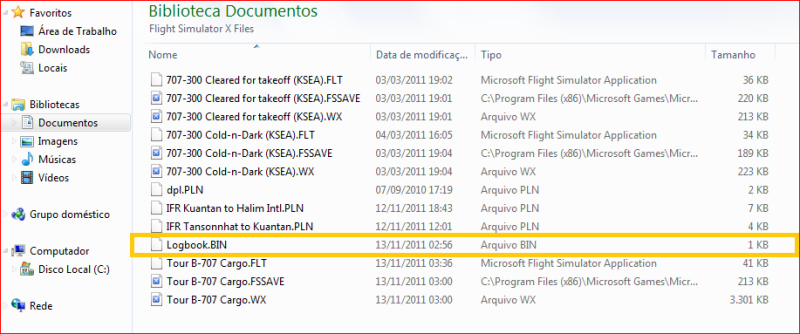
I've found the Logbook.BIN at Documents > Flight Simulator X Files, but it seems all the old logbook data were definitively lost during reinstalling procedure, as showed below. Quote:
If you find out it can do it, please tell me. Quote:
From now I'll try to keep a logbook back up file using logbookedit.zip Thanks, Pinatubo. |
|
Title: Re: Broken Arrow Post by CoolP on Nov 15th, 2011 at 5:47am
Pina, I hope you know that, regardless of any logbook entries, you are a well known sim veteran around here. :)
So I wouldn't give much on the hours FSX now shows. Just have fun collecting some more. :D |
|
Title: Re: Broken Arrow Post by xpurex on Nov 15th, 2011 at 6:55am
Thanks..for..the..info.
|
|
Title: Re: Broken Arrow Post by Pinatubo on Nov 15th, 2011 at 8:53pm CoolP wrote on Nov 15th, 2011 at 5:47am:
CoolP, thank you for your nice words. You are right. It is no use worrying about unfortunate events which have already happened and which can't be changed. As Mark said sometime ago, I'm a FS addict too. So, let's go on flying. :) Greetings, Pinatubo. |
|
Title: Re: Broken Arrow Post by Markoz on Nov 16th, 2011 at 9:02am Pinatubo wrote on Nov 15th, 2011 at 8:53pm:
It is still a painful loss. I had a similar thing happen in the early days of FSX, so I learned this lesson early. I have some 4000+ hours of flights in my logbook. I should have more! I have lost a lot through the need to fix up a problematic logbook, which hurts, but is not as bad as loosing the whole lot. I have a couple of tools (the main one being the one I mentioned previously) that I use to try to preserve as many of my flights as possible, but I continually get errors popping up in the logbook. I would bet that if I started a new logbook, I would probably have no more problems, but I dread losing all those hours of logged flights. |
|
CAPTAIN SIM FORUM » Powered by YaBB 2.6.0! YaBB Forum Software © 2000-2026. All Rights Reserved. |