CAPTAIN SIM FORUM
727 Captain >> 727 Captain >> A/P does not work
https://www.captainsim.org/forum/csf.pl?num=1309924315

Message started by Ed Callan on Jul 6th, 2011 at 3:51am

Title: A/P does not work
Post by Ed Callan on Jul 6th, 2011 at 3:51am
:(Hello All,
I just bought the 727-200 expansion pack(fsx) I already have the 727-100 basic.  The A/P does not work at all.  all other functions appear to be ok. My 727-100 works fine. I have uninstalled an reinstalled a couple of times but the AP does not work....  Am I missing a switch?

Thanx
Ed Callan

Title: Re: A/P does not work
Post by boeing247 on Jul 6th, 2011 at 4:23am
How are you using the autopilot? What's your process?  ;)

Title: Re: A/P does not work
Post by Markoz on Jul 6th, 2011 at 9:00am
Are you sure that they are all the same version? The latest version for the 727's is v2.4. You 727-100 Base Pack might be a different version, like 2.2 or 2.3.

To get the latest 727-100 Base Pack version, Check-in to Your Profile > Select product > Extended Download Service > Get New Links

Mark

Title: Re: A/P does not work
Post by Ed Callan on Jul 6th, 2011 at 1:32pm
Markoz,
 That was it thanx now I have to relearn how to use the AP

Ed C

Title: Re: A/P does not work
Post by Markoz on Jul 6th, 2011 at 5:04pm
Great to hear that it is working!!! Happy flying! ;D

Title: More AP Problems
Post by Ed Callan on Jul 7th, 2011 at 1:45pm
Hello All,
After installing v2.4 for both 727-100 and 727-200 exp pack,
 I noticed that when using the pitch controller for climb and descent there is no vertical control.  I turn off alt hold in level flight and try to adjust vs but there is no response.
 Also  when i uninstalled the b727-100 I lost a virtual cockpit mod that kept the AP from floating, does anyone know where i can find this

thanx
EC

Title: Re: A/P does not work
Post by Markoz on Jul 8th, 2011 at 3:57am
When you turn the A/P ON, are you turning ON both the Autopilot Aileron Switch and the Autopilot Elevator Switch? Or just the Autopilot Aileron Switch?

When I'm using the A/P to control the climb, I use the Autopilot Turn And Pitch Controller to adjust the rate of climb or descent (I don't use it don't turn control).
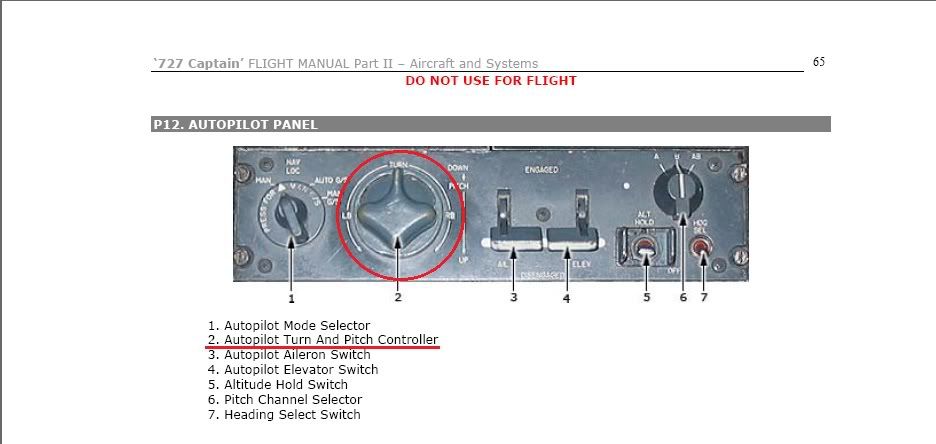


I don't know of, nor where to find, the mod you refer to. Sorry.

Mark

Title: Re: More AP Problems
Post by David Paul on Jul 8th, 2011 at 10:16am

Ed Callan wrote on Jul 7th, 2011 at 1:45pm:
Hello All,
After installing v2.4 for both 727-100 and 727-200 exp pack,
 I noticed that when using the pitch controller for climb and descent there is no vertical control.  I turn off alt hold in level flight and try to adjust vs but there is no response.
 Also  when i uninstalled the b727-100 I lost a virtual cockpit mod that kept the AP from floating, does anyone know where i can find this

thanx
EC


What version of FSX are you running?   On my setup, the autopilot pitch control did not work until I purchased and installed FSX Acceleration.   This issue is documented.  Captain Sim put out a downloadable "fix" that did not work for me.  It caused the yoke to thrash wildly back and forth.  

Title: Re: A/P does not work
Post by Ed Callan on Jul 8th, 2011 at 1:43pm
Mark,
 After t/o I establish a positive climb rate.....then I activate ail and elev switches then hdg select...I use the ap turn and switch controller during climb also.....My problem is after leveling off and I want to climb or descend the ap turn and switch does not work I get no pitch movement either up or down when I click on the pitch controller....I have to use the trim on the yoke....this is when i use ver 2.4....when i use ver 2.2 on the 727-100 there are no problems

thanx
Ed

Title: Re: A/P does not work
Post by Ed Callan on Jul 8th, 2011 at 1:46pm
David,
 I am using fsx sp2 and all is fine expet when I use ver 2.4.....do u know where I can find the cockpit mod?

thanx
Ed

Title: Re: A/P does not work
Post by David Paul on Jul 8th, 2011 at 5:35pm
Here is the download that is supposed to fix the AP pitch control.

http://www.captainsim.org/tools/x727/sp2/Captain_Sim.p721.sys.gau

Let us know if it works for you.

Title: Re: A/P does not work
Post by LOU on Jul 8th, 2011 at 8:51pm
In the above picture by Mark, the turn knob has two functions, pitch & roll.

I'm telling you this not knowing if this is what you are doing or if you have tried it, so please forgive me if you have done this already.

If you mouse click on the area of the number 2 in the photo, you will get the autopilot to trim the nose UP. If you just click once or twice you will get very small movements of the trim. If on the other hand you hold the mouse button down, you will see a lot of movement of the pitch.

This was not my favorite autopilot, but if you made small movements of the knob in pitch, it would do an OK job. Some of the pilots would use just the AIL paddle to control heading and just use the autopilot trim on the center console marked CRUISE TRIM.

If you are still having problems, let us know and we'll try something else.

Lou

Title: Re: A/P does not work
Post by Ed Callan on Jul 8th, 2011 at 11:06pm
Lou,
 Ok thanx for the reply....I know how to use that AP as I have used it many times in the 727-100(FSX) v2.2 basic.  the problem I have now is that when I upgrade to v2.4 in both the 727-100 and the 727-200 expansion pack, it works fine during climb out to when I level.
 After I level and wish to climb or descend, I switch off alt hold and click on the pitch/turn controller to est a des or clm.  I get no response from the aircraft and wind up using the trim on the yoke. Now i know there is the stab cruise trim which offers fine adjustments but it is a pain to keep bouncing back and forth on or to open another window on the screen.
 I would definitely prefer to use the pitch/turn controller instead

thanx
Ed

Title: Re: A/P does not work
Post by LOU on Jul 9th, 2011 at 2:28am
Ed, sorry you are having trouble. I have only the 727-100 v2.4 and have no problems with the autopilot. Mark is the re-load guru so maybe he can find a fix.

Lou

Title: Re: A/P does not work
Post by Markoz on Jul 9th, 2011 at 5:35am
After I level and wish to climb or descend, I switch off alt hold and click on the pitch/turn controller to est a des or clm.  I get no response from the aircraft and wind up using the trim on the yoke.
The only time I have that happen is if I turn off the ELEV paddle on the A/P.

Maybe you need to do a reinstall/repair. Run the 727-100 installer, select repair, then do the same for the 727-200.

Mark

Title: Re: A/P does not work
Post by David Paul on Jul 9th, 2011 at 10:00am
Not to repeat myself, but the problem here is that he doesn't have Acceleration.  You guys for whom it works fine must already have Acceleration.  

Nothing will fix this except installing Acceleration.  The OP can download  the Captain Sim "fix" and try it, but he will almost certainly get the wildly thrashing yoke problem.  

Title: Re: A/P does not work
Post by Ed Callan on Jul 9th, 2011 at 1:37pm
Lou and Mark,
 thanx for the help.  Ill try a reinstall

Ed

Title: Re: A/P does not work
Post by Ed Callan on Jul 9th, 2011 at 6:01pm
David,
 So your saying that I need acceleration to run ver 2.4 b727-100 and 200?  Because b727-100 ver 2.2 runs fine and I get no yoke problem in either version  ....thanx

Ed

Title: Re: A/P does not work
Post by Ed Callan on Jul 9th, 2011 at 6:06pm
Lou and Mark,
 i did the uninstall and resinstall.  I did the uninstall again . then b727-100 ver 2.2 then b727-100 ver 2.4 upgrade then 727-200 ver 2.4  expansion pack and still did no work...thanx for help

Ed

Title: Re: A/P does not work
Post by ramjet on Jul 9th, 2011 at 6:54pm
Hi Simmers,

New to the 727 crew. I've been looking at this forum for tips and you have helped me. I found a main battery switch at the top of the Flight Engineer panel and I read a post about using Shift+m to activate avionics. They worked and I got the plane started and all the gauges working, I made my plan, got approval, taxied and took off.

Once airborne I brought up the 2d AP popup and when I reached cruising alt I tried to set Alt hold and Heading hold. No luck. I saw a tutorial video on youtube on using the A/P and that you needed to engage the Ail and Elev holds after you are at alt and wings are level and so I did. Then I hit ALt hold and it worked great. I then made sure my heading bug was correct and I hit Heading hold, it also worked well. To turn I deactivated the Ail hold so I could turn and deselected Alt hold so I could rise or fall.

I know I have lots to learn but had fun with what I did and I got to my destination. I hope my experience will help someone else figure out how they can use the A/P.

I should add I am using   Win7x64, i5, GTX 285  FSX gold,

good flights, Cal

Title: Re: A/P does not work
Post by David Paul on Jul 9th, 2011 at 8:17pm

Ed Callan wrote on Jul 9th, 2011 at 6:01pm:
David,
 So your saying that I need acceleration to run ver 2.4 b727-100 and 200?  Because b727-100 ver 2.2 runs fine and I get no yoke problem in either version  ....thanx

Ed


You need Acceleration in order for the autopilot pitch control to work properly with the version 2.4 planes.   I'll bet you everyone on the forum who reports that it "works fine for them" is running Acceleration.   You can try to download the CS fix for it, but on my system and those of several other forum members, it causes the yoke to wildly yank back and forth like crazy.  Oh sure, the autopilot pitch control will at least do SOMETHING, but it won't work like it should.  


Title: Re: A/P does not work
Post by Ed Callan on Jul 9th, 2011 at 8:27pm
I checked the sys req and it sez fsx sp2 or acceleration is needed.....fyi

Ed

Title: Re: A/P does not work
Post by Ed Callan on Jul 9th, 2011 at 10:04pm
David,
 Where is and what is the fix your're talking about

Ed

Title: Re: A/P does not work
Post by David Paul on Jul 9th, 2011 at 10:42pm

Ed Callan wrote on Jul 9th, 2011 at 10:04pm:
David,
 Where is and what is the fix your're talking about

Ed


I posted the link to the file in reply #10 to this thread.  But here's the link to the Knowledge Base entry for this issue here : http://www.captainsim.com/cgi-bin/kb.pl?qid=4897

Maybe it will work for you.  It caused my yoke to thrash back and forth wildly with any change in pitch using the AP, which I'm sure is not what the real aircraft does.

Title: Re: A/P does not work
Post by Ed Callan on Jul 9th, 2011 at 11:08pm
David and all who have contributed so far,
 After browsing other forums and various googles, Im thinking it may be a prob with my OS.   I have win 7 32 bit and from what Ive been reading it may not be compatible with fsx acel or ver 2.4

 I am currently running b727-100 FSX and i have no probles with the AP pitch/turn controller.  I have noticed tho that when i click on the pitch/turn controller I get a tool tip that reads "autopilot turn and pitch controller(up pitch)" etc and for turns "autopilot turn and pitch controller (left bank)"etc.
  However when I run ver 2.4(in both 727-100/727-200) I get a tool tip that reads a certain number of degrees of pitch which does not change when i try to adjust the pitch.
  Hope this helps

Ed

Title: Re: A/P does not work
Post by Ed Callan on Jul 9th, 2011 at 11:39pm
David,
 I tried that link and there was no difference to what I have to do as follows.....est a positive rate with elev paddle down
              when i get the climb rate I want using the the yoke trim,
              I move the evev paddle up and the ap seems to hold that climb rate ok...so there u go

Ed

Title: Re: A/P does not work
Post by Markoz on Jul 10th, 2011 at 1:51am

Ed Callan wrote on Jul 9th, 2011 at 11:08pm:
After browsing other forums and various googles, Im thinking it may be a prob with my OS.   I have win 7 32 bit and from what Ive been reading it may not be compatible with fsx acel or ver 2.4

I have Windows 7 64bit and FSX and Acceleration performs beautifully on it. So do ALL the Captain Sim FSX add-ons (yes, I have them all). So I wouldn't blame the OS. I would say that it is like what David said, you need the Acceleration Pack to get it working correctly.

Mark

Title: Re: A/P does not work
Post by Ed Callan on Jul 10th, 2011 at 3:25am
Mark
 Ok Ill check into that and see what happens ...... thanx for all you help

Ed

Title: Re: A/P does not work
Post by Markoz on Jul 10th, 2011 at 3:39am
Hi Ed.

As long as you are installing them using the "Run as administrator" option, the installation and use of the 727-100/200 should be fine.

When you consider that David has said (twice) that he solved this problem by buying and installing Acceleration. I think that he has a very valid point. I have FSX Deluxe and Acceleration and I have never had this problem. I will admit that the A/P in 2.4 is not quite as good easy to use as v2.2 or v2.3, but once I got used to it, it works very well.

I guess if you look around, you can find FSX Gold Edition (FSX Deluxe and Acceleration in the one box) cheaply. It could be the way to go. Because MS don't sell FSX Deluxe and Acceleration separately anymore, then you'll have to get the Gold Edition. UNLESS you can buy a copy of Acceleration at an online auction site (like eBay).

Mark

CAPTAIN SIM FORUM » Powered by YaBB 2.6.0!
YaBB Forum Software © 2000-2025. All Rights Reserved.