Post by Markoz on Jul 2nd, 2011 at 2:53pm
Colvale wrote on Jul 2nd, 2011 at 11:02am:
| Hi Capt Lou,Mark,et al When near my arrival airport,I'd like to be able to tune in to their ATIS,so that way I get an idea which Rwy is in use but when I put the ATIS frequency in right-hand side COMMS/NAV panel,unlike other aircraft that I have used,I do not see that green ticker-tape ATIS message as I get closer in range. I have all the switches up,have selected VHF-1 on the LHS and VHF-2 on the RHS,and can tune in to the waypoint VORs to give me my DMEs,but for one reason or the other cannot get that ATIS info.I may be doing something wrong. One further query. Lining-up on Rwy31L at KJFK,now that I have got the hang of doing an auto-land,I had the V/L and G/S neons at green,right altitude locked at ALT HLD,and watched the descent but it looked as if I was going to land too far up Rwy31L instead of closer to the threshold,and again had to handland. |
For switching between Com1 and Com2, see my Topic here: http://www.captainsim.org/yabb2/YaBB.pl?num=1309352775. I only discover this by accident last Wednesday. ;D
As for the landing looking like you were too high, I think that fto could be on right. as a general guideline for the approach speed, I go by the placard under the glares hield.
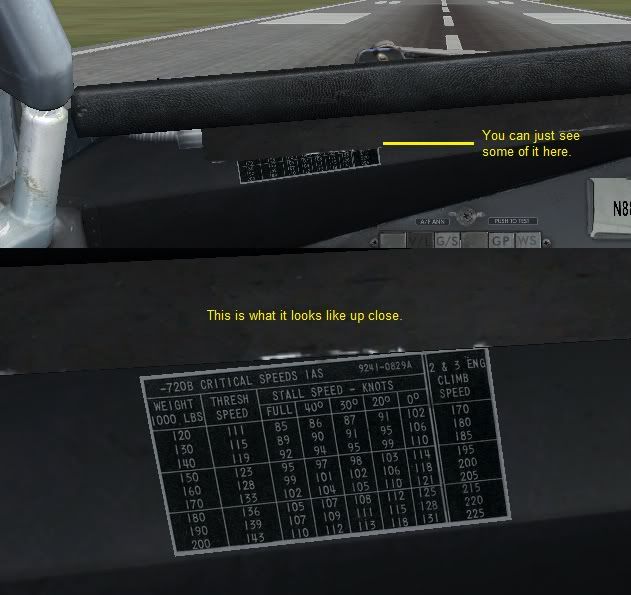
And here is a link to Lou's guide on its use: http://www.captainsim.org/yabb2/YaBB.pl?num=1308451807/3#3
Mark