Post by Markoz on Jun 29th, 2011 at 1:06pm
Hi all.
Did anyone one find the way to switch between COM1 and COM2? If you, like me, did NOT read the Aircraft and Systems manual (csx707_manual2.pdf) that was updated for version 1.3 thoroughly. Then you missed it.
I am doing a flight between KSEA and PHNL, again, when I accidentally clicked on the VOLUME knob on COM2. Normally there is nothing wrong with that, except that it was tuned to the KSEA ATIS. What happened next took me totally by surprise, I could actually hear the ATIS message!
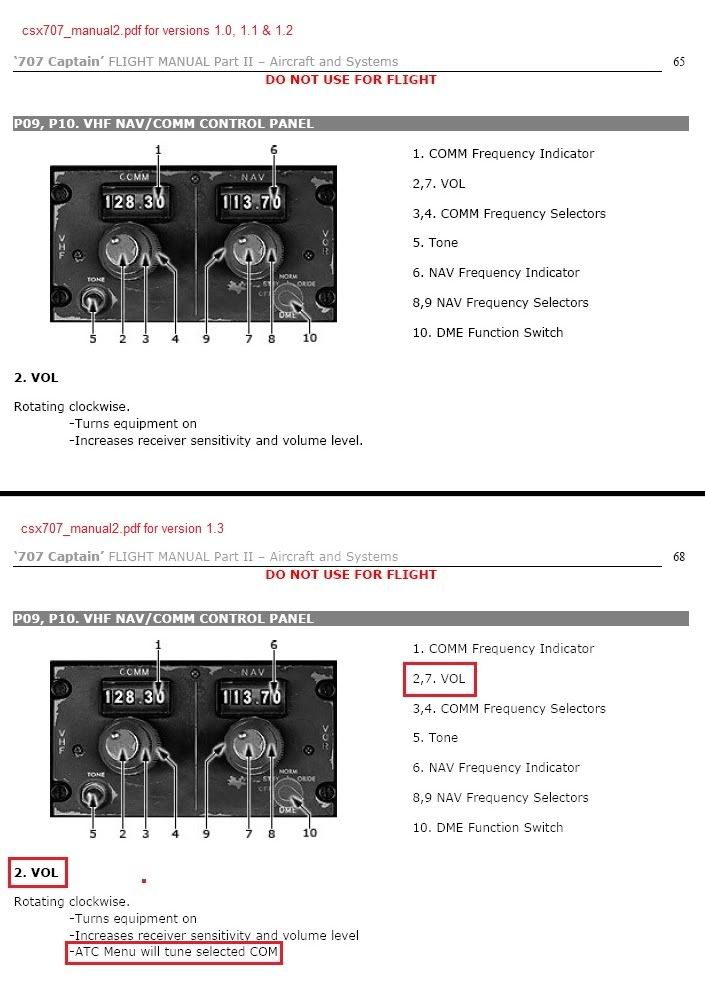
I have been searching for a way to switch Com1 and Com2 since I got the Captain Sim 707-300 (v1.0) back in August last year. Although I have read the manual many times over, I never noticed one particular line in the ‘707 Captain’ FLIGHT MANUAL Part II – Aircraft and Systems on page 68 (page 65 for v1.0).
Well this just just made the 707 better than it already was. ;D ;D ;D ;D ;D
Mark
Did anyone one find the way to switch between COM1 and COM2? If you, like me, did NOT read the Aircraft and Systems manual (csx707_manual2.pdf) that was updated for version 1.3 thoroughly. Then you missed it.
I am doing a flight between KSEA and PHNL, again, when I accidentally clicked on the VOLUME knob on COM2. Normally there is nothing wrong with that, except that it was tuned to the KSEA ATIS. What happened next took me totally by surprise, I could actually hear the ATIS message!
I have been searching for a way to switch Com1 and Com2 since I got the Captain Sim 707-300 (v1.0) back in August last year. Although I have read the manual many times over, I never noticed one particular line in the ‘707 Captain’ FLIGHT MANUAL Part II – Aircraft and Systems on page 68 (page 65 for v1.0).
Well this just just made the 707 better than it already was. ;D ;D ;D ;D ;D
Mark