| CAPTAIN SIM FORUM | |
|
707 Captain >> 707 Captain >> Switching between COM1 & COM2
https://www.captainsim.org/forum/csf.pl?num=1309352775 Message started by Markoz on Jun 29th, 2011 at 1:06pm |
|
|
Title: Switching between COM1 & COM2 Post by Markoz on Jun 29th, 2011 at 1:06pm
Hi all.
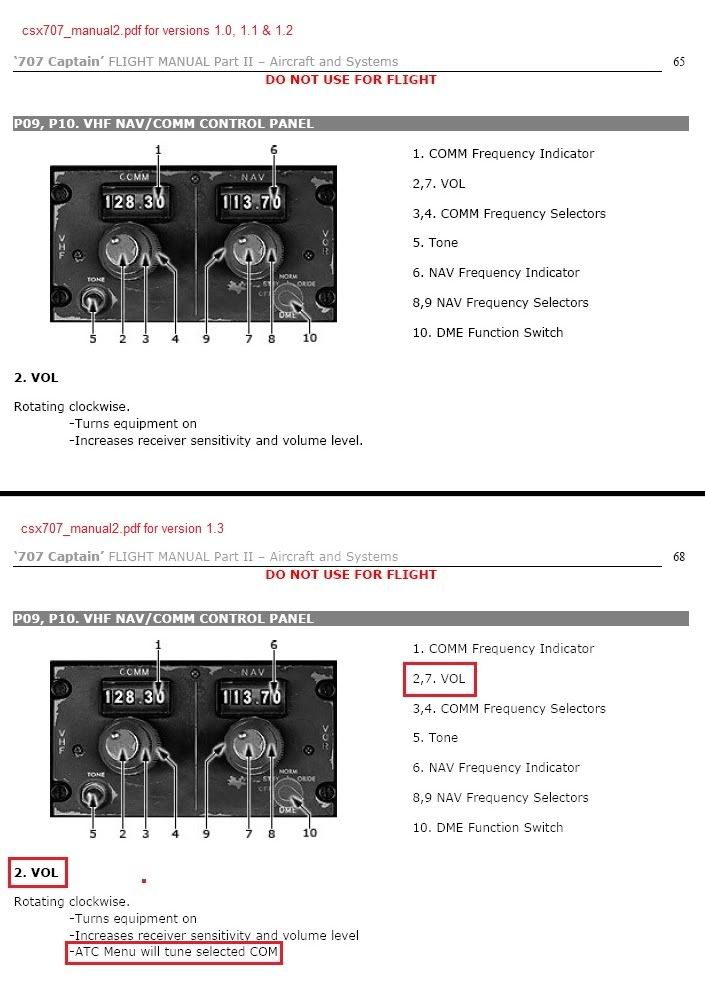
Did anyone one find the way to switch between COM1 and COM2? If you, like me, did NOT read the Aircraft and Systems manual (csx707_manual2.pdf) that was updated for version 1.3 thoroughly. Then you missed it. I am doing a flight between KSEA and PHNL, again, when I accidentally clicked on the VOLUME knob on COM2. Normally there is nothing wrong with that, except that it was tuned to the KSEA ATIS. What happened next took me totally by surprise, I could actually hear the ATIS message! I have been searching for a way to switch Com1 and Com2 since I got the Captain Sim 707-300 (v1.0) back in August last year. Although I have read the manual many times over, I never noticed one particular line in the ‘707 Captain’ FLIGHT MANUAL Part II – Aircraft and Systems on page 68 (page 65 for v1.0). Well this just just made the 707 better than it already was. ;D ;D ;D ;D ;D Mark |
|
Title: Re: Switching between COM1 & COM2 Post by LOU on Jun 29th, 2011 at 2:46pm
Mark,
Don't forget the audio switch box that each pilot, F/E or Navigator has at their position. Here is the main audio switch box located at each crew member position. If the audio switch is not up, you will not hear that radio! The silver switches select the audio input to the speaker or headset. You can have as many as you want turned on. Normally, you would listen to only one or two so as not to have too much input. In this screen capture I have selected VHF COMM #1 as the only audio input at this position. Other positions such as the F/E could be on HF-1 or 2 doing a position report or getting VOLMET weather reports. Notice in the middle of the selector box there is a switch marked OXY & BOOM and a PTT button. If you have the oxygen mask on you can talk whit the mask on by selecting OXY and using the push-to-talk button. The black MIC selector still controls which radio or intercom or PA the MIC will broadcast on. The BOOM position is if you have a headset with a boom mic, you can use the PTT button to transmit. There is also a trigger switch on each yoke to do the same thing. Some pilots would use the side PTT when transmitting so as not to move the yoke when the other pilot was doing the flying. Here is MIC selector switch. This is where you select which radio or intercom or PA the microphone will transmit on. Only one at a time for each position. It is possible that each crew member could be talking on a different radio or intercom at the same time. Lou Uploaded with ImageShack.us |
|
Title: Re: Switching between COM1 & COM2 Post by Markoz on Jun 29th, 2011 at 3:21pm
Thanks for that info Lou. I'll take a look at them. But since I got the 707 last year, I have tried dozens (well, lots) of different settings with those switches and the other two sets (FO and FE) in the VC, without getting the desired results. Those switches didn't switch between COM1 and COM2. The results I got by simply clicking on the volume knob have finally achieved this for me, that's why I am sharing the newly found way of doing it with everyone.
Mark BTW. Still no nav lights on my 707's. I uninstalled, removed registry entries, downloaded new installers and then reinstalled them. It didn't help. I guess I need to submit a ticket. It's strange because I have strobe and beacon lights, just no nav lights. I have tried that with the 727 yet, but I'm not very optimistic about the chances of that working either. |
|
Title: Re: Switching between COM1 & COM2 Post by LOU on Jun 29th, 2011 at 3:23pm
Hummmm, my 707 & 727 have nav lights??? I did not reload anything since day one. This is a real mystery... :-?
|
|
CAPTAIN SIM FORUM » Powered by YaBB 2.6.0! YaBB Forum Software © 2000-2025. All Rights Reserved. |