Post by Markoz on Jun 27th, 2011 at 4:27am
What happens when you change the flight plan and reload it, is that the autopilot starts the plan from the beginning (from origin to waypoint 1).
The only way that I know of to change which waypoint you want to head to (that I know of), is using the default GPS.
How to add the default GPS:
Open the panel.cfg with Windows notepad.
In [Window Titles] add the following line (bold text):
[Window Titles]
Window00=Simicons
Window01=Animations Control
Window02=CS Weather Radar
Window03=Map
Window04=Autopilot
Window05=Crew Messenger
Window06=GPS
Then add the bold text part below [Window05] and before [VCockpit01], like this:
[Window05]
size_mm=349,218
window_size=0.25
window_pos= 0.030, 0.690
background_color=0,0,0
visible=0
ident=11005
render_3d_window=0
gauge00=Captain_Sim.x707.P15!P15_voice, 0,0, 349,218
[Window06]
background_color=0,0,0
size_mm=303,283
position=2
visible=0
ident=GPS
gauge00=fs9gps!gps_500, 0,0,303,283
[VCockpit01]
size_mm=1024,1024
pixel_size=1024,1024
texture=$FPSP
background_color=0,0,0
gauge00=Captain_Sim.x707.R01!R01_001_light, 625, 824, 56,55
gauge01=Captain_Sim.x707.R02!R02_clock, 50, 300, 155,151
gauge02=Captain_Sim.x707.R03!R03_aplight, 625, 750, 55,55
gauge03=Captain_Sim.x707.R05!R05_rmi, 275, 775, 200,200
*This is not the panel.cfg with the CIVA INS panel
Now you have added the GPS, we will assume that you are in mid flight and have added the STAR/TRANS to the revised flight plan. DO NOT LOAD IT YET!
Now place the HDG Bug at the top center of the HSI and turn the Autopilot MODE SELECTOR SWITCH to HDG so that the 707 continues towards its current waypoint.
Here I have switched the Autopilot Mode Selector Switch to HDG
Now load the revised flight plan.
New plan loaded, but all the early waypoints are not finished. The Autopilot in NAV mode would head for waypoint 1 (notice I am still in HDG mode!
Open the default FS GPS (if you followed my instructions use SHIFT+7). Press the FPL button to call up the Flight Plan.
Press the PUSH CRSR button on the GPS and scroll down to the current waypoint (the one you were heading towards in the first plan).
Notice that I have highlighted the waypoint I was originally headed towards before the revised plan was loaded
Press the MENU button, and it display a box that says (what I see using my demo flight plan):
FLY LEG
TARAL --> CULIN
ACTIVATE? <- this is highlighted and flashing
Press the ENT button and that leg of your flight plan is now active.
The flight plan leg to my current waypoint is now activated (see that the previous waypoints are clear) but I'm still in HDG Mode
Now turn the Autopilot MODE SELECTOR SWITCH to NAV and the 707 will continue as if nothing happened.
All back to normal and my 707 has not skipped a beat. She has continued on as if nothing has happend
I hope this helps you with your flights, especially after you have revised them to include STAR and TRANS.
And to those who shudder at the thought of putting the default GPS in an aircraft, think again. This is a most helpful tool to have in the CS707 because of the fact that it can follow an FS flight Plan. ;)
Mark
Note: You can learn about the FS GPS in the Help > Learning Center > GPS > using
The only way that I know of to change which waypoint you want to head to (that I know of), is using the default GPS.
How to add the default GPS:
Open the panel.cfg with Windows notepad.
In [Window Titles] add the following line (bold text):
[Window Titles]
Window00=Simicons
Window01=Animations Control
Window02=CS Weather Radar
Window03=Map
Window04=Autopilot
Window05=Crew Messenger
Window06=GPS
Then add the bold text part below [Window05] and before [VCockpit01], like this:
[Window05]
size_mm=349,218
window_size=0.25
window_pos= 0.030, 0.690
background_color=0,0,0
visible=0
ident=11005
render_3d_window=0
gauge00=Captain_Sim.x707.P15!P15_voice, 0,0, 349,218
[Window06]
background_color=0,0,0
size_mm=303,283
position=2
visible=0
ident=GPS
gauge00=fs9gps!gps_500, 0,0,303,283
[VCockpit01]
size_mm=1024,1024
pixel_size=1024,1024
texture=$FPSP
background_color=0,0,0
gauge00=Captain_Sim.x707.R01!R01_001_light, 625, 824, 56,55
gauge01=Captain_Sim.x707.R02!R02_clock, 50, 300, 155,151
gauge02=Captain_Sim.x707.R03!R03_aplight, 625, 750, 55,55
gauge03=Captain_Sim.x707.R05!R05_rmi, 275, 775, 200,200
*This is not the panel.cfg with the CIVA INS panel
Now you have added the GPS, we will assume that you are in mid flight and have added the STAR/TRANS to the revised flight plan. DO NOT LOAD IT YET!
Now place the HDG Bug at the top center of the HSI and turn the Autopilot MODE SELECTOR SWITCH to HDG so that the 707 continues towards its current waypoint.
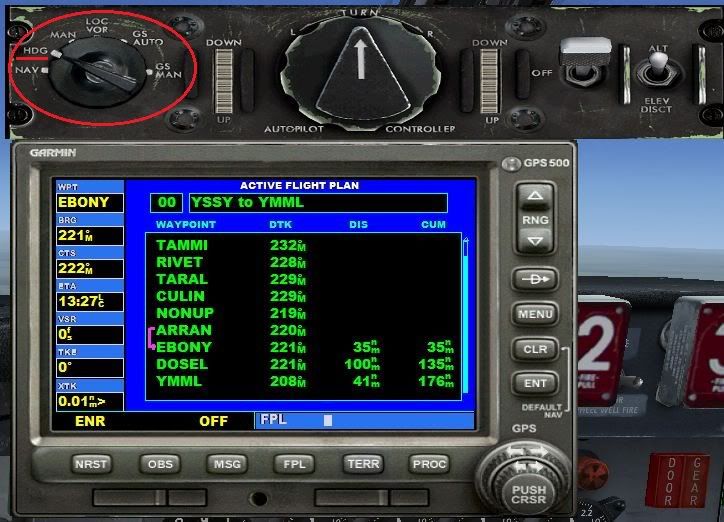
Here I have switched the Autopilot Mode Selector Switch to HDG
Now load the revised flight plan.
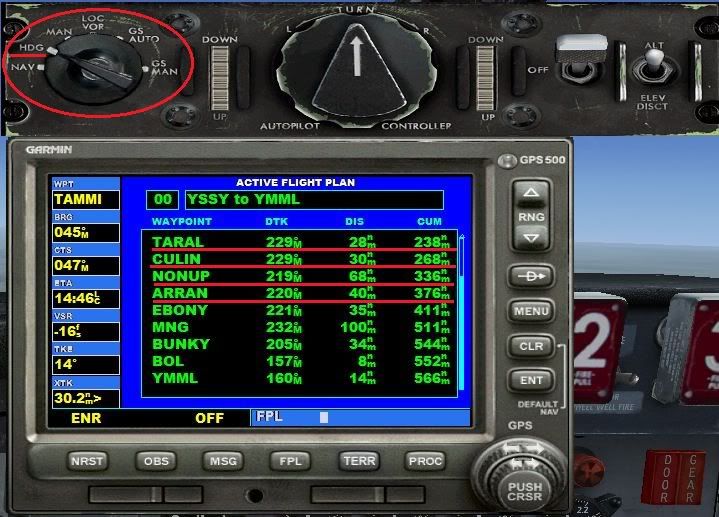
New plan loaded, but all the early waypoints are not finished. The Autopilot in NAV mode would head for waypoint 1 (notice I am still in HDG mode!
Open the default FS GPS (if you followed my instructions use SHIFT+7). Press the FPL button to call up the Flight Plan.
Press the PUSH CRSR button on the GPS and scroll down to the current waypoint (the one you were heading towards in the first plan).

Notice that I have highlighted the waypoint I was originally headed towards before the revised plan was loaded
Press the MENU button, and it display a box that says (what I see using my demo flight plan):
FLY LEG
TARAL --> CULIN
ACTIVATE? <- this is highlighted and flashing
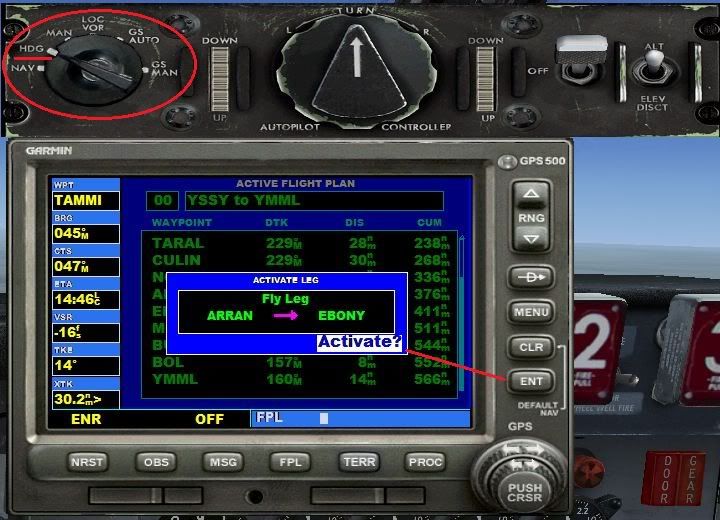
Press the ENT button and that leg of your flight plan is now active.
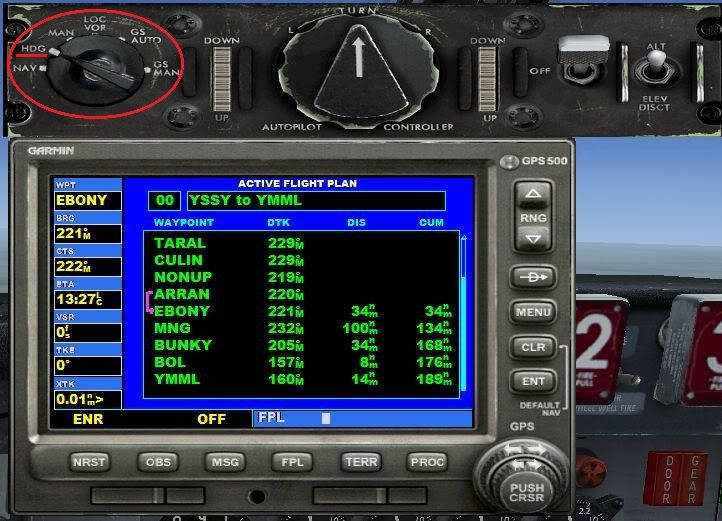
The flight plan leg to my current waypoint is now activated (see that the previous waypoints are clear) but I'm still in HDG Mode
Now turn the Autopilot MODE SELECTOR SWITCH to NAV and the 707 will continue as if nothing happened.
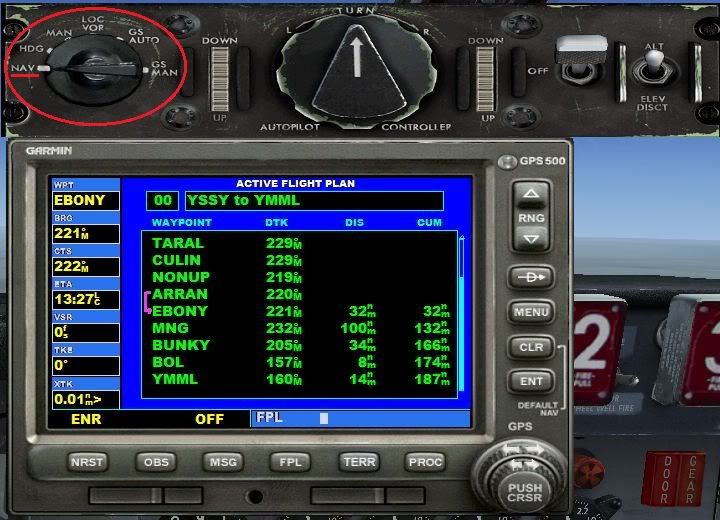
All back to normal and my 707 has not skipped a beat. She has continued on as if nothing has happend
I hope this helps you with your flights, especially after you have revised them to include STAR and TRANS.
And to those who shudder at the thought of putting the default GPS in an aircraft, think again. This is a most helpful tool to have in the CS707 because of the fact that it can follow an FS flight Plan. ;)
Mark
Note: You can learn about the FS GPS in the Help > Learning Center > GPS > using