| CAPTAIN SIM FORUM | |
|
707 Captain >> 707 Captain >> 707Captain Tutorial
https://www.captainsim.org/forum/csf.pl?num=1308869400 Message started by Colvale on Jun 23rd, 2011 at 10:50pm |
|
|
Title: 707Captain Tutorial Post by Colvale on Jun 23rd, 2011 at 10:50pm
As a new user,can someone kindly direct me to a Tutorial Flight PDF for the 707Captain? I have done a search for it but could not locate it.I have tried to follow the 3 manuals but found it tough going.If there is a link to a YouTube tutorial video even better.
Thanks and apologies if this has been requested previously. |
|
Title: Re: 707Captain Tutorial Post by boeing247 on Jun 24th, 2011 at 3:11am
As far as I know, there is nothing like this. CS has said in the past that they do not do tutorial flights, so I definitely know that they have not produced any such thing.
Is there a specific aspect of the plane that you need help with, or is it the whole plane? I can make some instructions on how to use the Doppler navigation system if you like, and there is a great video series on YouTube on how to use an INS (Inertial Navigation System). |
|
Title: Re: 707Captain Tutorial Post by Colvale on Jun 24th, 2011 at 11:45am
Thanks for your reply,boeing247.I have no problems with that INS as I too have seen that YouTube tutorial.Very good,I must say.Informative.
I just wanted a QuickStart tutorial for a 'Cold 'n Dark' scenario start.Having to wade through 59 pages of the Operations Manual each time I want to fly this aircraft from a 'Cold 'n Dark' scenario,is quite frankly,IMHO,a bind. I managed to get to starting Engine #1 after a long read through that Ops Manual but then when I tried to select the other engines, that is where I came unstuck.By then,I gave up. |
|
Title: Re: 707Captain Tutorial Post by boeing247 on Jun 24th, 2011 at 4:25pm
Ah, okay. Yeah, engine startup is hard (I'm still trying to figure it out, too ;)). Here's a link to instructions on the 727 engine startup, so you can see if that works. I haven't been able to try anything because my wimpy laptop has trouble with the 707, so I never fly it (which is why I'll be getting a more powerful system, soon).
|
|
Title: Re: 707Captain Tutorial Post by Colvale on Jun 24th, 2011 at 7:58pm
Thanks,boeing247.I was hoping you might have been able to help me out there but it seems you too have not only an engine start-up,but a hardware issue too.
The 727 being a tri-jet I wonder if the link you allude to but which I cannot see in your reply,will work with a 4-jet 707? |
|
Title: Re: 707Captain Tutorial Post by Markoz on Jun 25th, 2011 at 2:11am
Try following this guide: http://www.captainsim.org/yabb2/YaBB.pl?num=1286115031/1#1 on Engine Start.
I did this back when the 707 Captain was first released and we all had trouble starting it. |
|
Title: Re: 707Captain Tutorial Post by Colvale on Jun 25th, 2011 at 3:59pm
Mark
That is exactly what I was looking for.Superb,precise,and concise.Has saved me wading through 59 pages of the PDF. Thanks. |
|
Title: Re: 707Captain Tutorial Post by Markoz on Jun 25th, 2011 at 4:09pm
If you look at the early posts for the 707 Captain, you will see my exasperation with starting the 707. The first time I installed it, it started perfectly. Then for some strange reason, it became a nearly impossible to get it started. Ecery tattept either failed completely or I only got one or two engines started. That reply shows the method I finally came up with, that got them started every time I tried!
I share this with everyone so they can get it started and flying every time they want. It is NOT by-the-book, but it works. However, once you familiarize yourself with that method, you will then be able to start them by-the-book. Mark |
|
Title: Re: 707Captain Tutorial Post by Colvale on Jun 25th, 2011 at 8:33pm
One more question,Mark,as you seem to have the HU on this particular aircraft on me,as I'm much more familiar with the likes of the another company range of aircraft,747,MD-11,737,the another company 763,QW757,etc.How do I set the throttles to a certain speed as I cannot seem to see an A/T switch,button,or lever anywhere.
And when using the pitch trim in the A/P 2D panel,that pitch trim turnwheel seems to race away either in the up or the down profile,so instead od climbing at a V/S rate of say 2000ft/min,I'm reaching stall conditions as it races away to 4000ft or more/min.How do I set that pitch trim turnwheel to set a V/S to acceptable levels? Thanks in advance. |
|
Title: Re: 707Captain Tutorial Post by Markoz on Jun 26th, 2011 at 1:46am
How do I set the throttles to a certain speed as I cannot seem to see an A/T switch,button,or lever anywhere.
This bird is flown manually. You place the throttles where they need to be to maintain a speed, there is no A/T. I am constantly changing them. As the plane gets lighter, she will fly faster with a throttle setting, so as time goes by, I'm reducing them to maintain a speed. When I'm in high winds and it's quite bumpy, it is difficult to maintain a specific speed, so I look at it being near enough (but definitely not above VNE). And when using the pitch trim in the A/P 2D panel,that pitch trim turnwheel seems to race away either in the up or the down profile,so instead od climbing at a V/S rate of say 2000ft/min,I'm reaching stall conditions as it races away to 4000ft or more/min.How do I set that pitch trim turnwheel to set a V/S to acceptable levels? Just click the Pitch Trim Wheels quickly for smaller, less drastic movements. Another thing to do is watch the ball on the Horizontal Flight Director (HFD). The numbers represent degrees (15, 10, 5) and when you release it at a set degree, it stays. Here is what I do after takeoff - Once I have raised the gear and climbed to 1000' AGL, I turn on the AP (Z) and this holds the current pitch (attitude) of the aircraft. I know what the pitch will be at the time of turning the AP on, because I will be looking at the VSI when I hit the 'Z' key. From here on, I make small changes to the VS using the Pitch Trim Wheels on 2D AP panel. Mark HFD.png (Attachment deleted) |
|
Title: Re: 707Captain Tutorial Post by Colvale on Jun 26th, 2011 at 3:41pm
Hi Mark.Once more,I'm indebted to you for your help.
I had discovered that where prior to posting my last question I was letting the pitch trim thumbwheel on the 2D AP panel roll away in freewheel motion up or down,thereby causing an oscillation up then down,now by actually clicking on that thumbwheel,I can get it to stop at a V/S rate,usually around 2000ft/m, that I want,and the plane will climb at that set V/S rate.Likewise for the descent.But I will now follow your guidance. On a different topic,when making an approach,despite getting the APP freq and selecting it in NAV1,after selecting VOR/LOC on the AP panel,the plane will not track that ILS freq so I end up having to fly the Approach and Landing manually.I'd like to be able to use the G/S setting.Any tips? Thanks in advance. |
|
Title: Re: 707Captain Tutorial Post by Markoz on Jun 26th, 2011 at 4:21pm
To capture the ILS, I use VOR LOC and to capture the Glide Slope, I use GS AUTO. Capturing and tracking ILS and Glide Slope works perfectly fine for me.
You might want to have a quick read on the Autopilot in the ‘707 Captain’ FLIGHT MANUAL Part II – Aircraft and Systems (cs707_manual2.pdf) on page 69-71 and make sure you are doing it correctly. Mark |
|
Title: Re: 707Captain Tutorial Post by boeing247 on Jun 26th, 2011 at 6:22pm Markoz wrote on Jun 25th, 2011 at 2:11am:
Awesome! I didn't know anybody had made a start procedure for the 707. I'm ordering the computer today, so hopefully I can fly the bird within a week or so! ;D |
|
Title: Re: 707Captain Tutorial Post by Colvale on Jun 26th, 2011 at 10:34pm
Hi Mark.Thanks for your reply.
One other thing to ask your expertise.I use a commercial route planner which exports to different formats including FSX's native .pln,which when I select AP,and NAV,the 707 uses to track that flightplan. However,as this commercial flight planner allows me to add SIDs and STARs,as I near my arrival airport I add those additional waypoints to that flightplan,then update it in FSX,when I select NAV again,the aircraft does an about turn and is heading backwards along that flightplan.How can I get it to now track the new updated flightplan? Instead,I have to use HDG and track the route manually. |
|
Title: Re: 707Captain Tutorial Post by boeing247 on Jun 27th, 2011 at 3:06am
It's usually not a good idea to change the flight plan while flying it. (But wait for Mark's opinion, I usually don't know what I'm talking about ;) ;D)
|
|
Title: Re: 707Captain Tutorial Post by Markoz on Jun 27th, 2011 at 4:27am
What happens when you change the flight plan and reload it, is that the autopilot starts the plan from the beginning (from origin to waypoint 1).
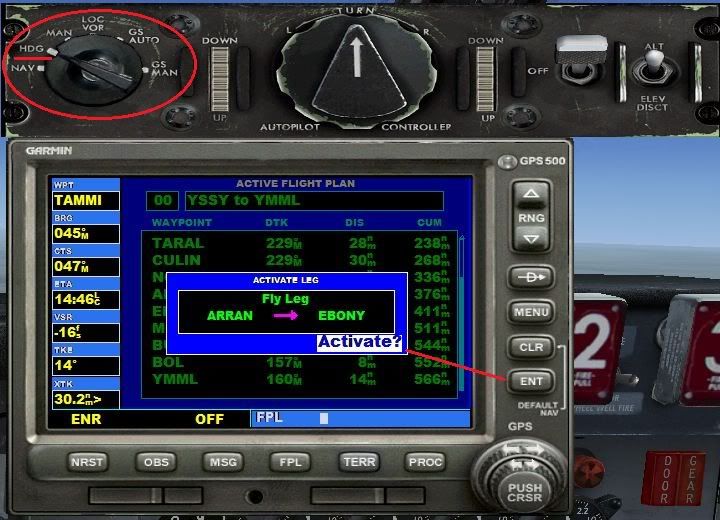
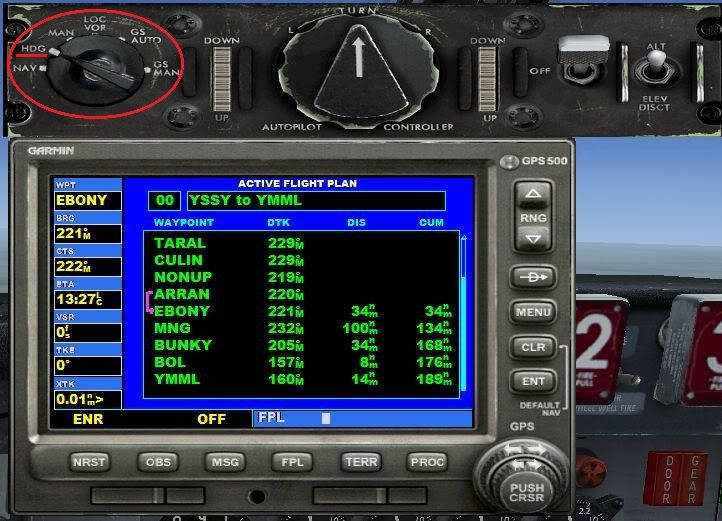
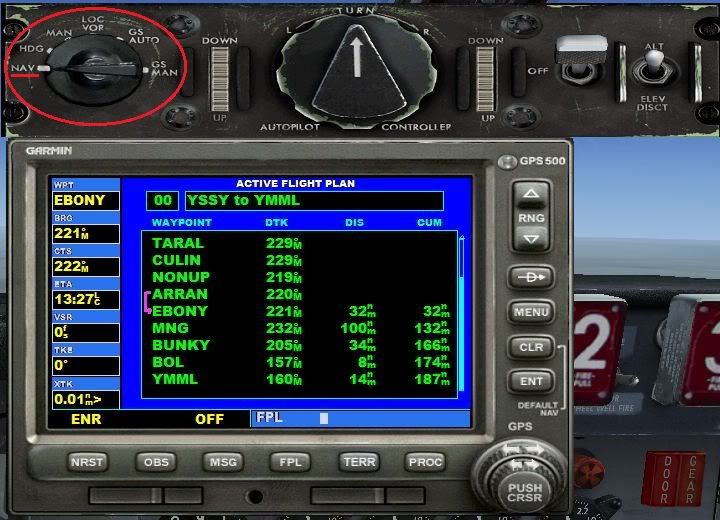
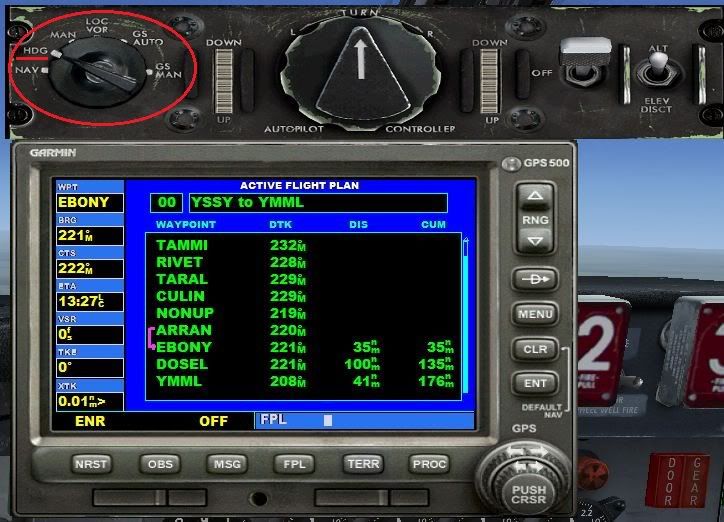
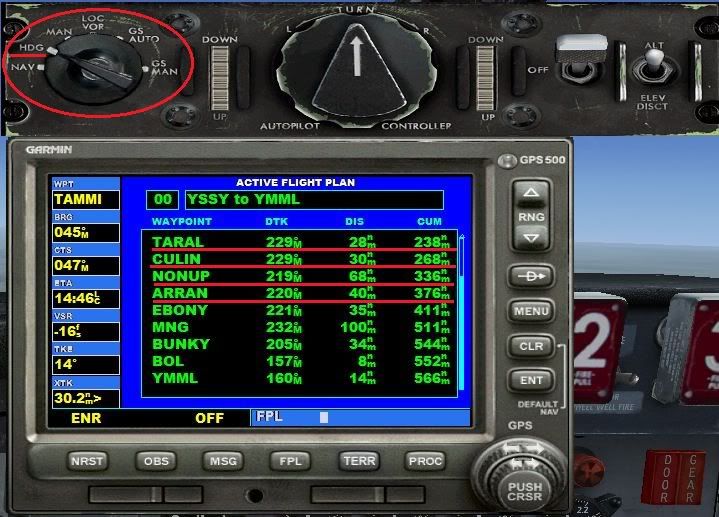
The only way that I know of to change which waypoint you want to head to (that I know of), is using the default GPS. How to add the default GPS: Open the panel.cfg with Windows notepad. In [Window Titles] add the following line (bold text): [Window Titles] Window00=Simicons Window01=Animations Control Window02=CS Weather Radar Window03=Map Window04=Autopilot Window05=Crew Messenger Window06=GPS Then add the bold text part below [Window05] and before [VCockpit01], like this: [Window05] size_mm=349,218 window_size=0.25 window_pos= 0.030, 0.690 background_color=0,0,0 visible=0 ident=11005 render_3d_window=0 gauge00=Captain_Sim.x707.P15!P15_voice, 0,0, 349,218 [Window06] background_color=0,0,0 size_mm=303,283 position=2 visible=0 ident=GPS gauge00=fs9gps!gps_500, 0,0,303,283 [VCockpit01] size_mm=1024,1024 pixel_size=1024,1024 texture=$FPSP background_color=0,0,0 gauge00=Captain_Sim.x707.R01!R01_001_light, 625, 824, 56,55 gauge01=Captain_Sim.x707.R02!R02_clock, 50, 300, 155,151 gauge02=Captain_Sim.x707.R03!R03_aplight, 625, 750, 55,55 gauge03=Captain_Sim.x707.R05!R05_rmi, 275, 775, 200,200 *This is not the panel.cfg with the CIVA INS panel Now you have added the GPS, we will assume that you are in mid flight and have added the STAR/TRANS to the revised flight plan. DO NOT LOAD IT YET! Now place the HDG Bug at the top center of the HSI and turn the Autopilot MODE SELECTOR SWITCH to HDG so that the 707 continues towards its current waypoint. Here I have switched the Autopilot Mode Selector Switch to HDG Now load the revised flight plan. New plan loaded, but all the early waypoints are not finished. The Autopilot in NAV mode would head for waypoint 1 (notice I am still in HDG mode! Open the default FS GPS (if you followed my instructions use SHIFT+7). Press the FPL button to call up the Flight Plan. Press the PUSH CRSR button on the GPS and scroll down to the current waypoint (the one you were heading towards in the first plan). Notice that I have highlighted the waypoint I was originally headed towards before the revised plan was loaded Press the MENU button, and it display a box that says (what I see using my demo flight plan): FLY LEG TARAL --> CULIN ACTIVATE? <- this is highlighted and flashing Press the ENT button and that leg of your flight plan is now active. The flight plan leg to my current waypoint is now activated (see that the previous waypoints are clear) but I'm still in HDG Mode Now turn the Autopilot MODE SELECTOR SWITCH to NAV and the 707 will continue as if nothing happened. All back to normal and my 707 has not skipped a beat. She has continued on as if nothing has happend I hope this helps you with your flights, especially after you have revised them to include STAR and TRANS. And to those who shudder at the thought of putting the default GPS in an aircraft, think again. This is a most helpful tool to have in the CS707 because of the fact that it can follow an FS flight Plan. ;) Mark Note: You can learn about the FS GPS in the Help > Learning Center > GPS > using |
|
Title: Re: 707Captain Tutorial Post by Colvale on Jun 27th, 2011 at 12:10pm
Hi Mark.
Once again,I'm indebted to you. You have now clarified to me why my 707 was heading back to where it came from.And the tutorial on how to add the default GPS is a great boon. As I stated, I use a commercial Flight Planner that gives me the arrival airport's ATIS,which is where I get my arrival Rwy,and then accordingly input the STARs. Now,thanks to you,I will be able to use a revised Flight Plan. |
|
Title: Re: 707Captain Tutorial Post by Colvale on Jun 27th, 2011 at 8:51pm Markoz wrote on Jun 25th, 2011 at 2:11am:
Hi Mark.Tried this engine start flowsheet.Managed to get engines to fire,etc,etc,but cannot get the rudder to deflect to give me turn after push-back,and despite advancing throttles, no power seems to be going through.Start/idle levers at top setting,all fuel pumps on,bleeds on. Co-pilot's hydraulic lamps stay lit despite selecting on.Rudder lamps off. What am I doing wrong? |
|
Title: Re: 707Captain Tutorial Post by Markoz on Jun 28th, 2011 at 1:52am
Managed to get engines to fire,etc,etc,but cannot get the rudder to deflect to give me turn after push-back,and despite advancing throttles, no power seems to be going through.
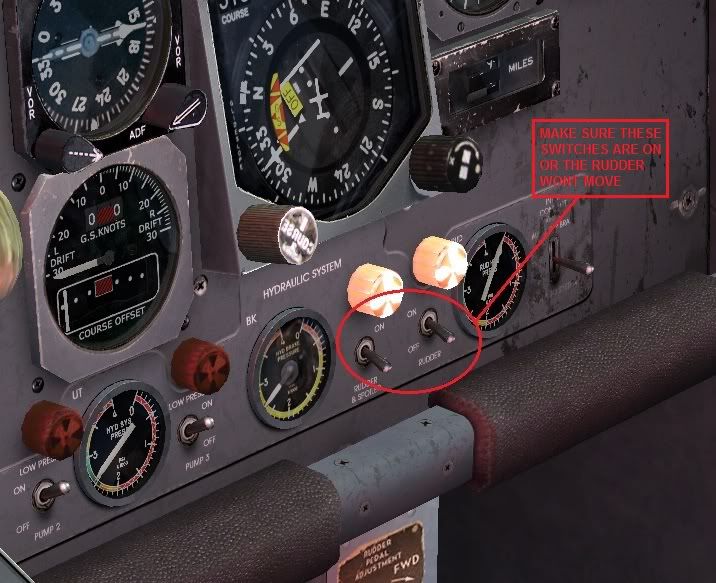
From the manual: ‘707 Captain’ FLIGHT MANUAL Part II – Aircraft and Systems (cs707_manual2.pdf) pages 37-38 R17. HYDRAULIC SYSTEM PANEL 9,10. AC Auxiliary Pump Switches When positioned to ON: Activates pump motor. OFF: Shuts off pump motor. Switch No.1 is powered from an AUX PUMP CONT No. 1 CB on P5, TR bus No. 4, the No.2 switch from an AUX HYD PUMP CONT-2 CB on P5, TR bus No.3. Make sure that switches 5, 7, 9 and 10 are ON (they are OFF when you load the 707-300 Cold-n-Dark (KSEA).FLT! When switches 9 and 10 are OFF, the rudder wont move. In this image, the AC Auxiliary Pump Switches (9 & 10) are OFF and so my rudder doesn't move. Hope this helps Mark |
|
Title: Re: 707Captain Tutorial Post by Colvale on Jun 28th, 2011 at 10:49am
Hi Mark.
Thank you for that. The two switches that you have circled were exactly the lamps that stayed on. I will read up on that relevant section as I was sure that I had turned on all the relevant switches but still could not get those 2 switches to extinguish. But I'll give it another go. At least I got to the point of doing a 'Cold 'n Dark' engine start, which was the first objective. |
|
Title: Re: 707Captain Tutorial Post by Markoz on Jun 28th, 2011 at 1:35pm
If there are ever any lights glowing in the 707, I quickly to look them up in the ‘707 Captain’ FLIGHT MANUAL Part II – Aircraft and Systems (cs707_manual2.pdf), to find out why they are ON, how to get them OFF and what will happen if I don't get them to go out.
This is a good way to learn about an aircraft (not just the 707). The same applies to all the manuals dealing with it. If I'm trying to do something I can't figure out, out come the manuals an I start looking for help with what I need to know. I read up on how to start the aircraft and then I go for a flight. I look into the manuals after I have flown around for a while in the aircraft. This is the case for all my third party aircraft, except one. With the 707 engine start, I kept at it until I came up with a way to get them started every time I tried. Once I could get them started every time, it was time to learn the rest of the procedures and about the instruments. Mark |
|
Title: Re: 707Captain Tutorial Post by Colvale on Jun 28th, 2011 at 8:44pm
Hi Mark
Glad to report :)that this time around, I followed your Start-up flowsheet to the tee ,but also remembered after reading your advice above to switch the DC Voltage switches and the AC Paralleling switches to GEN3/GEN4 and TR3/TR4 respectively in turn as these power the AC Aux Pump switches,and indeed watched as those neons went out and thus I was able to gain Rudder control. Everything to T/O went smoothly.Thanks.I have also integrated your GPS window fix but not yet used it as I now create a FP with both SIDs and STARs integrated,so she can track without any interference from me. :) |
|
CAPTAIN SIM FORUM » Powered by YaBB 2.6.0! YaBB Forum Software © 2000-2025. All Rights Reserved. |