| CAPTAIN SIM FORUM | |
|
General >> Hangar talks >> Design
https://www.captainsim.org/forum/csf.pl?num=1304312589 Message started by boeing247 on May 2nd, 2011 at 5:03am |
|
|
Title: Design Post by boeing247 on May 2nd, 2011 at 5:03am
Well, I didn't want to make a post for this here and bug everybody, but after too long searching the web, I suppose I have to.
Does anybody happen to know of a good tutorial for designing aircraft for FSX. There are plenty on creating on in Gmax (that's the program I'm using), but I can't find anything on actually creating the aircraft package so you can use it in FSX. Thanks, boeing247 |
|
Title: Re: Design Post by boeing247 on May 4th, 2011 at 1:09am
Looks like nobody here knows... Does anybody at least maybe have a suggestion on where to ask? ;)
|
|
Title: Re: Design Post by Markoz on May 4th, 2011 at 5:23am
Milton Shupe did one of the best tutorials for creating and aircraft in gmax that I have seen. Check it out HERE.
Sorry it took so long, but I couldn't find it until today (I got all of this stuff form myself back in about 2008). You must have the FSX SDK which comes with FSX Deluxe and FSX Gold. Mark |
|
Title: Re: Design Post by boeing247 on May 4th, 2011 at 11:44pm
Thanks! ;D Yes, I have the SDK. The tutorial is for FS2004, but it should work for FSX, right?
|
|
Title: Re: Design Post by Markoz on May 5th, 2011 at 12:43pm boeing247 wrote on May 4th, 2011 at 11:44pm:
Yes it will. The method of creating the model (MDL) is using XtoMDL which is for FSX only. |
|
Title: Re: Design Post by pj747 on May 5th, 2011 at 2:14pm
My friend made the elephant from the African mission fly. He also made a flying gecko that licked its eye when you hit L for lights.
|
|
Title: Re: Design Post by Markoz on May 5th, 2011 at 2:38pm 701151 wrote on May 5th, 2011 at 2:14pm:
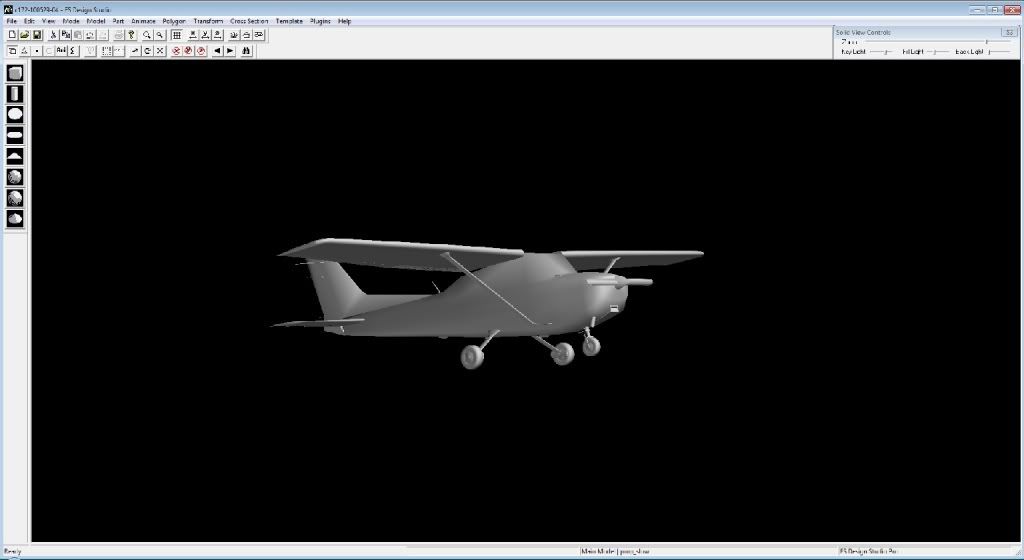
As good and as funny as that is, I don't think an elephant's or gecko's make good flying machines! :D ;D Here is one I have been working on for.....for ever, since December 2005 using FSDS 3.0 and FSDS 3.5.1. It's a C172 (based on the default FS9 C172): Mark |
|
Title: Re: Design Post by boeing247 on May 6th, 2011 at 2:26am
Naturally, I'm making a Boeing 247. ;)
Oh, does the scale have to be in millimeters, or can you put it in inches? (Normally I like the metric system, but bigger units are easier ;)) |
|
Title: Re: Design Post by Markoz on May 6th, 2011 at 8:25am boeing247 wrote on May 6th, 2011 at 2:26am:
It is better to use the metric system. So millimeters is best. :) ALT > Customize > Units setup... > Metric > Millimeters Make sure you are starting gmax using the FSX_Gmax shortcut. It can be found in <Gmax>\gamepacks\FSX_GmaxGamePack folder. It loads all the necessary scripts used to create FSX models. Another thing you need to do is: ALT > FSTools > LODNameTool > Click Create new GUID for this f.... > Friendly Name: (just use the name of the aircraft, boeing247, in this case). If you don't do that, you can't export to the FSX mdl (it won't work in FSX). Mark |
|
Title: Re: Design Post by boeing247 on May 6th, 2011 at 11:41pm
Thanks for the tip about the scripts. Could I use centimeters or even meters instead of millimeters, though, or will it throw something off.
|
|
Title: Re: Design Post by Markoz on May 7th, 2011 at 1:37am
To be honest. I don't know. I was taught by the guys at FFDS Design forums to use millimeters, I don't recall anyone questioning that advice. I know I didn't.
There is a trick you can use in gmax, enter the value in cm or m by adding that to the end of the number and gmax will automatically change it to millimeters. E.g. Enter 5m and gmax will change it to 5000mm, enter 5cm and gmax will change it to 50mm etc... I use this with imperial to metric conversion by entering, for example, 5 feet 6 inches, like this: 5'6" and gmax will convert that to millimeters for me (1676.4mm). Mark |
|
Title: Re: Design Post by boeing247 on May 7th, 2011 at 1:42am
Cool. Now, I should have to download GMax from the SDK in order to get the FSX Gamepack, right? (I'm using a different version now). :)
|
|
Title: Re: Design Post by Markoz on May 7th, 2011 at 3:17am
The gmax installation files are IN the SDK folder when you first install it. You need to copy them to somewhere else because in the process of updating to SP1a and SP2, it gets removed and they are no longer in the SDK folder (as I said in an earlier reply). ;)
The FSX_gamepack for gmax is still in the SDK after you have installed SP2 (SDK\Environment Kit\Modeling SDK). It is only gmax that has been removed. You can get all the gmax files from TurboSquid HERE. The following files are all you really need. gmax12.exe gmax12_help.exe gmax12_tutorials.exe library.exe From this TurboSquid forum post: "get the well known and accepted workaround to get the registration HERE or HERE" - I recommend the first one. There is nothing illegal about the registration workaround. For some unknown reason (to me), the normal way of registering doesn't work. I was lucky enough to get mine registered before this happened, but my official registration is not accepted by gmax anymore so now I have to use this workaround. TurboSquid are the ones who distribute and support gmax now and they are the ones who allow you to download and use workaround (well they certainly haven't put a stop to it in the last 5-6 years since I first found it). Mark |
|
Title: Re: Design Post by boeing247 on May 7th, 2011 at 6:03am
I originally got Gmax from TurboSquid; do I need install it from the installer in the SDK instead, though? I haven't updated to SP1 or SP2 (I have Acceleration, and I've heard that that's pretty much equivalent to SP2, but I'm not sure if that's true), so do I not have those files? Sorry if I'm asking weird questions, I think I missed something and confused myself. ;)
Thanks, boeing247 |
|
Title: Re: Design Post by Markoz on May 7th, 2011 at 9:12am
The latest (last) version of gmax is v1.2. It does not matter which one you install from.
For information in regards to the SDK Service Packs read this: http://www.fsdeveloper.com/wiki/index.php?title=SDK_Installation_%28FSX%29. Hopefully this will help you with installing the SDK SP's and it saves me having to write it all down here for you. Mark |
|
Title: Re: Design Post by boeing247 on May 7th, 2011 at 4:02pm
Okay, cool. Somehow I never came across that sight during all the time I was searching the web. ;) I'll read through that.
|
|
CAPTAIN SIM FORUM » Powered by YaBB 2.6.0! YaBB Forum Software © 2000-2025. All Rights Reserved. |