CAPTAIN SIM FORUM
707 Captain >> 707 Captain >> CIVA INS 2D Panels Don't Appear
https://www.captainsim.org/forum/csf.pl?num=1303322156

Message started by Pinatubo on Apr 20th, 2011 at 5:55pm

Title: CIVA INS 2D Panels Don't Appear
Post by Pinatubo on Apr 20th, 2011 at 5:55pm
Hi,

I followed the instructions contained at page 22 of 707 CAPTAIN FLIGHT MANUAL - PART II –AIRCRAFT SYSTEMS, as below:

.......................................

"...If you have CIVA INS installed you should use CIVA INS panel.cfg file:
1. Backup (rename) original panel.cfg file in ...\SimObjects\Airplanes\CS_B707-300\panel\ folder.
2. Rename civa_panel.cfg file to panel.cfg file..."

.......................................

I did it:

civa_panel.cfg (renamed to panel.cfg)

panel.cfg (deleted)

.......................................

Now my panel.cfg is as below:

[Window Titles]
Window00=Simicons
Window01=Animations Control
Window02=CS Weather Radar
Window03=Map
Window04=Autopilot
Window05=Crew Messenger
Window06=INS Control Display Unit
window07=INS Mode Select Unit
window08=INS ADEU


.........................................

But the icons 03, 06, 07, 08 don't appear at SimIcons panel, and when I try to open them (06, 07 and 08) using FS > Views > Instrument panel > INS Control Display Unit / INS Mode Select Unit / INS ADEU, all I get are black rectangles. Map (03) opens ok.

Someone can help me to fix the problem?

Thanks,

Pinatubo.

Title: Re: CIVA INS 2D Panels Don't Appear
Post by Nick Cooper on Apr 21st, 2011 at 5:07am

Pinatubo wrote on Apr 20th, 2011 at 5:55pm:

civa_panel.cfg (renamed to panel.cfg)
panel.cfg (deleted)


There appear to be two Civa choices in the panel.cfg files.

It seems to me that there may be an error in the instructions you quote,as the first line refers to the panelCIVA INS.cfg file and the third line to the (different) CIVA_panel.cfg file.

Try renaming the panelCIVA INS.cfg file to panel.cfg instead.
I expect that will work.

Regards,
Nick.


Title: Re: CIVA INS 2D Panels Don't Appear
Post by Markoz on Apr 21st, 2011 at 8:32am
Hi Pinatubo.

Have you downloaded and installed the CIVA INS? If not, get it from here: http://www.simufly.com/ins/download.html. Without that installed, it would explain the black boxes you are seeing.


Pinatubo wrote on Apr 20th, 2011 at 5:55pm:
I did it:

civa_panel.cfg (renamed to panel.cfg)

panel.cfg (deleted)

I take it that you deleted the original panel.cfg, then renamed the civa_panel.cfg to panel.cfg. If that is so, then the naming of the panels as you have done (shown in the quote), is correct and so you don't need to change anything there.

Mark

Title: Re: CIVA INS 2D Panels Don't Appear
Post by CoolP on Apr 21st, 2011 at 2:33pm
I think Mark is spot on there. The Civa gauges have to be installed to show up. Unless done, you will see those mentioned black rectangles as there isn't any graphic to show.

Don't look too long into the black hole, it's endless!  :P

Title: Re: CIVA INS 2D Panels Don't Appear
Post by Nick Cooper on Apr 21st, 2011 at 9:30pm
Yes,Mark is correct,I have Civa installed and both alternative panel.cfg files work properly.
Clearly,I replied without properly checking and I apologise.
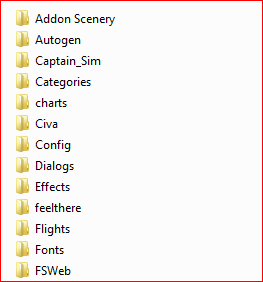
The installation should look like this...

which is where the panel.cfg file directs FSX to look for the gauges.

Regards,
Nick

Title: Re: CIVA INS 2D Panels Don't Appear
Post by CoolP on Apr 21st, 2011 at 9:48pm
Looks good. Glad to read it's up and running. Enjoy!  :)

Title: Re: CIVA INS 2D Panels Don't Appear
Post by Pinatubo on Apr 22nd, 2011 at 6:39am
I am very grateful to colleagues Nick Cooper, Mark and CoolP, by the correct information. Yes, indeed CIVA_INS was not completely installed, but now, after downloading, the CIVA_INS displays appear and work well.

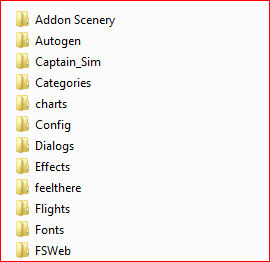
Before and after:


Right now, it is 03:30 AM (Rio de Janeiro time) (06:30 AM GMT) and I finished a B-707 turbulent flight (by my guilty, of course) from Johannesburg (FAJS) to Cape Town (FACT) with just two engines running (the two inboard ones were flame out) and I didn't get to restart them again during the flight. Well, the flight should take 2 hours but it took 3.5 hours. Fortunatelly it was a beautiful landing, despite the distressed passengers...LOL ;D

Now I'm going to sleep. I'm tired.

Thanks again,

Pinatubo.

Title: Re: CIVA INS 2D Panels Don't Appear
Post by Markoz on Apr 22nd, 2011 at 7:06am
I am very grateful to colleagues Nick Cooper, Mark and CoolP, by the correct information. Yes, indeed CIVA_INS was not completely installed, but now, after downloading, the CIVA_INS displays appear and work well.
Glad you got it all sorted out and working.

Right now, it is 03:30 AM (Rio de Janeiro time) (06:30 AM GMT) and I finished a B-707 turbulent flight (by my guilty, of course) from Johannesburg (FAJS) to Cape Town (FACT) with just two engines running (the two inboard ones were flame out) and I didn't get to restart them again during the flight.
Sounds like you were not watching the fuel gauges closely enough! I've been there and done that before. ;D

Well, the flight should take 2 hours but it took 3.5 hours. Fortunatelly it was a beautiful landing, despite the distressed passengers...LOL ;D
You should never fly when tired, that leads to bad things happening. Fortunately you landed safely. I have been there and done that too. It's part of the learning curve. But in your case, you HAD to finish the flight. You couldn't stop. I totally understand your thinking!

Mark

CAPTAIN SIM FORUM » Powered by YaBB 2.6.0!
YaBB Forum Software © 2000-2025. All Rights Reserved.