Post by Markoz on Mar 19th, 2012 at 12:50am
@trvdmeulen - The information provided by Lost in Isaan (see the quote below) is spot on. It works perfectly for me. If it isn't working for you, then maybe you did something wrong, like I did, I changed the csweapon.xml without any problems, then I changed the panel.cfg, but it didn't work. Or so I thought. I had modified the wrong panel.cfg, the one in the panel folder and not the panel.cfg in the panel.csweapon folder. You might have done the same.
@ivo - You need to follow the instructions in the quote below to have the Weapon for FSX 3D HUD in the VC. It is that simple.
Lost in Isaan wrote on Oct 2nd, 2011 at 11:57pm:
Here is what mine look like:
FSX\SimObjects\Airplanes\another company F-16A 9\csweapon.xml:
<GaugeInfo>
<!-- gau section -->
<AntiAlias2d>1</AntiAlias2d>
<!-- 2D HUD anti-aliasing. 1-yes, 0-no (1). 0 increases performance. -->
<AntiAlias3d>1</AntiAlias3d>
<!-- VC HUD anti-aliasing. 1-yes, 0-no (1). 0 increases performance. -->
<HudFov2d>20.34</HudFov2d>
<!-- 2d HUD field of view. Degrees -->
<HudFov3d>17.00</HudFov3d>
<!-- vc HUD field of view. Degrees -->
<CollimationData>0.0,31.5,-4.5,6.0</CollimationData>
<!-- see SDK -->
<EyePtDeltaRatio>0.8</EyePtDeltaRatio>
<!-- hud acceleration sensetivity factor -->
<Collimate>1</Collimate>
<!-- VC HUD collimation. 1-yes, 0-no (1). -->
<TestFrame>0</TestFrame>
<!-- HUD test pattern. 1-yes, 0-no (0). -->
</GaugeInfo>
FSX\SimObjects\Airplanes\another company F-16A 9\panel.csweapon\panel.cfg:
[Vcockpit01]
//file=F-16_1.bmp
Background_color=0,0,0
size_mm=512,512
visible=1
pixel_size=1024,1024
texture=$F-16_1
\\gauge00=..\panel\HUD!HUD, 0,46,254,264
gauge00=CSWeapon!hud3d, 2,-20,254,400
gauge01=..\panel\VIPER!DED, 258,1,159,63
gauge02=..\panel\VIPER!RADIO, 0,0,1,1
gauge03=..\panel\VIPER!flaps_control, 0,0,1,1
gauge04=..\panel\SCControl!CTRL, 0,0,1,1
gauge05=..\panel\VIPER!AS_SB, 0,0,1,1
gauge06=..\panel\MFD!LMFD, 6,310,165,170
gauge07=..\panel\MFD!RMFD, 182,310,165,170
gauge08=..\panel\VIPER!ex_light_control, 0,0,1,1
gauge09=..\panel\VIPER!AS_Mastercaution, 0,0,1,1
gauge10=..\panel\VIPER!Eng_smoke, 0,0,1,1
@Lost in Isaan - Thanks. It works perfectly and saved me a lot ot time! ;)
Mark
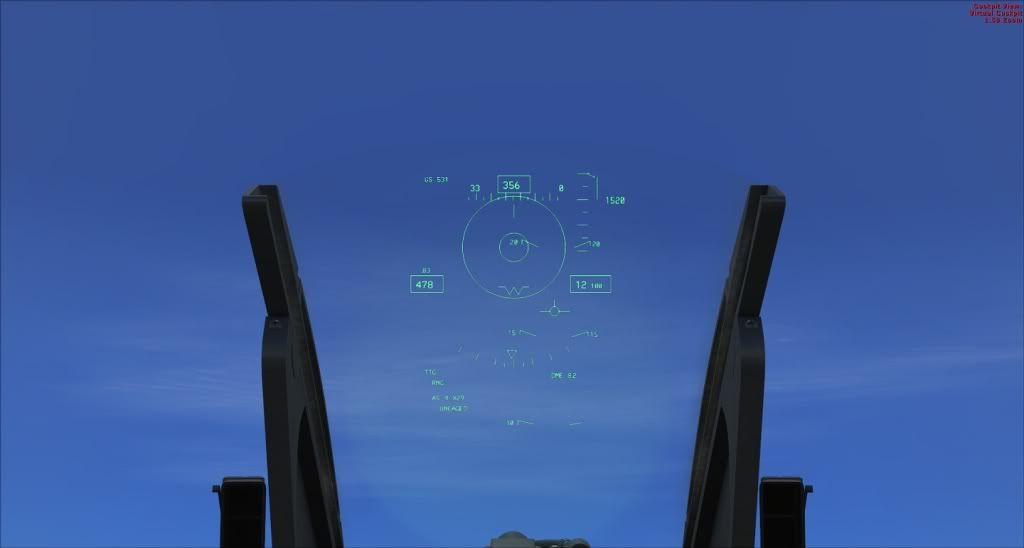
@ivo - You need to follow the instructions in the quote below to have the Weapon for FSX 3D HUD in the VC. It is that simple.
Lost in Isaan wrote on Oct 2nd, 2011 at 11:57pm:
| Modify the 3 panel.cfg files under [Vcockpit01], gauge00 to look like this. //gauge00=HUD!HUD, 0,46,254,264 gauge00=CSWeapon!hud3d, 2, -20, 254, 400 Each and every another company F16-xx folder (some 22 of them) must have the CSWeapons.xml file in there, modify the Collimation variable to look like this. <CollimationData>0.0,31.5,-4.5,6.0</CollimationData> |
Here is what mine look like:
FSX\SimObjects\Airplanes\another company F-16A 9\csweapon.xml:
<GaugeInfo>
<!-- gau section -->
<AntiAlias2d>1</AntiAlias2d>
<!-- 2D HUD anti-aliasing. 1-yes, 0-no (1). 0 increases performance. -->
<AntiAlias3d>1</AntiAlias3d>
<!-- VC HUD anti-aliasing. 1-yes, 0-no (1). 0 increases performance. -->
<HudFov2d>20.34</HudFov2d>
<!-- 2d HUD field of view. Degrees -->
<HudFov3d>17.00</HudFov3d>
<!-- vc HUD field of view. Degrees -->
<CollimationData>0.0,31.5,-4.5,6.0</CollimationData>
<!-- see SDK -->
<EyePtDeltaRatio>0.8</EyePtDeltaRatio>
<!-- hud acceleration sensetivity factor -->
<Collimate>1</Collimate>
<!-- VC HUD collimation. 1-yes, 0-no (1). -->
<TestFrame>0</TestFrame>
<!-- HUD test pattern. 1-yes, 0-no (0). -->
</GaugeInfo>
FSX\SimObjects\Airplanes\another company F-16A 9\panel.csweapon\panel.cfg:
[Vcockpit01]
//file=F-16_1.bmp
Background_color=0,0,0
size_mm=512,512
visible=1
pixel_size=1024,1024
texture=$F-16_1
\\gauge00=..\panel\HUD!HUD, 0,46,254,264
gauge00=CSWeapon!hud3d, 2,-20,254,400
gauge01=..\panel\VIPER!DED, 258,1,159,63
gauge02=..\panel\VIPER!RADIO, 0,0,1,1
gauge03=..\panel\VIPER!flaps_control, 0,0,1,1
gauge04=..\panel\SCControl!CTRL, 0,0,1,1
gauge05=..\panel\VIPER!AS_SB, 0,0,1,1
gauge06=..\panel\MFD!LMFD, 6,310,165,170
gauge07=..\panel\MFD!RMFD, 182,310,165,170
gauge08=..\panel\VIPER!ex_light_control, 0,0,1,1
gauge09=..\panel\VIPER!AS_Mastercaution, 0,0,1,1
gauge10=..\panel\VIPER!Eng_smoke, 0,0,1,1
@Lost in Isaan - Thanks. It works perfectly and saved me a lot ot time! ;)
Mark