Post by Markoz on Jul 17th, 2011 at 2:48am
When you add Weapon for FSX to any aircraft, it adds the following:
panel.csweapon (folder)
HUD_Glass.bmp
panel.cfg
csweapon.xml
This puts ALL (included in csweapon.xml) of the available weapons into the aircraft that you added Weapon to using the Loader.
To change between different Guns, Rockets and Missiles, you need to use the Keyboard Shortcuts provided in the manual:
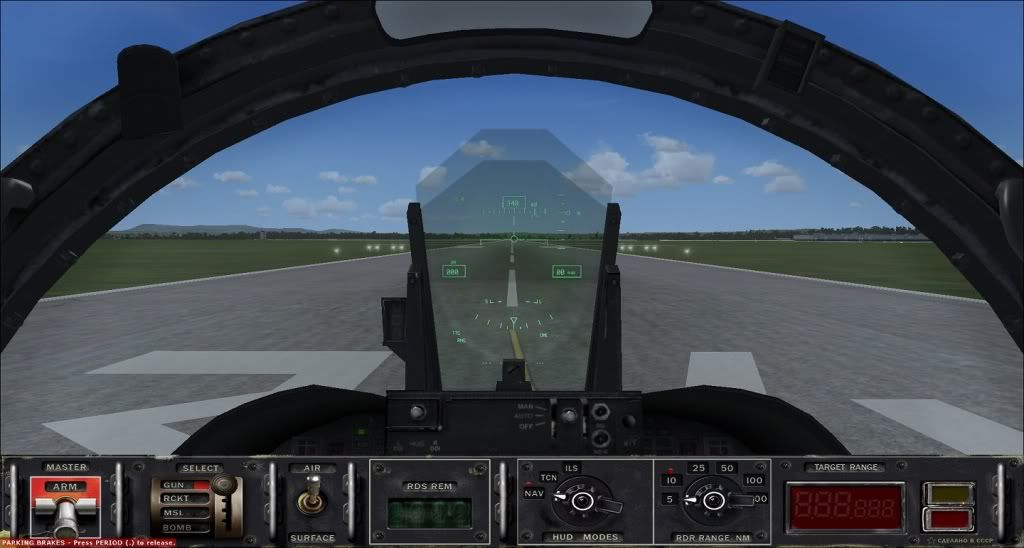
Another way to switch between the weapons is to press SHIFT+1 to bring up the Weapon Panel (see image) and click on different points to change them.
You can add Weapon to any aircraft of your choice, but if you want the guns, rockets and missiles firing from the correct location on a particular aircraft, you have to edit the csweapon.xml (as you did for the F16 guns). I find that it isn't easy (to me), it takes lots of changes and reloading of the aircraft in FSX to get it right.
Mark
panel.csweapon (folder)
HUD_Glass.bmp
panel.cfg
csweapon.xml
This puts ALL (included in csweapon.xml) of the available weapons into the aircraft that you added Weapon to using the Loader.
To change between different Guns, Rockets and Missiles, you need to use the Keyboard Shortcuts provided in the manual:
| CONTROL KEYS REFERENCE CARD | |
| WEAPON ON/OFF | CTRL+6 |
| SELECT WEAPON TYPE | CTRL+7 |
| SELECT WEAPON SUBTYPE | Ctrl+Shift+7 |
| SELECT SUBTYPE FIRE MODE | Ctrl+Shift+8 |
| SWITCH AIR-SURFACE MODES | CTRL+8 |
| SWITCH BASIC HUD MODES | CTRL+9 |
| SELECT RADAR RANGE | CTRL+0 |
| DROP/SWITCH TARGET LOCK | CTRL+U |
| FIRE | SPACE OR JOYSTICK BUTTON 1 |
Another way to switch between the weapons is to press SHIFT+1 to bring up the Weapon Panel (see image) and click on different points to change them.
You can add Weapon to any aircraft of your choice, but if you want the guns, rockets and missiles firing from the correct location on a particular aircraft, you have to edit the csweapon.xml (as you did for the F16 guns). I find that it isn't easy (to me), it takes lots of changes and reloading of the aircraft in FSX to get it right.
Mark