| CAPTAIN SIM FORUM | |
|
757 Captain >> 757 version 4.x (FSX ONLY) >> ACE and Freight Manager
https://www.captainsim.org/forum/csf.pl?num=1293563760 Message started by Tomi on Dec 28th, 2010 at 7:15pm |
|
|
Title: ACE and Freight Manager Post by Tomi on Dec 28th, 2010 at 7:15pm
Hi all, I need some help with both ACE and load manager. Do I:
1. Open up ACE, load what I need, save and voila, all will be updated; 2. Open up freight panel, load up fraignt and SAVE? Main question is about save function in load manager. I noticed that I startup plane, well, have ext power or APU ON, then when I save all is reset - ie nothing is working. Can someone bring some light about this to me? |
|
Title: Re: ACE and Freight Manager Post by DAL 191 on Dec 28th, 2010 at 8:52pm
To load the freighter I believe you have to use the animated loader and load the plane one pallet at a time. You can set the weight per type of pallet thru ACE and you can also change the aircraft cfg file stations to get the cargo weight you want. It only takes 30 minutes. That's why I never reinstalled the freighter along with FSX reinstalls.
Michael Cubine |
|
Title: Re: ACE and Freight Manager Post by Tomi on Dec 28th, 2010 at 9:03pm
This I know :) problem is that I do not know what does the function SAVE relate in freight panel - I did not see explanation in manual. Second, ACE, does changes in passenger version automaticaly set plane weight? Also, do I play with ACE before FSX startup or after?
Sorry, I was a bit used to 767 from competition. I do not judge whic his better, I only would like to know how to operate goodies in proper way :) |
|
Title: Re: ACE and Freight Manager Post by Markoz on Dec 29th, 2010 at 12:26am
The SAVE function in ACE for the freighter only saves the ULD weights for the upper deck (large) and lower deck (small) containers. It is explained in 757 Captain FLIGHT MANUAL Part I – User’s Manual (cs757_manual1.pdf), page 26.
It has this effect - If I save them as 2000 lbs (large), then every time I load a container on the upper deck I will add 2000 lbs of weight to the 757. Every time I load a small container on the lower deck I will add 1000 lbs of weight to the 757. When you are finished with the load mangers in FSX on the 757, you must save click on 'SAVE' after you have loaded it or 757's payload will remain empty. I load the 757 upper and lower decks at the same time. I click save on ONE of the load managers (I don't need to save with both) to save the Cargo load. Once you have clicked on save on the payload managers, the 757 will retain the load untill you save after unloading! Mark |
|
Title: Re: ACE and Freight Manager Post by Tomi on Dec 29th, 2010 at 8:08pm
Markoz - many thanks. Now I know what save means on load manager. I do nto understand why when I load each container, and tehn press save, FSX kind of resets itself... cocpit is back to all off condition. Do you know? is this normal?
Second, pax loading. I open up ACE, load pax and save, then fire up FSX and payload will be updated? Is this correct? This poart of info is not clear in manual. it says that I have to save, but when? before FSX? after FSX is loaded, does it update payload automatically, etc. |
|
Title: Re: ACE and Freight Manager Post by Markoz on Dec 30th, 2010 at 6:56am
When you are pressing SAVE on the Load Manager, it saves the loaded ULD containers (and the weight of each), on the upper and lower decks, into the aircraft.cfg then reloads the aircraft into FSX so the 757 is accepted with the changes. If you exit FSX after you save the load, it will still be there the next time you load the 757-200F.
I load the Freighter, SAVE, do the flight, unload, SAVE and then exit FSX. This way my 757-200F (same for the 767-300F) is empty when I start the flight. You could load it and save it, never do a SAVE after you unload it, and it will always be loaded for your flights. Whichever way you like it, is fine. Mark |
|
Title: Re: ACE and Freight Manager Post by Tomi on Dec 30th, 2010 at 7:01pm
Markoz, thanks, understood.
Now, one more thing. Can you tell me about ACE? Do I load up cargo/passengers and save and plane i ready to fly with chosen weight? Do i do that in ACE before I start up FSX and flight, or first FSX, flight, open up ACE do changes, save and up we go? |
|
Title: Re: ACE and Freight Manager Post by Markoz on Dec 31st, 2010 at 9:42am
Set the passengers and cargo for the passenger aircraft, then save, then start FSX. You should be set to fly at the settings you just did. You'll probably see an extra 510lbs of weight in FSX, it's the crew. ACE seems to be missing the extra crews weight.
You can use ACE while in FSX but the plane has to be reloaded to have the changes show. Mark |
|
Title: Re: ACE and Freight Manager Post by Tomi on Jan 1st, 2011 at 11:36am
That sets it all. Many thanks!
|
|
Title: Re: ACE and Freight Manager Post by GDex on Jan 25th, 2011 at 5:11pm
Question to Mark: I understand how to load the passengers/cargo using the ACE. That tells me the total payload weight. Then I can calculate the required amount of fuel and see the fuel weight in the FSX fuel/payload window. However for operating purposes, I need the aircraft gross weight, i.e. empty weight + payload + fuel weight. I can calculate the GW separately by hand, but this will not be the same number as in the FSX fuel/payload window, which only shows the crew weight for payload. How do I know that the FSX flight dynamics calculations use the real GW and not the one shown in the FSX fuel/payload window?
|
|
Title: Re: ACE and Freight Manager Post by Markoz on Jan 26th, 2011 at 2:35am
Hi GDex.
There is an error with ACE. *It does NOT include the Crew weight. The 757-200 with Full Passengers and 9000lbs cargo displays 34800 lbs payload 35650 lbs pyload a difference of +850 (Captain @ 170, First Officer @ 170 & Crew @510 = 850), so when ACE shows the GW of the aircraft, it is alway out by those 850lbs. I always go by the FSX GW listing. FSX handles the GW as it is shown in the Fuel and Payload window. * I shall add this into the topic of 757 issues! Mark |
|
Title: Re: ACE and Freight Manager Post by GDex on Jan 26th, 2011 at 3:00pm
Mark, thanks for your prompt response. However, I now realize that I inadvertently posted this in the wrong section of the forum. My question related to the B727, not the 757. However I was looking for an existing thread related to weights and ACE and assumed the 757 ACE was the same as in 727’s. Obviously not. The 727 ACE does NOT show a total GW, but only the actual payload weight. However, in the FSX Fuel and Payload window, the payload weight shows only 510 lbs (crew weight), but NOT THE PAYLOAD WEIGHT. Here is an example:
In the 727 ACE, I select the B727-200 version (Air Canada) and load full passengers (125) and 4 ULDs @ 1200 lbs for a total payload of 27,300 lbs. Then I load up the same A/C in FSX, select it again (as I found required due to the sound issues), then look up the fuel/payload info. It shows up the following (all lbs): Empty Weight: 100,700 Payload: 510 (crew weight only) Fuel: 51,445 Total GW: 152,655 However, if it included the passengers and cargo, it should read as follows: Empty Weight: 100,700 Payload: 27,810 (27,300 + 510) Fuel: 51,445 Total GW: 179,445 So you see my question: does FSX use 152,655 or 179,445 for GW? Big difference! If your answer still stands, that it uses Fuel and Payload window numbers, then the problem is a lot worse than the 757’s: it is ignoring the bulk of the weight as opposed to merely the crew. If so, for some reason, there is no connection between the 727 ACE and FSX. Just in case I am doing something wrong, here is the process I follow: 1. With FSX closed, I start the 727 ACE. 2. Select the aircraft and payload numbers I want. 3. Close ACE (or leaving it open produces the same results) 4. Start FSX 5. Select the same aircraft from the main FSX window. 6. Load up the flight. 7. Re-load the aircraft from the menu. 8. Check the Fuel and Payload window numbers, and the results are as described above. I also looked in the aircraft.cfg file, and the only weights I found were the max and empty weights in the Weights and Balance section. This file is dated 25/12/2009, so obviously it has not been updated since I bought it (December 2010). Out of curiosity, I also checked the C-130 and B-52 ACEs. The C-130’s ACE does show the Takeoff Weight, and it nearly matches the GW shown in the FSX Weights and Balance section, short 998 lbs (crew weight is 1,000), so it looks like it has the same problem as the 757. However I am not worried about this since 1,000 lbs does not materially affect aircraft performance compared to the passenger/cargo weight, which is in the tens of thousands lbs. As for the B-52, the ACE does not allow loading anything. The only payload weight is the crew’s weight. So the operator is wasting thousands of dollars of fuel just to carry a crew around! If CS are going to do anything, I hope it will be to address the B727 and B-52 ACE issues. Those are the worse situations, by far. |
|
Title: Re: ACE and Freight Manager Post by Markoz on Jan 26th, 2011 at 4:45pm
When using the ACE, you must save your changes. If you are running FSX with the plane already in use, those changes are not read from the aircraft.cfg. You MUST reload the aircraft in FSX AFTER saving any changes made in ACE. Once you have saved changes to the payload in ACE they remain in use (in the aircraft.cfg) until you make and save new changes.
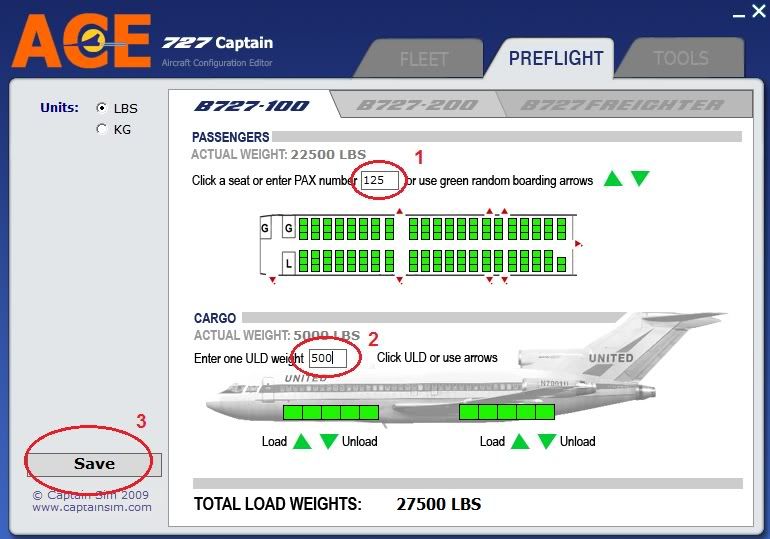
In the attached image I have numbered how I make the changes: (1) The total number of passengers. (2) The weight of each cargo ULD container. As well as the number of containers. (3) I then SAVE the changes. I usually do this before I load the 727 (same for the 757 & 767) into FSX for a flight. If I happen to have the 727 already loaded into FSX, I reload the aircraft ALT > A > A > ENTER or, in my case, I have Reload Aircraft set to the key command CTRL+R. As you said, there is a 510 pound discrepancy (crew weight not recognized by ACE) between ACE and the aircraft.cfg. :( Hope this helps. Mark |
|
Title: Re: ACE and Freight Manager Post by GDex on Jan 27th, 2011 at 12:07am
Mark
Although I forgot to write it, I always Save before closing the ACE. However I think I found the problem. I duplicated the exact example you showed, using the -100, and the full payload weight did show in the FS Fuel and Payload window. However, with the -200, it does not work. Only the crew shows up. Please try it! I then looked in both aircraft.cfg files. The -100 does list all the passengers and cargo, but not the -200. So it looks like the connection does not establish itself between the ACE and the -200 aircraft.cfg file as it does with the -100 aircraft.cfg file. |
|
Title: Re: ACE and Freight Manager Post by Markoz on Jan 27th, 2011 at 12:08pm
I tried ACE on all the 727's (-100/-200/100F/-200F) and it works fine for me.
Mark |
|
Title: Re: ACE and Freight Manager Post by GDex on Jan 27th, 2011 at 5:56pm
Seeing it worked fine on your computer, I figured maybe I have a bum installation. So I uninstalled (through Revo Uninstaller, which removes related registry entries) and re-installed both the 727-100 and -727-200. No joy. In fact, now the ACE would not even transfer the data to the -100. So I searched the CS KB and found that ACE should be run as an administrator. I did that, through the Properties box so that it will always run as a an administrator. This resolved it for the -100, but not for the -200. So I have submitted a ticket to CS and will see what they say.
Thanks for the help anyway. Gaétan |
|
Title: Re: ACE and Freight Manager Post by Captain Sim 2 on Jan 31st, 2011 at 1:21pm
The issue appears on Vista only. The issue is on the list for the next upgrade, and is forwarded to our development team. We will do our best to address the issue in the next upgrade.
|
|
Title: Re: ACE and Freight Manager Post by GDex on Jan 31st, 2011 at 2:20pm
Thanks. However, please note this situation also occurs on the Windows 7 platform. Personally, my OS is Windows 7 Home Premium, 32 bits.
Any idea when the next upgrade will be out? Weeks or months? |
|
Title: Re: ACE and Freight Manager Post by Brigs on Feb 25th, 2012 at 4:56am
Question, I have been loading the 727-200F while on the tarmac with the little animated loader that you see putting the containers in the aircraft, do I still have to use ACE before I load the aircraft, or can I skip ACE and just load the plane with the animated loader and still get the weight that I want?
Thanks for the clarification :) |
|
CAPTAIN SIM FORUM » Powered by YaBB 2.6.0! YaBB Forum Software © 2000-2026. All Rights Reserved. |