Post by Markoz on Sep 8th, 2010 at 10:21am
Hello All.
I have made some adjustments for panel.cfg for use with the CIVA INS. I want to share them with you.
[Window04]
size_mm=250,196
//pixel_size=250,196 // remove, or comment out, this line so that its size matches the Msu1 & Adeu1
background_color=16,16,16
window_pos= 0.000, 0.050 // this places it on the left hand side of the screen just below the top (if I have the SHIFT+Z info showing as well as the Menu it sits below them).
position=0
visible=0
ident=41
no_luminous=1
gauge00=../civa/ins!Cdu1, 0, 0, 250, 196
[Window05]
size_mm=250,71
background_color=16,16,16
window_pos= 0.000, 0.306 // this one places it directly below the Cdu1 gauge
position=5
visible=0
ident=40
no_luminous=1
gauge00=../civa/INS!Msu1, 0, 0, 250, 71
[Window06]
size_mm=250,101
background_color=16,16,16
window_pos= 0.000, 0.398 // this places it directly below the Msu1 gauge
position=8
visible=0
ident=42
no_luminous=1
gauge00=../civa/INS!Adeu1, 0, 0, 250, 101
This is how it looks on my 22" LCD monitor @ 1680x1050 (I use window mode, not full screen):
They are for everyone. So feel free to use them (and modify if you like). If they don't quite fit, adjust the section underlined area: window_pos= 0.000, 0.398
It changes the vertical position.
Mark
I have made some adjustments for panel.cfg for use with the CIVA INS. I want to share them with you.
[Window04]
size_mm=250,196
background_color=16,16,16
window_pos= 0.000, 0.050 // this places it on the left hand side of the screen just below the top (if I have the SHIFT+Z info showing as well as the Menu it sits below them).
position=0
visible=0
ident=41
no_luminous=1
gauge00=../civa/ins!Cdu1, 0, 0, 250, 196
[Window05]
size_mm=250,71
background_color=16,16,16
window_pos= 0.000, 0.306 // this one places it directly below the Cdu1 gauge
position=5
visible=0
ident=40
no_luminous=1
gauge00=../civa/INS!Msu1, 0, 0, 250, 71
[Window06]
size_mm=250,101
background_color=16,16,16
window_pos= 0.000, 0.398 // this places it directly below the Msu1 gauge
position=8
visible=0
ident=42
no_luminous=1
gauge00=../civa/INS!Adeu1, 0, 0, 250, 101
This is how it looks on my 22" LCD monitor @ 1680x1050 (I use window mode, not full screen):
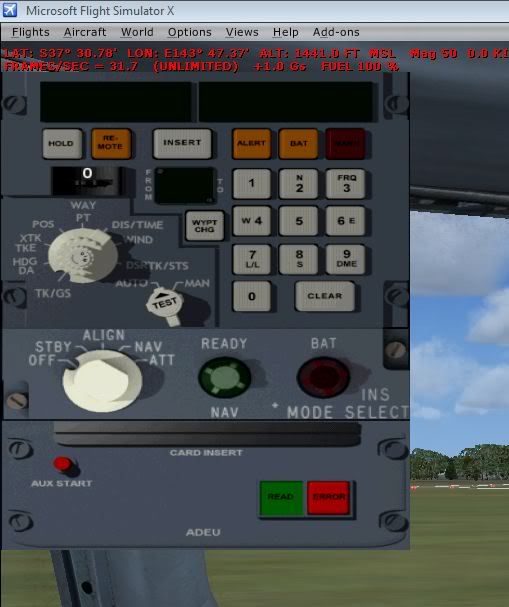
They are for everyone. So feel free to use them (and modify if you like). If they don't quite fit, adjust the section underlined area: window_pos= 0.000, 0.398
It changes the vertical position.
Mark