| CAPTAIN SIM FORUM | |
|
C-130 X-perience >> C-130 X-perience - General >> Swapping guages in panel?
https://www.captainsim.org/forum/csf.pl?num=1275093546 Message started by thesearcher on May 29th, 2010 at 12:39am |
|
|
Title: Swapping guages in panel? Post by thesearcher on May 29th, 2010 at 12:39am
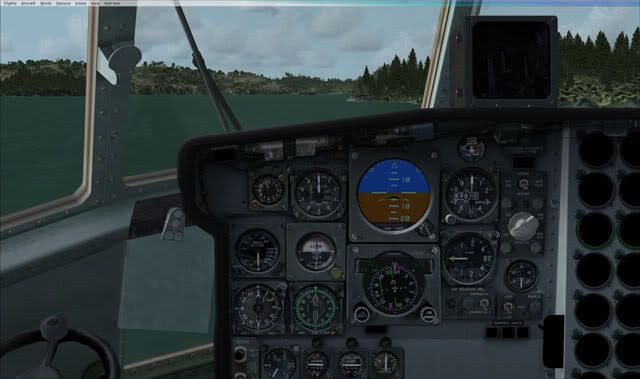
I've tried swapping a couple of gauges in the demo with more modern looking ones from the default King air, but it caused the engine guages to somehow dissapear. Has anyone successfully swapped any gauges in the CS C130?
|
|
Title: Re: Swapping guages in panel? Post by Markoz on May 29th, 2010 at 3:05pm
I have the full C-130 X-perience Pro Pack so I can't really say what might have gone wrong in the demo. I can't see why swapping any of the gauges for others, regardless of which ones, would cause the others to disappear.
I didn't think you got all the gauges in the demo version to start with. Maybe you didn't notice it before? I know that is the case with most of Captain Sim demo aircraft. Mark |
|
Title: Re: Swapping guages in panel? Post by Mr.toto on May 31st, 2010 at 7:25am
i trying to modify panel but i can't find Main panel.bmp --*
can anyone tell me where's the main panel.bmp? Thank you |
|
Title: Re: Swapping guages in panel? Post by Markoz on May 31st, 2010 at 8:45am
Hi Mr.toto
If you look in the panel.cfg, you will see this listing for the main panel:- [Window00] size_mm=1024,768 background_color=0,0,0 position=4 visible=1 render_3d_window=0 ident=MAIN_PANEL gauge00=Captain_Sim.etc............ There ISN'T any reference to a .bmp in there. If there was, the line used would be file=blahblahblah.bmp. Sorry, but no main panel bmp is used. Mark |
|
Title: Re: Swapping guages in panel? Post by Mr.toto on May 31st, 2010 at 2:06pm
ok i forgot fsx almost use .dds file
so, C130_C7_T.dds is real file in 2D Panel right? if i like to retouch something. regards |
|
Title: Re: Swapping guages in panel? Post by Markoz on May 31st, 2010 at 3:58pm
You might be right. Check out these textures in the Flight Simulator X\SimObjects\Airplanes\CS_C130\texture folder :-
C130_11, C130_C12_T, C130_C16, C130_C18_T, C130_C19_T, C130_C20_T, C130_C21_T and C130_C22_T They may be the ones you are looking for. I'm not sure because they look more like the ones in the VC. Those files I named are .bmp files. All the rest in the folder are .dds. Mark |
|
Title: Re: Swapping guages in panel? Post by Mr.toto on Jun 1st, 2010 at 4:29am Markoz wrote on May 31st, 2010 at 3:58pm:
Hello Mark i checked, C130_C7_T.dds <== VC file :'( :'( and C130_11, C130_C12_T, C130_C16, C130_C18_T, C130_C19_T, C130_C20_T, C130_C21_T and C130_C22_T no captain and first officer panels :'( :'( i'd like to modification RTAF aup upgrade please advice, Thank you Prechapoj |
|
Title: Re: Swapping guages in panel? Post by Markoz on Jun 1st, 2010 at 9:52am Mr.toto wrote on Jun 1st, 2010 at 4:29am:
Hi Prechapoj. I had a look at the panel.cfg using FS Panel Studio and it seems to me that the Main Panel bitmap is actually IN the gauge file itself. It also looks the same for ALL the panels in ALL the CS C-130's and so I don't think you can make any changes to the bitmap files at all. The gauges are all .gau and are programmed using C# or some similar programming language. Mark |
|
Title: Re: Swapping guages in panel? Post by Mr.toto on Jun 2nd, 2010 at 3:54am
Thank you for your help, Mark.
:'( :'( |
|
CAPTAIN SIM FORUM » Powered by YaBB 2.6.0! YaBB Forum Software © 2000-2026. All Rights Reserved. |