CAPTAIN SIM FORUM
767 Captain (FSX) >> 767 Captain (FSX) >> Rnav for dummies?
https://www.captainsim.org/forum/csf.pl?num=1266807868

Message started by deimos256 on Feb 22nd, 2010 at 3:04am

Title: Rnav for dummies?
Post by deimos256 on Feb 22nd, 2010 at 3:04am
I have been having issues with rnav approaches, ill select an rnav runway and a transition, and while plugging the discontinuity, my alts will alter for a descent and when i activate they all go back to my cruise alt, if i try to manually add alts, the fmc or autopilot refuses to make a t/d  point for me.  However when I use an ILS approach with a STAR and a transition my automatically altered altitudes remain intact and I get a T/D point.  Am i doing something wrong for RNAV?  I really like this plane and want it to work, so if I'm doing something wrong I'd like to know before i uninstall it and save myself the headache.  Before anyone asks I'm runnin latest FSUIPC, I have tried reinstalling the 767 AND I have reinstalled FSUIPC after adding another aircraft.  

Title: Re: Rnav for dummies?
Post by deimos256 on Feb 27th, 2010 at 5:19am
Nothing? nothing at all?  So nearly 50 people saw this thread, stared at it mouths agape, and nobody had any input?  I was simply asking what everyone does as far as approaches, For some bizarre reason, be it ILS or RNAV approach, the fmc alters alts for a descent and then resets them when i activate, I cant be the only person going thru this and if i am id like to know what im doing wrong.  And if this gets merged to the rocking/porpoising issue thread im deleting the 767 off my hard drive, deleting the installer, and never bothering with it again.  This 767 isnt the only show in town, and its a shame because everything else i own from CS works flawlessly.

Title: Re: Rnav for dummies?
Post by Markoz on Feb 27th, 2010 at 6:53am
Hi deimos256.

I have read this post. And I didn't reply simply because I haven't done an RNAV approach before. That also means that I don't have that problem as well showing up either.

Maybe if you give us the flight plan, some of us could try it and see how we go. We can then see if we get the problem too. We might even be able to figure out what might be causing the problem and then find a fix for it.

Mark

Title: Re: Rnav for dummies?
Post by deimos256 on Feb 27th, 2010 at 12:41pm
im using an fsx generated flightplan using high altitude airways, could it be that fsx is taking me too close to the airport and when i enter an approach it messes up the FMC?  I would love to use one of the websites to make my own flightplan but i have no idea how to enter all that data into the FMC

Title: Re: Rnav for dummies?
Post by Markoz on Feb 27th, 2010 at 4:58pm
If I create a flight plan using the FSX Flight Planner, I have found that when it finds the High Altitude airways it starts with the VOR loacated at the departure airport and finishes with the VOR at the destination airport. I usually delete the departure airports VOR from the flight plan, but I leave the destination VOR in it. How this affects an RNAV approach I don't know because I haven't done one yet.

Because I update my AIRACS from Navigraph every month, I use FS Commander 8.6 to create most plans. CS767/757 and FSC8.6 will match when it comes to the flight plans I create.

As for using something like http://rfinder.asalink.net/free/. I started off using that and I thought it was pretty easy.

Mark

Title: Re: Rnav for dummies?
Post by deimos256 on Feb 27th, 2010 at 7:57pm
ok for example created a route for KEWR to KDAB and I got this

KEWR DCT RBV J191 PXT J14 RIC J165 CHS J174 MILIE J79 BEENO J103 OMN DCT KDAB

is that all you need as far as info to punch into the FMC? aside from a sid star etc ?

Title: Re: Rnav for dummies?
Post by Markoz on Feb 28th, 2010 at 2:13am
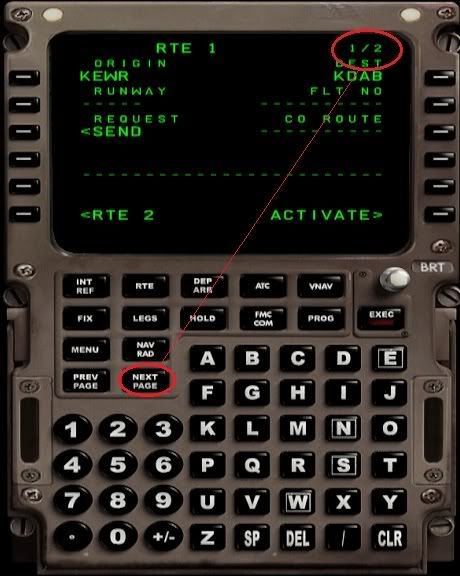
Okay. You obviously know how to put the Departure and Destination airports into the FMC (Pic1). Notice that up the top it displays 1/2. Click on NEXT PAGE.
Pic1.

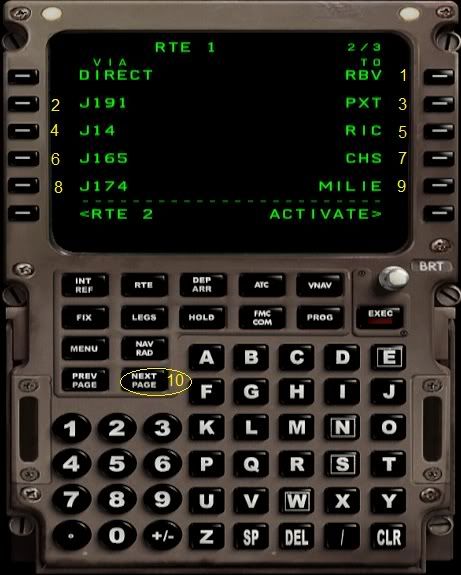
On ROUTE PAGE 2, enter them the same way as I have in Pic2 (1 - 9), and when there is no more room click on NEXT PAGE (10) again.
Pic2
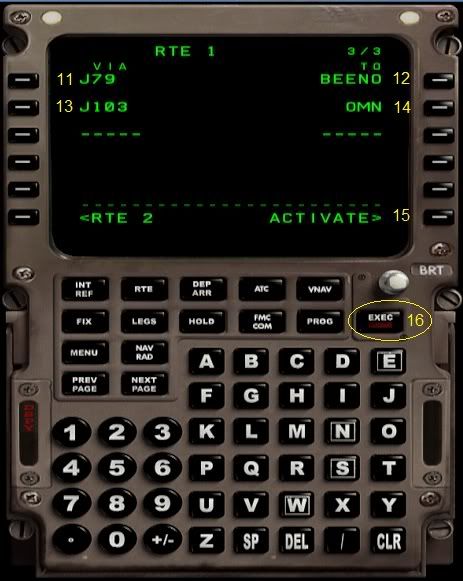
Continue to do the same as I have on ROUTE PAGE 3 in Pic3 (11 - 14). Activate the plan (15) and EXEC (16). Doing your route this way, the FMC fills in ALL the waypoints along the "Airway" for you and saves a lot of time key clicking if you were to add all the waypoints individually. You can see this by looking in the LEGS pages. Thanks for that information go to Tim Capps who pointed that out to me.
You can add KDAB on the right LSK3 in Pic3 if you want. I usually don't worry about it because the STAR and TRANS waypoints will complete the arrival at KDAB. As an afterthought, is entering the destination airport the reason you altitudes are getting reset after EXECing the STARs and TRANS?
Pic3
One other thing. You had me stumped with the DCT. It wasn't in the database. I finally figured out that you were using a shortcut for DIRECT. The full word would have made it easier to figure out. But no worries. I got it in the end. LOL.

Hope this helps.

Mark

Title: Re: Rnav for dummies?
Post by deimos256 on Feb 28th, 2010 at 3:43pm
Thanks for the info on entering data!  I did that and managed to enter an rnav approach to DAB, and the alts didnt bounce back to cruise alt, only thing is, it made a flightpath the put me over the airport at 14k and then had a bunch of very tight turns, when it caem to the first one it just kept flying to past the airport, completely ignoring the flightplan, im not sure what caused this but the waypoint in question had a heading of 000 degrees and trk next to it or something.  

Title: Re: Rnav for dummies?
Post by deimos256 on Feb 28th, 2010 at 6:17pm
A new problem has popped up as well, For instance i made a flight from KMCO to KOAK with the last thing I put into the RTE page being CZQ, then for an arrival i picked ils29, star locke1, with a czq transition, when i go to the legs page the runway doesnt show up, it adds a few legs but theres no end, plus all the altitudes stay at 32000.

Title: Re: Rnav for dummies?
Post by DAL 191 on Mar 1st, 2010 at 1:58am
I think I would forget about RNAV approaches and landings. If ATIS indicates there is an ILS or visual approach available, I would do one of those. I have tried to do RNAV to airports on the west coast of Florida using a lot of different waypoints, LNAV and VNAV settings, FMC settings, etc. and all I have done is crash and do lots of missed approaches. Forget em. Stck with ILS or visual.

Mike Cubine

Title: Re: Rnav for dummies?
Post by deimos256 on Mar 1st, 2010 at 2:43am
I have certainly had more success with ILS approaches, however now for some reason ill select one and my legs will end with the last wapoint on the approach, and wont list the runway, therefore no e/d point and no t/d point.  Im doing it the same as i have been but now this, the mysteries continue

Title: Re: Rnav for dummies?
Post by Markoz on Mar 1st, 2010 at 5:25am
I tried this route:

KEWR DCT RBV J191 PXT J14 RIC J165 CHS J174 MILIE J79 BEENO J103 OMN DCT KDAB

and selected an RNAV approach. Bad Idea. I eventually gave up and selected an ILS approach and succeeded.

Like Dave, I would stick to ILS approaches or a visual. They are lot easier. RNAV approaches don't appear to work. This was my first, so that doesn't hold up too well. LOL.

Mark

Title: Re: Rnav for dummies?
Post by deimos256 on Mar 1st, 2010 at 10:14am
Ok I wont try rnav anymore, now when you use an ils approach can you just enter that or does it need a star and a transition etc?  KDAB doesnt have any stars

Title: Re: Rnav for dummies?
Post by deimos256 on Mar 1st, 2010 at 10:42am
Ok I tried that exact route including the dct KDAB, and I entered an approach of ILS07L and i tried using both transitions and both times it gave me legs that included the follwing (000degrees, TRK OMN/18)  When i last tried this flight, I got to that leg and i just kept flying right past the airport until i eventually shut off the A/P and turned around and landed myself.  

Title: Re: Rnav for dummies?
Post by Markoz on Mar 1st, 2010 at 11:53am
I sometimes find it easier to do an ILS approach using only the TRANS because sometimes a STAR will twist and twirl all over the place.

You are right. KDAB doesn't have STARs for the ILS approach, but it does have Transitions. I used them for an ILS07 approach. They were a bit messy so I tidied them up by removing some of the TRANS waypoints. I still had a T/D and a E/D at RWY07.

Mark

Title: Re: Rnav for dummies?
Post by deimos256 on Mar 1st, 2010 at 2:22pm
Ok I'll just have to experiment with removing legs because yesterday I used an ils approach and a trans and like I said even that put me into a figure 8 flightpath. I'm not even looking for autoland or anything precision I'm just looking for the fmc to descend me and get me lined up. Ill do the landing myself.

Title: Re: Rnav for dummies?
Post by Scupper on Mar 23rd, 2010 at 9:40am
I'm just learning this stuff too, but I've figured out what the 'disappearing runway' on ILS approaches is about (i.e. when the runway is not shown on the legs page of the CDU).

If you've selected an ILS approach, the plane knows that it's going to have to land on the runway and it will do it by itself, - you just need to control the speed (on the autopilot panel) and the flaps (gradually, by increments). If you're too late pushing the App button on the autopilot panel, it won't pick up the glideslope/localiser and will probably sail over the runway without landing. I recommend pushing App before turning onto the final approach heading.

Then you need to check that you don't have a crazy vertical speed (of descent) happening on the autopilot (if you do, set it to 0fpm). You might also have to check that no altitude is constricting the flare in the autopilot altitude window. It's probably a good idea to zero both of these before the final approach so they can't possibly iterfere and override the ILS.

This is the current state of my understanding, and it's working for me, - hope it does for you too.  :)

CAPTAIN SIM FORUM » Powered by YaBB 2.6.0!
YaBB Forum Software © 2000-2026. All Rights Reserved.