| CAPTAIN SIM FORUM | |
|
727 Captain >> 727 Captain >> Don't Have Support Account But Require a Bit of He
https://www.captainsim.org/forum/csf.pl?num=1263055130 Message started by CodyColby on Jan 9th, 2010 at 4:38pm |
|
|
Title: Don't Have Support Account But Require a Bit of He Post by CodyColby on Jan 9th, 2010 at 4:38pm
I bought your product from another website although they say to contact captain sim for product support. I have a quick question and don't really want to have to take more time to figure this out.
I've bought the 727 base pack now that it's all installed it shows up with only parts of the plane. Whats up? There is an image attached of what I see. http://itehhosting.com/Untitled.png |
|
Title: Re: Don't Have Support Account But Require a Bit of He Post by javiercuellar on Jan 9th, 2010 at 5:01pm
Cant see any image in the link.
|
|
Title: Re: Don't Have Support Account But Require a Bit of He Post by CodyColby on Jan 9th, 2010 at 6:36pm javiercuellar wrote on Jan 9th, 2010 at 5:01pm:
Sorry, corrected. :) http://itehosting.com/Untitled.png |
|
Title: Re: Don't Have Support Account But Require a Bit of He Post by Markoz on Jan 9th, 2010 at 9:29pm
Hi Cody
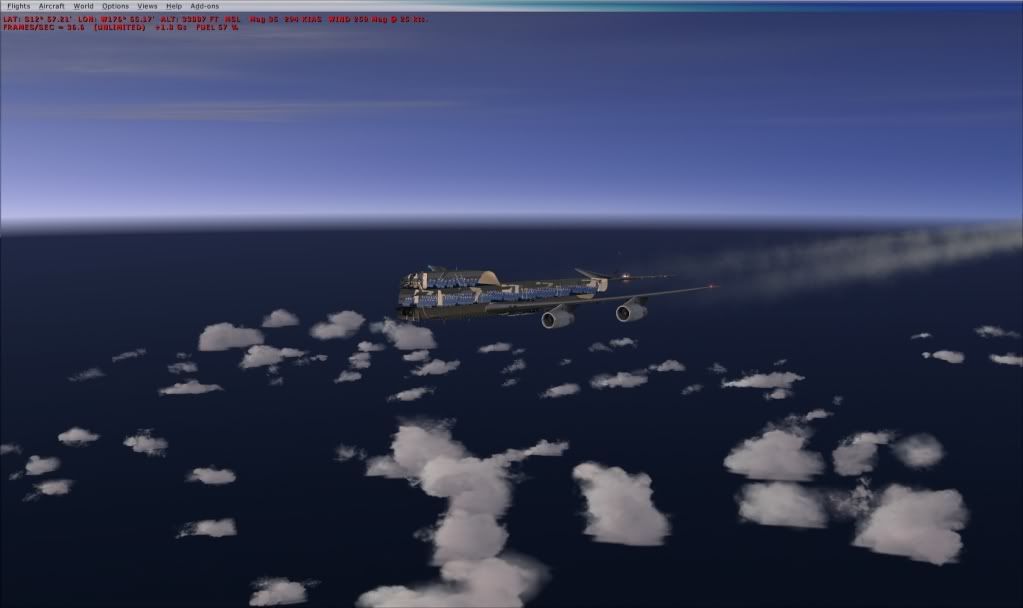
I have had this happen too. For me, it happened with my 744X and I didn't have the 727 then, so you can't blame it. It only happened once, after playing FSX for quite a few hours (I was doing a transpacific flight). I have since updated my Graphics Card drivers for Windows 7 (which going by the pic you are using) and have not encountered this again. So make sure you are using the latest Graphics Card drivers. Giving us your System Specs would help too. ;) Hope this helps. Mark |
|
Title: Re: Don't Have Support Account But Require a Bit of He Post by CodyColby on Jan 10th, 2010 at 2:59pm Markoz wrote on Jan 9th, 2010 at 9:29pm:
Thank for helping me out with this. I've updated my drivers to the latest and still the plane is refusing to work. My system specs are: Pentium Dual - Core CPU E5300 @ 2.60 GHz; 2 GB's Ram; 32 Bit Windows 7. And one more thing, when playing for the few seconds I did with my transperent plane... I noticed that I got HORIBLE FPS. I can usually run with medium settings about 35-40 FPS but when this plane came up, I was toping out at maybe 5 FPS. Is there any other infomation you need? Best Regards, Cody :) |
|
Title: Re: Don't Have Support Account But Require a Bit of He Post by Markoz on Jan 10th, 2010 at 9:13pm
Do you have Preview DirectX 10 on? I have heard of strange things happening because of it. It's the only other thing I can think of for now.
Just to show you aren't alone. Here is a pic of when it happened to me: It has only only happened once so far. The following day Nvidia released a new driver (195.26) and all is ok. The only issue I have now is this: After flying for a long time and switching to a few different planes, i.e take off, fly somewhere, land and change planes. repeat numerous times, I can no longer see any aircraft in the preview pane when changing planes. If I choose to select a plane and return to flying, my screen is completely black. To fix this all I do is close FSX and then restart it and all is good again. My system specs are: Core 2 Quad 9550 @ 2.93, 8 GB RAM, Win 7 Pro 64 Bit, 1 GB Geforce 9800 GTX+. When I had my invisible plane I only had 4 GB RAM on my system. Mark |
|
CAPTAIN SIM FORUM » Powered by YaBB 2.6.0! YaBB Forum Software © 2000-2025. All Rights Reserved. |