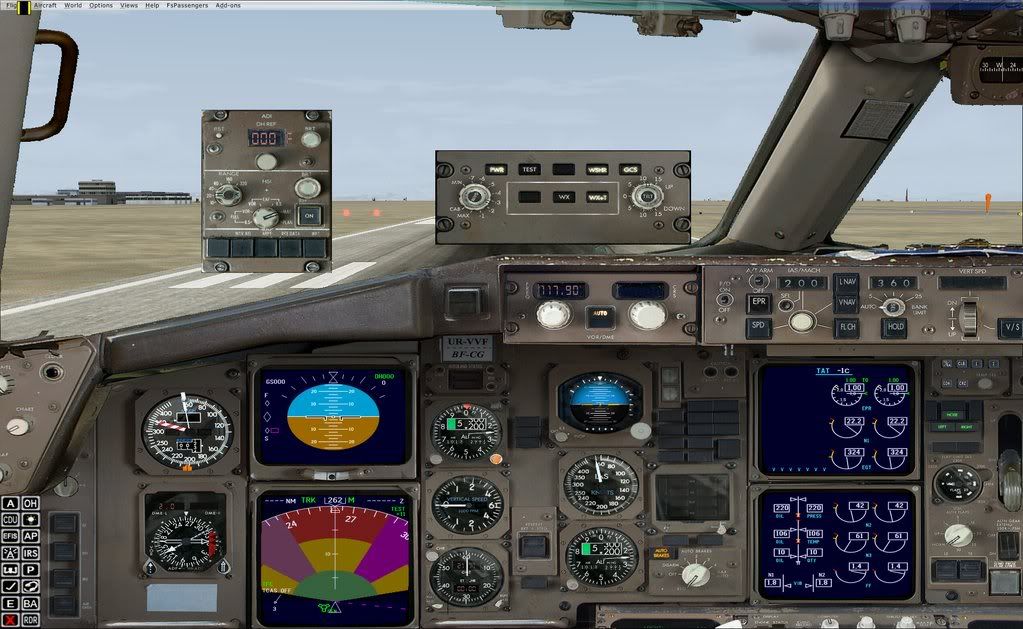
Post by blackforce on Feb 1st, 2009 at 8:25pm
hey thanks for your help, here is a screen shot. and everything is on and it just stays on test.
| CAPTAIN SIM FORUM | |
|
757 Captain >> 757 version 4.x (FSX ONLY) >> weather radar?
https://www.captainsim.org/forum/csf.pl?num=1232482764 Message started by blackforce on Jan 20th, 2009 at 8:19pm |
|
|
Title: weather radar? Post by blackforce on Jan 20th, 2009 at 8:19pm
can someone help me with the wx radar? when i power it on it just stays on test, i saw this thing work only about 2 times. and seems to me no support for this aircraft at all, this is on vista 64bit, thanks
|
|
Title: Re: weather radar? Post by blackforce on Jan 20th, 2009 at 10:50pm
just found out the guy who made this, is done with it and locked everthing over there.
http://forums.simflight.com/viewforum.php?f=193 http://forums.simflight.com/viewtopic.php?f=193&t=71103 |
|
Title: Re: weather radar? Post by blackforce on Jan 23rd, 2009 at 8:02pm
well anybody know why this is not working?
|
|
Title: Re: weather radar? Post by bhodges61 on Jan 24th, 2009 at 1:03am
Sorry, I can't really help. If I turn my weather on to anything other than 'Clear Skies' none of the cockpit sounds work anymore...not kidding. Which also makes the radar all but useless.
|
|
Title: Re: weather radar? Post by JayG on Jan 24th, 2009 at 5:44pm
Assuming you pressed the ON button on the EFIS panel after powering up the radar, and you are in the air and you actually have weather to paint, have you increased the gain?
|
|
Title: Re: weather radar? Post by blackforce on Jan 24th, 2009 at 8:27pm
thanks guy, i got it to work hifi weather system asa, will not work with it.
|
|
Title: Re: weather radar? Post by Bob Markey on Jan 29th, 2009 at 7:56pm
Guys,
When you start the WX Radar, you need to understand it will display the test pattern for a while. Nothing will show unless the Weather button is also pressed on EFIS panel. This button is directly adjacent to the right of the HSI display switch (the one that sets VOR/ILS/MAP/PLAN). Both the WX radar must be on and the WX switch on EFIS. Additionally all the correct buttons must be active in the WX Radar panel. It will only show you weather pertinent to its orientation (I.e. deflect it downward to see what's below your current attitude, etc). This is not a "real time display", you must wait for the radar to sweep the area and the computer to process the information. It does work, I use it every flight. If you still have trouble after this, please specify exactly how you have your related systems configured, and provide a screenshot of your EFIS, WX Radar, and HSI and I'll try to help. |
|
Title: Re: weather radar? Post by Bob Markey on Feb 1st, 2009 at 5:26am
Oh and also, don't forget to hit the 2D panel. The WX Radar isn't a Captain Sim product, but is included in this plane, and it is tied to the 2D panel somehow... gotta go there (even just for a second) to get it to work in the VC.
|
|
Title: Re: weather radar? Post by blackforce on Feb 1st, 2009 at 8:25pm
hey thanks for your help, here is a screen shot. and everything is on and it just stays on test.
|
|
Title: Re: weather radar? Post by Bob Markey on Feb 1st, 2009 at 8:30pm
Hey buddy, I don't know the trouble then. Be sure to cycle all interior and exterior views. If this doesn't help, one thing I've noticed which helps to clear "odd" problems in this plane is to delete any saved flights which 757 is selected (or possibly all saved flights).
I had the "RAT Unlocked" bug for many weeks, and finally decided to delete all my saved flights. Since this, all problems with this plane have gone away. Hope it helps. ;D |
|
Title: Re: weather radar? Post by blackforce on Feb 1st, 2009 at 8:34pm
ok where do i delete the flights from? thanks
|
|
Title: Re: weather radar? Post by Bob Markey on Feb 1st, 2009 at 8:58pm
From in the main "Free Flight" window, where it asks you what plane, location, weather, time, etc. There is a row of buttons, one is marked "Load" from within here, you get a list of all saved flights, highlight them and then click the delete button for each... once this is done, shut down and restart FSX and it will restart with the default flight which has the ultralight and such... from here, if you load 757 and cycle thru all displays before turning on anything in the plane, I would hope the radar issue you have goes away. :D
|
|
Title: Re: weather radar? Post by blackforce on Feb 2nd, 2009 at 12:13am
nope it don't work, using asa from hifi the radar will not come on just satys on test, but thanks for your help.
|
|
Title: Re: weather radar? Post by Bob Markey on Feb 2nd, 2009 at 2:15am
There must be another issue elsewhere then. Hmm. Have you tried a total uninstall following the directions from the knowledgebase? Maybe something didn't get installed right in the first place.
|
|
Title: Re: weather radar? Post by blackforce on Feb 2nd, 2009 at 1:44pm
yep already reinstalled simmarket sold me 4.1 so i then downloaded 4.2, and come to think of it the radar worked with 4.1, but the aircraft was so unstable, that is why i got 4.2, boy this thing has been nothing but a pain in the rear. >:(
|
|
Title: Re: weather radar? Post by Bob Markey on Feb 2nd, 2009 at 5:17pm
Your best option at this point is to open an official support request thru a ticket. Sorry buddy, I wish I knew... be sure to mention to them that you already cycled all views, etc.
|
|
Title: Re: weather radar? Post by bb1134 on Feb 9th, 2009 at 2:46am blackforce wrote on Feb 2nd, 2009 at 12:13am:
I'll confirm it's an ASA problem. I was stuck in test mode as well. Went to world/weather/real world and a few seconds later the radar switched to WX+T mode from test. I'll check with the HiFi boards and see if anyone else has reported this. Bob KMEM |
|
Title: Re: weather radar? Post by blackforce on Feb 9th, 2009 at 1:39pm
yep already did over there, was told it was cs problem.
|
|
Title: Re: weather radar? Post by Bob Markey on Feb 9th, 2009 at 6:08pm
It's not CS' gauge. :) Can't be their problem. 8-)
|
|
CAPTAIN SIM FORUM » Powered by YaBB 2.6.0! YaBB Forum Software © 2000-2025. All Rights Reserved. |